
Tiptoeing In My Jordans Video: Sneak Across the Barn with Your Co-Star
Turn two portraits into a 15s Tiptoeing In My Jordans parody—Photo 1 sneaks across a barn in a tux and heels while Photo 2 stares in disbelief.
- Two Clear Portraits
- Zero Prompts Needed
- Tux & Heels Barn Parody
- 15s 16:9 · Ready in ~1–2 Min
Why a Tuxedo and Heels in a Barn?
The viral Tiptoeing In My Jordans Video parody swaps sneakers for formalwear—and puts you and a friend right in the middle of the joke
Instead of actual Jordans, this meme template leans into pure visual contrast: Photo 1 sneaks across a sunlit wooden barn in a sharp black tuxedo and glossy stilettos, while Photo 2 watches from a hay bale in stunned disbelief. Pick your two portraits above—or swap them anytime—to cast friends, partners, coworkers, or even pets.
Make My Tiptoeing Video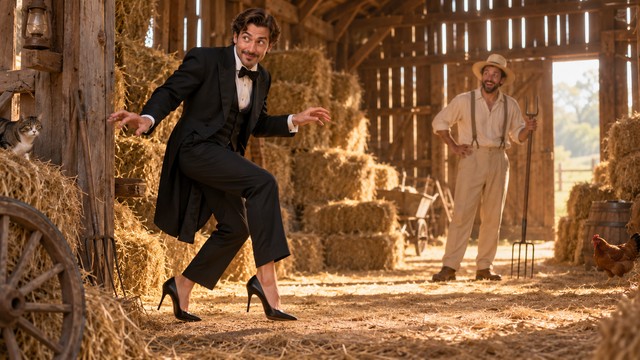 Exaggerated Tiptoe Stride
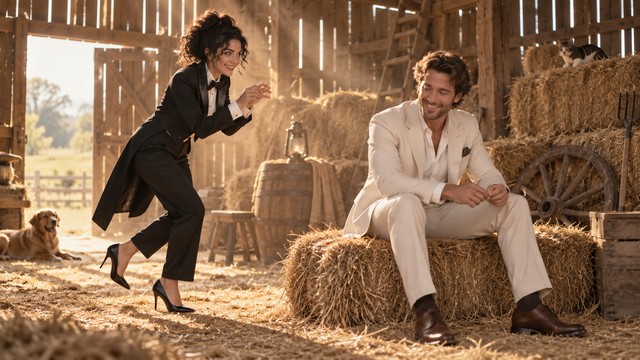 Playful Duo Reaction
Three Steps to Your Tiptoeing In My Jordans Clip
No costumes, no filming, and no prompts to write.
- 1
1. Upload Two Photos
Put your sneaking lead in Photo 1 and your shocked reactor in Photo 2—one clear face per slot.
- 2
2. Choose Quality & Sound
Pick 480p, 720p, or 1080p, and keep AI audio on or mute it for your own TikTok track.
- 3
3. Download & Share
Your 15-second widescreen clip renders in ~1–2 minutes, ready for group chats, Reels, or Shorts.
Pick Photos Like This for Clean Faces
- Use bright, sharp portraits with one person per image so both faces stay recognizable in motion.
- Choose front-facing or lightly angled shots where both eyes are clearly visible.
- Assign the tuxedo-and-heels lead to Photo 1 and the hay-bale reactor to Photo 2 (use Swap to flip them).
Skip These Photos to Avoid Artifacts
- Avoid group shots or split collages—extra faces can confuse who is sneaking and who is watching.
- Avoid sunglasses, low hats, or heavy shadows that hide eye expressions.
- Avoid tiny, blurry screenshots or distant full-body photos.
Built for Instant Group-Chat Comedy
Cast your best friend, partner, office buddy, or even your dog in seconds.
Exaggerated Physical Comedy
Arms outstretched, dramatic high-knee steps, and glossy heels clicking across dusty floorboards—all animated automatically from a single portrait.
Consistent Two-Face Casting
Both your lead's sneaky smirk and your co-star's jaw-drop stay recognizable from the opening step to the final reaction.
Golden-Hour Barn Cinema
Warm sunbeams, hay bales, and a smooth widescreen camera pan give a simple joke the polish of a real shoot.
Audio On or Track-Ready
Generate built-in sound effects for quick DMs, or mute audio at no extra cost to overlay trending sounds on TikTok and Reels.
Transparent Credits & Auto-Refunds
Credit packs start at $29.90 (1,685 credits—up to five 480p clips or two 720p clips) and work site-wide across all effects and models, not just this template. No free trial credits are included, and any failed render refunds your credits automatically.
Two-Photo AI Clip vs. Filming It Yourself
| Option | What You Need | Result | Time |
|---|---|---|---|
| Two-photo barn generator above | Two clear portraits | 15s 16:9 Tiptoeing In My Jordans clip with both faces intact | ~1–2 minutes |
| Renting outfits and filming IRL | Black tux, stiletto heels, a barn, and a camera operator | Awkward retakes and hours of editing | Half a day |
| Prompting generic AI from scratch | Long multi-character prompts and trial-and-error | Inconsistent outfits, stiff motion, and wasted retries | Unpredictable |
Frequently Asked Questions
Why does the video show a tuxedo and heels instead of Jordans?
It is a deliberate visual-contrast parody of the Tiptoeing In My Jordans meme—swapping sneakers for a formal black tuxedo and glossy stilettos inside a rustic barn makes the tiptoe walk much funnier.
Will the generated characters actually look like us?
Yes. With bright, front-facing single-person portraits, both the sneaking lead and the reacting co-star stay clearly recognizable throughout the 15-second clip.
Do I need to write any prompts or edit the video?
No. The Tiptoeing In My Jordans barn setting, lighting, camera pan, and outfits are pre-configured—just upload two photos and choose your resolution.
Which person goes in Photo 1 vs. Photo 2?
Photo 1 becomes the person tiptoeing across the barn in a tux and heels; Photo 2 becomes the co-star reacting from the hay bale. You can click Swap Photo 1 ↔ 2 anytime to reverse roles.
Are there free trial credits, and what if a render fails?
Sign-up does not include free trial credits—starter credit packs begin at $29.90 (1,685 credits, up to five 480p clips) and work site-wide across every effect and AI model, not just this template. Any failed render refunds your credits automatically.
How long does generation take, and should I keep audio on?
Most clips finish in ~1–2 minutes. Leave Audio on for built-in sound effects, or turn it off if you plan to add trending music on TikTok or Reels.
Can I use a pet photo in one of the slots?
Yes—clear close-up portraits of dogs or cats work great in either slot for an absurdly funny barnyard cameo.
Optional: Remix the Backdrop in AI Video Maker
This page's generator is locked to the classic barn scene (zero prompts needed). Want a nightclub or office backdrop instead? Copy a preset below and paste it into our general AI Video Maker.
Optional: Remix the Backdrop in AI Video Maker
This page's generator is locked to the classic barn scene (zero prompts needed). Want a nightclub or office backdrop instead? Copy a preset below and paste it into our general AI Video Maker.
Golden Barn Tux & Stilettos
15-second widescreen 16:9 comedy clip in a sunlit rustic barn. Character 1 (@Image1) in a crisp black tuxedo and glossy stiletto heels tiptoes dramatically across dusty wooden floorboards with arms outstretched for balance, sneaking past golden sunbeams. Character 2 (@Image2) sits on a hay bale in casual clothes, staring wide-eyed in stunned disbelief. Keep both faces sharp and recognizable, natural camera pan, warm golden-hour lighting.
Already built into the generator above—no copying needed for the barn scene.
VIP Velvet Rope Sneak
15-second widescreen 16:9 comedy clip outside a glowing neon nightclub at night. Character 1 (@Image1) in a sharp black tuxedo and glossy high heels tiptoes dramatically past a red velvet rope with exaggerated balance arms. Character 2 (@Image2) leans against the entrance holding a clipboard, jaw dropped in total shock. Keep both faces clear and recognizable, vibrant magenta and cyan street reflections.
Paste into AI Video Maker to move the joke onto a neon city sidewalk.
9-to-5 Cubicle Tiptoe
15-second widescreen 16:9 comedy clip in a bright modern office hallway. Character 1 (@Image1) in a formal black tuxedo and glossy stilettos sneaks past glass conference rooms on exaggerated high-knee tiptoes, arms out for balance. Character 2 (@Image2) peeks over a cubicle wall holding a coffee mug with a stunned side-eye. Keep both faces recognizable from start to finish, crisp natural office lighting.
Paste into AI Video Maker for an instant workplace roast.
Ready to Cast Your Duo?
Upload two portraits above and get your 15s Tiptoeing In My Jordans Video in ~1–2 minutes—with automatic credit refunds if any render fails.
Make My Tiptoeing VideoMore AI Video Effects
Neon Duo Dance AI
Turn two photos into a neon-lit 15s synchronized dance video.
Zombie Couple Video AI
Transform couple portraits into a cinematic zombie duet clip.
Flying Car AI
Launch any street photo into a high-speed flying car scene.

Costume Transformation AI
Morph everyday outfits into dramatic themed costumes smoothly.