
Your new profile picture
Swap your Instagram, X or Discord avatar for a loading-screen version of you while everyone counts down to GTA VI.
Upload one photo and the GTA style AI generator gives you back a sunset-lit poster with bold outlines, palm trees and your own face and pose, in seconds. No photo? Describe a character instead.
Make yours
Pick Image to Image to keep your face, skin tone and pose, or Text to Image to invent someone new. The sunset loading-screen look is added for you; the box is only for an outfit, car, place or time of day you want.
Most people try the GTA style AI generator on themselves first, then do the whole group chat.
Swap your Instagram, X or Discord avatar for a loading-screen version of you while everyone counts down to GTA VI.
Put two or three friends side by side in one neon night poster and watch the chat light up.
Run the photo with your car or motorcycle through the GTA style AI generator and get the sunset hero shot it always deserved.
Make the guest of honor the cover star of the invite, palm trees and all.
Have your own cover-style art ready to post on November 19, when the whole feed is talking about GTA VI.
How it works
Three steps, nothing to learn.
Step 1
Choose Image to Image and upload a clear photo of yourself, or stay on Text to Image and describe a character.
Step 2
Name an outfit, a car or bike, a place or a time of day, or write realistic for a game-screenshot look. Leave it empty for the classic sunset poster.
Step 3
Pick 1K, 2K or 4K, press the button and download the PNG for your profile, wallpaper or next post.
Examples
Tap a sample in the GTA style AI generator to load its scene, then swap in your own photo.
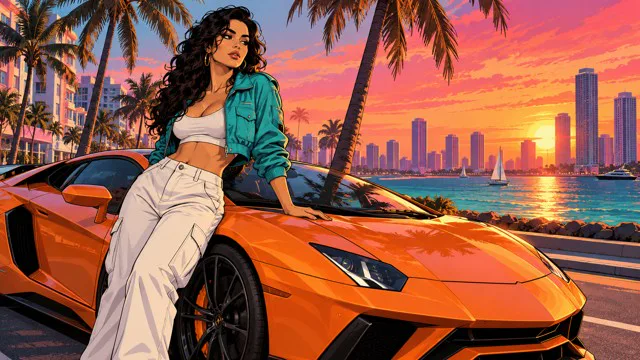
You in a hero pose against an orange supercar, palm trees and a sunset skyline.
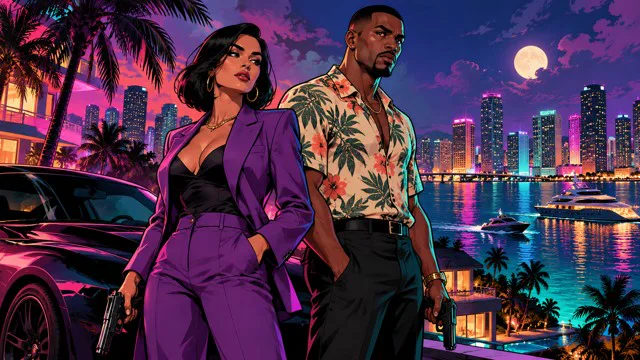
You and a friend side by side in a neon night city, like the cover pair.
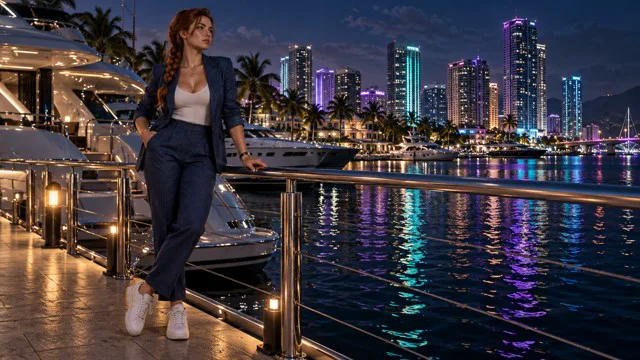
A calm pose on a yacht dock with the city lights shimmering on the water.
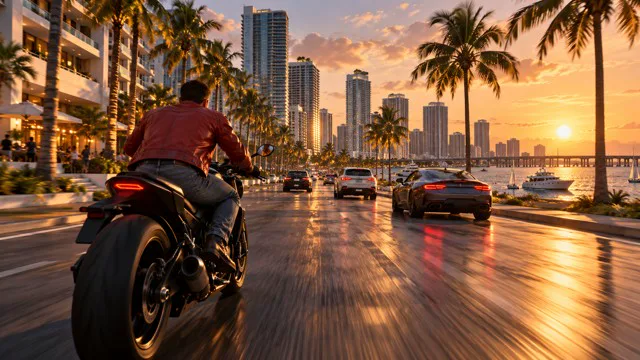
You speeding down a coastal road on a bike with the skyline behind.
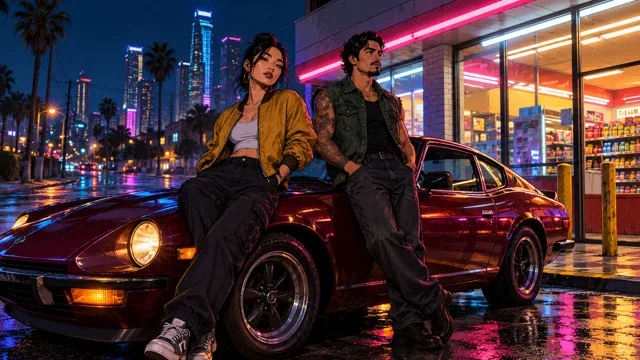
Your crew leaning on a classic car outside a neon-lit corner store at night.
GTA VI is set for November 19, 2026, and the countdown has fans turning their own photos into loading-screen portraits. Italy's Il Sole 24 Ore wrote about the trend on September 7, 2026. The links are in the sources further down.
Dates from PCWorld, Guru3D and Il Sole 24 Ore, listed under Sources.
Only matters for Image to Image. A clean photo gives the most recognizable you.
GPT Image 2 is selected by default in the GTA style AI generator. Any other option in the picker shows its own price before you make anything.
| Model and size | Credits per image | Best for |
|---|---|---|
| GPT Image 2 · 1K | 10 | Social posts and quick tries |
| GPT Image 2 · 2K | 16 | Profile pictures, sharper detail |
| GPT Image 2 · 4K | 25 | Wallpapers, posters and prints |
One 1K image costs 10 credits, 2K costs 16 and 4K costs 25. Uploading a photo does not change the price.
Scene ideas
Paste one into the optional box. The loading-screen style is added for you.
The classic cover pose
Leaning on an orange supercar, white jeans and a cropped teal jacket, sunset beach boulevard with palm trees and a skyline.
For you and a friend
Two people back to back, purple suit and floral shirt, neon-lit downtown at night with a full moon.
Action scene
Running from a speedboat onto a beach at golden hour, holding a duffel bag, helicopter in the sky, palm trees.
Rural look
Standing by a lifted pickup truck on a swamp road, airboat and cypress trees behind, humid orange evening light.
Looks like real gameplay
Realistic in-game screenshot style, walking out of a pastel art deco hotel at night, wet street reflections, cinematic lighting.
Great as a wallpaper
Sitting on a rooftop edge above a glittering coastal city at dusk, wind in the hair, wide cinematic framing.
The questions people ask right before they upload.
Yes, if you use Image to Image. Your face, skin tone, hairstyle and pose carry over while the style changes around you. A clear, well-lit photo gives the closest likeness.
Use a photo of one adult with the face clearly visible, half-body or full-body, in even light. Skip sunglasses, hands over the face and very dark or blurry shots.
With GPT Image 2, one image costs 10 credits at 1K, 16 at 2K and 25 at 4K. You see the price on the button before you press it.
If a render fails, the credits go back to your balance automatically. If it works but you want a different take, try another photo or change the scene and run it again.
Yes. Upload a photo where both faces are large and clear, or write a duo scene in the optional box. Only use photos of adults who agreed to it.
Yes. Write an outfit, a car or bike, a place and a time of day in the optional box. Add the word realistic if you want a game-screenshot look instead of an illustrated poster.
Yes. Download the PNG and post it wherever you like, as a profile picture, wallpaper or post. Only use photos of yourself or of people who said yes, and never photos of children.
Yes. Stay on Text to Image and tell the GTA style AI generator the character you want, for example a woman in a teal jacket on a beach boulevard. You get an original character in the same loading-screen style.
Be the cover star
Upload their photo to the GTA style AI generator and see them under a sunset skyline in seconds.
More about the trend
The countdown to GTA VI has made the loading-screen look a social media favorite.
A GTA style AI generator is an AI image tool that turns a photo or a text idea into original art that looks like an open-world crime-game loading screen: thick black outlines, flat cel shading, saturated sunset colors, palm trees, a coastal city and a confident hero pose.
Rockstar has set Grand Theft Auto VI for November 19, 2026 on PS5 and Xbox Series X|S. In the run-up, fans across TikTok, Instagram and X have been turning their own photos into loading-screen style portraits. Photo apps have added GTA-style filters, and prompt collections for the style circulate widely.
This GTA style AI generator makes original artwork in that style. It does not use game assets, logos, menus or official characters.
Grand Theft Auto and GTA are trademarks of Take-Two Interactive. This page is independent and not affiliated with or endorsed by Rockstar Games or Take-Two Interactive.
So your images stay safe to share.
It is an AI image tool that turns your photo or a text idea into art that looks like an open-world crime-game loading screen: bold outlines, cel shading, sunset colors and a hero pose.
GTA VI is set for November 19, 2026, and fans have been turning their own photos into loading-screen portraits during the countdown. Il Sole 24 Ore reported on the trend on September 7, 2026.
No. Everything the GTA style AI generator makes is original artwork in the style. No game screenshots, logos, menus or official characters are used, so the characters, cars and places are new.
No. This page is independent and not affiliated with or endorsed by Rockstar Games or Take-Two Interactive. GTA and Grand Theft Auto are trademarks of Take-Two Interactive.
Rockstar has set Grand Theft Auto VI for November 19, 2026 on PS5 and Xbox Series X|S. Fans have been making loading-screen portraits of themselves during the countdown.