Table of Contents
MiniMax H3 ComfyUI: Does It Work? The Honest 2026 Guide
Here's the scene: you open ComfyUI, go to the Manager, and type "MiniMax" into the custom-node search.
You've seen H3's clips — the motion, the text rendering — and you want that inside your workflow graph, next to your ControlNets and upscalers. So you search for a minimax h3 comfyui node.
And you hit a wall.
If that's you, you're not missing a hidden setting. As of September 2026, there is no official ComfyUI support for MiniMax H3 — and there probably never will be, for a reason that has nothing to do with effort and everything to do with how closed models work. This guide tells you what actually exists, what the community workaround can and can't do, and what most people end up using instead when they want real video generation inside ComfyUI.
I'm writing this from the h3video.org side of the table: we track MiniMax H3's platform and API access daily, and we've watched the ComfyUI ecosystem around both H3 (community API nodes) and the open-weights alternatives (Wan 2.x) through 2026. By the end of this article you'll know exactly which of the three real paths — H3 via the Hailuo platform, H3 via the MiniMax API, or an open model like Wan 2.x inside ComfyUI — fits your hardware, budget, and control needs. And you'll be able to verify it yourself in about 15 minutes.
MiniMax H3 ComfyUI: The Straight Answer (and Why It Won't Change)
Does MiniMax H3 work in ComfyUI? No. Not natively, not officially, and not locally.
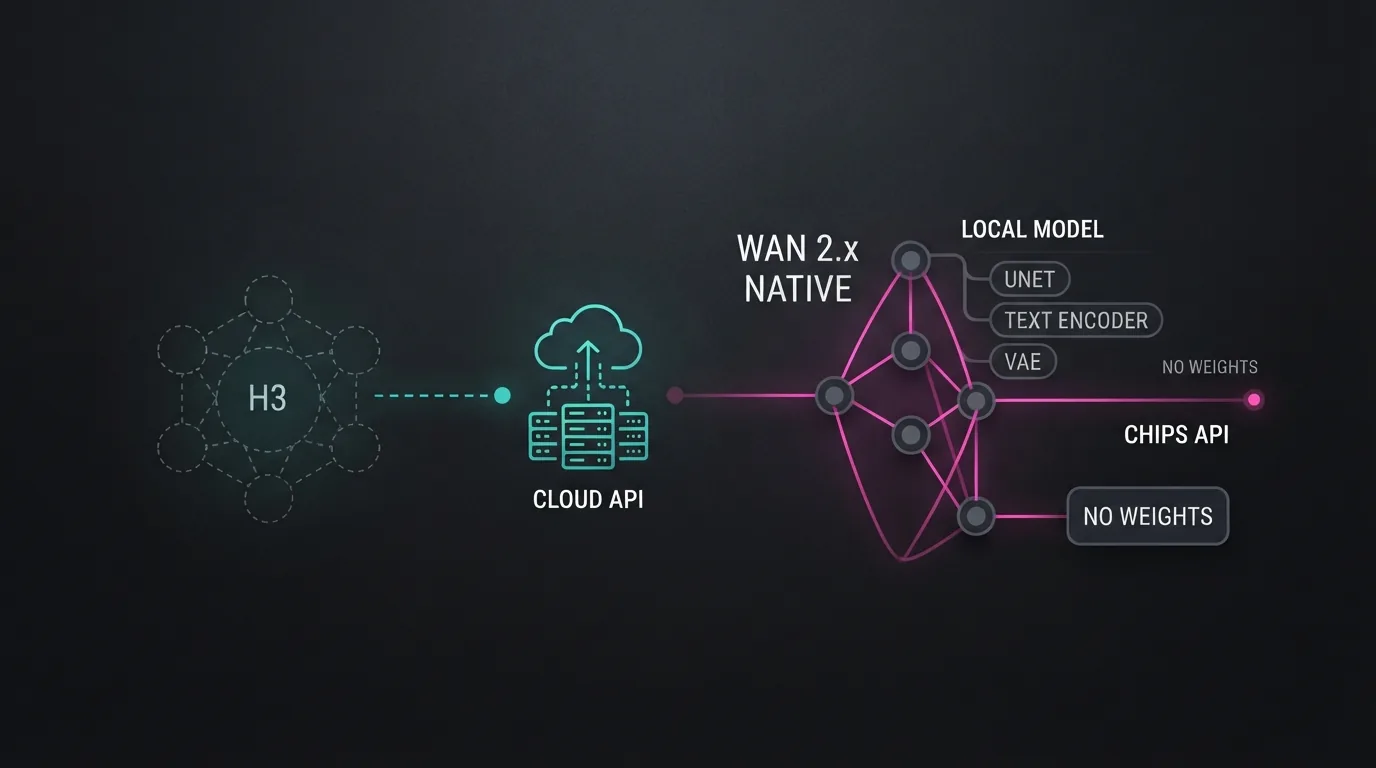
H3 is a closed model. Its weights are not published, it runs only on MiniMax's servers, and you reach it through two official doors: the Hailuo AI platform (web app) and the MiniMax API (with official SDKs). ComfyUI, by design, runs models whose weights live on your own GPU. Those two worlds don't overlap — which is why typing "MiniMax" into ComfyUI Manager doesn't return an official node.
What does exist, in practice, are three real options:
- Third-party/community ComfyUI nodes that call the MiniMax API from inside a workflow. These give you partial workflow integration — H3 generation triggered from your graph, output returned to your canvas — but not local inference, and not fine-tuning. Existence and maintenance of these nodes vary; verify any node before you trust your workflow (or your API key) to it.
- The official routes: Hailuo AI's platform and the MiniMax API with first-party SDKs. This is where you get the full H3 — everything the model can do, billed per generation.
- The full-ComfyUI route with open-weights models: the Wan 2.x line (Wan 2.1, 2.2, 2.5, 2.7), released under Apache 2.0, has native, mature ComfyUI support — official workflows, nodes, LoRAs, and a large community. For most people searching "comfyui minimax" or "hailuo comfyui," this is the answer they actually end up using.
The rest of this article unpacks each path, then gives you a decision framework and two quick tests so you can stop guessing.
What ComfyUI Actually Is (and Why Closed Models Like H3 Don't Fit)
If you want to understand why there's no H3 node, you have to understand what ComfyUI does under the hood.
ComfyUI is a node-based tool for running local, open-weights generative models. You drag nodes onto a canvas — checkpoint loader, prompt encoder, sampler, VAE decoder — and wire them into a graph. When you hit run, ComfyUI loads the actual model weights (safetensors or GGUF checkpoints) into your GPU's VRAM and executes the diffusion process on your own machine. The video frames come out of your graphics card, written to your disk.
That local execution is the entire point. It's why ComfyUI gives you pixel-level control: LoRAs, ControlNets, latent editing, custom samplers, batched renders. Every one of those features works because the weights are sitting in your VRAM, not behind an HTTPS endpoint.
MiniMax H3 breaks that model at step one. There are no H3 weights to download — not a safetensors file, not a GGUF quant, nothing. H3 inference happens on MiniMax's infrastructure, and the only interface is the Hailuo platform or the MiniMax API. A node graph can't load a model that was never distributed. This is the same reason you won't find native ComfyUI nodes for other closed video models, and it's why "when will MiniMax add ComfyUI support?" is the wrong question. The right question is: "will MiniMax ever release open weights?" — and as of September 2026, the answer is no.
Here's the technical depth moment, because it shapes everything downstream: an "H3 ComfyUI node" would not be doing inference. It would serialize your prompt and parameters into a JSON request, POST it to the MiniMax API over HTTPS, poll a remote queue until the job finishes, then download the finished MP4 into your workflow. That's still useful — it keeps your generation history, prompts, and post-processing in one canvas — but the node is an orchestrator, not an engine. The GPU work never touches your machine, and every generation costs you an API call.
The Workaround: MiniMax H3 API Nodes in ComfyUI — What You Can and Can't Do
So what about those community nodes you've heard about? At the time of writing, third-party "MiniMax" or "Hailuo" nodes exist in the ComfyUI ecosystem. They are not made by MiniMax, and their quality and maintenance are uneven — some are actively maintained, some are abandoned experiments. Before you install anything, check the repository's last commit date, open issues, and star count. A node with no commits in 18 months will probably break on the next API change.
Assuming you find one that's alive, here's the honest capability list.
What an H3 API node lets you do:
- Trigger H3 text-to-video and image-to-video generations from inside your ComfyUI graph
- Keep prompts, seeds, and outputs in one workflow alongside your other nodes
- Pass the returned MP4 to downstream nodes — frame extraction, upscaling, encoding
- Automate batches: loop over a prompt list without touching the Hailuo web app
What it does not let you do:
- Run H3 locally — there is no local inference, and no offline mode
- Fine-tune H3 or train LoRAs on it — the weights aren't yours
- Use ComfyUI samplers, ControlNets, or latent editing on H3's internals — the model never enters your graph
- Avoid MiniMax's queue, rate limits, and per-generation billing — you're still calling the API, just from a different chair
Think of it as a remote-control node: your ComfyUI canvas becomes the dashboard, but the actual generation happens on MiniMax's servers. If your goal is "keep everything in one tool," it works. If your goal is "own and control the model," it doesn't.
One practical note: because these nodes hold your API key inside a workflow, treat them with extra care — more on that in the guardrails section below.
Wan 2.x in ComfyUI: The Open-Weights Route That Actually Works
Now the part most "minimax h3 comfyui" searchers don't expect: the model family that does run natively in ComfyUI is Wan 2.x, and it's the closest thing to an H3-like experience you can actually download.
Wan 2.x — the line from Wan 2.1 through 2.2, 2.5, and 2.7 — is released under the Apache 2.0 license, which means the weights are public, commercial use is permitted, and the ecosystem is open. Wan's own team publishes official ComfyUI workflows and example scripts, and support has been in the ComfyUI ecosystem long enough to be genuinely mature: native nodes, community node packs, LoRA training pipelines, and thousands of shared workflows.
What you get with Wan 2.x in ComfyUI:
- True local inference. The checkpoint lives on your disk and runs in your VRAM. Generate 100 clips a day and your only cost is electricity.
- Full graph control. Because the weights are local, every ComfyUI feature applies: LoRAs, start/end frame control for image-to-video, prompt traveling, latent tweaks. Wan 2.5 adds audio generation; newer releases push motion quality and text rendering closer to closed-model territory.
- No queue, no rate limit, no API bill. Your GPU is the server.
- A real ecosystem. Community LoRAs on Civitai, tutorials, and workflows you can open and read.
The trade-off is hardware. Expect something like this, depending on model size and quantization:
- Smaller/quantized Wan builds can run on ~12–16 GB VRAM
- The larger 14B-class models want 24 GB or more for comfortable 720p/1080p output
- Generation is as fast as your GPU — on a mid-range card, a 5-second clip takes minutes, not the seconds a cloud API returns
If you came to ComfyUI for control, Wan 2.x is the only path that fully delivers it. It's also why the honest answer to "does H3 work in ComfyUI?" is usually followed by "no — but here's what ComfyUI users actually run."
MiniMax H3 vs Wan 2.x in ComfyUI: A Side-by-Side Comparison
This is the table to bookmark, because it does the decision work for you:
| Dimension | MiniMax H3 (platform/API) | Wan 2.x (in ComfyUI) |
|---|---|---|
| Model access | Closed; MiniMax servers only | Open weights, Apache 2.0 |
| Runs where | Cloud (Hailuo AI, MiniMax API) | Your GPU, locally |
| ComfyUI support | None official; third-party API nodes only | Native, mature, official workflows |
| Cost | Per generation / subscription — see MiniMax H3 pricing | Hardware + electricity only |
| Control depth | Prompt + platform settings | Full graph: LoRAs, ControlNets, latents, samplers |
| Fine-tuning | Not available | Full LoRA training, community ecosystem |
| Motion quality & text rendering | Flagship — H3's signature strengths | Strong and improving with each 2.x release |
| Latency & queue | API queue, fast per clip | Local speed = your GPU |
| Offline use | No | Yes |
| Workflow integration | Partial (API node, cloud inference) | Complete |
Read it top to bottom and the pattern is obvious: H3 wins on raw output quality and convenience; Wan 2.x wins on control, cost at volume, and integration. Which column matters more depends on your workflow — which is exactly what the next section decides.
How to Decide in 60 Seconds: H3 via Platform/API or Wan 2.x via ComfyUI
Here's the Rule of Thumb, and you can reuse it forever:
ComfyUI runs weights you can download. H3 is an API you can call. If the weights aren't on your disk, there's no native node — and there won't be one unless MiniMax releases them.
Now apply it:
Choose MiniMax H3 (platform or API) when:
- You want the best available motion quality and text rendering, right now, without buying a GPU
- You generate occasionally — a few clips a day — so per-generation pricing is cheaper than a video card
- You don't need LoRAs, fine-tuning, or graph-level control
- The Hailuo platform or the MiniMax generator route fits your workflow
Choose Wan 2.x in ComfyUI when:
- You want to own the model: local, offline, unlimited generations
- You need real workflow control — LoRAs, ControlNets, start/end frames, custom pipelines
- You already have a capable GPU (or are planning one)
- You generate at volume, where per-generation API fees would add up fast
Choose both when you're prototyping: iterate freely and cheaply in Wan on your GPU, then send the winning prompt to H3 via the API for the final, higher-quality render. This "local sketch, cloud final" pattern is increasingly common in 2026 — and it works whether you trigger H3 from the Hailuo app, the API SDK, or a community ComfyUI node.
The trap to avoid: installing an unmaintained H3 API node and convincing yourself you have "H3 in ComfyUI." You have an HTTP client shaped like a node. That's fine if you accept it — just don't design a pipeline around local control that the node can't provide.
Verify Before You Commit: Two 15-Minute Tests
Don't take this article's word for any of it. Both paths can be verified in about fifteen minutes each, for less than the cost of a coffee.
Test 1: The MiniMax H3 API node (15 minutes, ~$0.10 in API credits)
- Open ComfyUI Manager and search "MiniMax" (or "Hailuo"). Note what appears — and that nothing official does.
- For any community node you find: open its GitHub. Check the last commit date, open issues, and stars. Unmaintained = skip.
- If it survives review, install it in a disposable setup, plug in a fresh API key, and generate one 5-second H3 clip from a prompt you know well.
- Confirm the MP4 lands back in your graph, then check your API usage dashboard to see what it cost.
If the node fails or looks abandoned — that's your answer. The official routes (the MiniMax H3 generator, API SDKs) still work without it.
Test 2: Wan 2.x in ComfyUI (15 minutes + one download)
- In a current ComfyUI install, load the official Wan 2.x example workflow (the Wan team ships them; the latest release is the one to use).
- Download the matching checkpoint and run the default image-to-video example — one clip, default settings.
- Watch your VRAM usage while it runs, then play the output and judge motion and text rendering with your own eyes. On a mid-range card, budget a few minutes of render time per 5-second clip — that's the local trade-off, not a bug.
The Rule of Thumb again: if the weights downloaded to your disk, the model works in ComfyUI. Wan 2.x passes that test natively; H3 cannot, because there's nothing to download.
FAQ: MiniMax H3 ComfyUI Questions, Answered
Does MiniMax H3 work in ComfyUI? No. There is no official ComfyUI support for MiniMax H3. It's a closed model whose weights are not published, so it can't run in a local node-based tool.
Is there a MiniMax H3 ComfyUI node? Not from MiniMax. Third-party community nodes exist that call the MiniMax API from inside a ComfyUI workflow — they give you partial workflow integration, not local inference. Verify maintenance status before relying on one.
Can I use H3 in my ComfyUI workflow? Partially. With a community API node you can trigger H3 generations from your graph and receive the output back for further processing. But inference happens in the cloud, you can't fine-tune, and ComfyUI's ControlNet/LoRA features can't touch H3's internals.
What video models actually work in ComfyUI? Open-weights models work natively: the Wan 2.x line (2.1/2.2/2.5/2.7) is the most mature with official workflows, plus other open lines like Hunyuan Video and CogVideoX. Any model with downloadable weights can be integrated; closed API models can't, beyond the API-node pattern.
Why is MiniMax H3 not in ComfyUI? Because ComfyUI executes model weights locally on your GPU, and MiniMax keeps H3's weights private. A native node would require MiniMax to release open weights, which they haven't — so the gap is architectural, not a missing integration effort.
Is Wan 2.x in ComfyUI good enough compared to H3? For control, yes — Wan gives you LoRAs, ControlNets, offline use, and unlimited generations that H3 can't. For raw flagship motion quality and text rendering, H3 still leads; the gap narrows with each Wan 2.x release. Many creators use both: Wan locally for iteration, H3 via API for finals.
API node vs local model — which should I pick? Apply the Rule of Thumb: if the weights can live on your disk, run them locally; if they can't, call the API. Need control and volume? Wan 2.x in ComfyUI. Need peak quality occasionally? H3 via the platform or API.
Guardrails: Third-Party Nodes, API Keys, and Licenses
Three safety checks that matter more than any workflow trick — starting with the API-key issue flagged in the workaround section:
1. Verify third-party nodes before installing. A community node has full access to whatever runs in your graph — including any API key you feed it. Actions: check the GitHub repo's last commit, open issues, and contributor history before install. Skip anything abandoned or with unresolved security reports. Prefer nodes that have been around for months, not days.
2. Protect your MiniMax API key. Never paste your production API key into a node or workflow you haven't reviewed — and never share a workflow JSON with a key embedded in it. Actions: create a dedicated key with minimal permissions for ComfyUI experiments, monitor usage in your API dashboard after installing any node, and revoke the key immediately if anything looks off.
3. Read the licenses. Wan 2.x is Apache 2.0 — commercial use is fine, which is a big part of its appeal. MiniMax H3 output rights follow MiniMax's terms of service, so re-read them before using H3 generations in commercial work. And check the license of any community node itself; "open source" on the node doesn't mean the underlying model is.
The Bottom Line: Core Summary
Searching "minimax h3 comfyui" is usually the moment someone realizes closed models and local tools don't mix — and that realization, handled right, saves you from building a workflow on sand.
- MiniMax H3 has no official ComfyUI support — it's a closed model with no published weights, and that won't change unless MiniMax releases them.
- Community H3 API nodes exist but only orchestrate cloud calls — useful for keeping H3 inside your canvas, useless for local inference or fine-tuning. Verify before you trust them.
- The full H3 experience lives on the official routes: the Hailuo AI platform and the MiniMax API/generator, with per-generation pricing you can compare on our pricing page.
- Wan 2.x is the real ComfyUI video answer — Apache 2.0, native nodes, official workflows, LoRAs, and full local control, trading peak quality for ownership.
- Rule of Thumb: if the weights aren't on your disk, there's no native node. Downloadable model → ComfyUI. API-only model → platform or API, optionally with a verified node as your remote control.
Your next move: run one of the two 15-minute tests above. If you want H3's flagship quality today, open the MiniMax H3 generator and make one clip. If you want a video model inside ComfyUI, download Wan 2.x and run the official workflow. Then subscribe to our blog — if MiniMax ever ships open weights or official ComfyUI tooling, we'll be the first place that tells you exactly what it means.