Step 1
Describe or structure your prompt
Write a natural language prompt describing the image and text you want, or supply structured JSON with bounding box coordinates and hex color palettes for pixel-level layout control.
Ideogram 4 AI Image Generator
A 9.3 billion parameter open-weight image model built for design accuracy — 0.97 OCR text rendering, structured JSON prompting with bounding box control, hex color palettes, native 2048px output, and aspect ratios up to 6:1.
What Is Ideogram 4
Ideogram 4 is Ideogram AI's first open-weight text-to-image foundation model, released on June 3, 2026. At 9.3 billion parameters, it is built from the ground up for design work — precise typography, structured layouts, controlled color palettes, and reliable composition.
Unlike general-purpose image generators that treat text as a visual afterthought, Ideogram 4 achieves 0.97 accuracy on the X-Omni OCR benchmark — the highest among open-weight models — and ranks #1 among open-weight models on DesignArena and #1 in layout control on 7Bench (0.69 mIoU). It runs on a single 24GB GPU (NF4 quantized) and is available via API from $0.03/image.
How It Works
From prompt to design-ready image in three steps.
Step 1
Write a natural language prompt describing the image and text you want, or supply structured JSON with bounding box coordinates and hex color palettes for pixel-level layout control.
Step 2
Choose output from 256px to 2048px at any aspect ratio up to 6:1. Select the generation quality tier that fits your workflow. The model renders the full image including embedded text in a single pass.
Step 3
Download as transparent PNG, upscale the result, extend or reframe the canvas, or edit specific regions. Remix existing outputs into new variations without starting over.
Key Features
A 9.3B parameter model that outperforms models 8x its size on the tasks that matter for design.
Ideogram 4 achieves 0.97 on the X-Omni OCR benchmark — the highest among open-weight models. In professional blind tests, designers preferred its typography 47.9% of the time, beating Gemini 3.1 Pro (30%), FLUX.2 (15.5%), and Grok Imagine (15%). Posters, labels, and UI mockups render legibly on the first attempt.
Try ideogram 4Supply structured JSON with bounding box coordinates for exact element placement, up to 16 hex colors per image, and literal text strings with style descriptions. The model validates the JSON before generating — invalid prompts are rejected, not guessed. This is pixel-level layout control, not prompt roulette.
Try ideogram 4Generate from 256px to 2048px natively at any aspect ratio up to 6:1. No awkward upscaling of 1024px outputs that look soft at print resolution. Wide enough for banners, billboards, and social media headers without cropping.
Try ideogram 4NF4 quantized version runs on a single RTX 4090 (24GB VRAM, CUDA). FP8 version supports broader hardware with 32GB. Inference code is Apache 2.0. Available on 14+ platforms including Hugging Face, ComfyUI, Replicate, Leonardo AI, and Krea AI.
Try ideogram 4Generate images with native alpha channel support — subjects separated from backgrounds without manual masking. Combined with prompt editing, remixing, extend, and reframe, you can iterate from concept to production asset in one workflow.
Try ideogram 4Available via API at Turbo ($0.03/image), Standard ($0.06), and Quality ($0.09). Subscriptions start at $8/month with unlimited slow generation on all tiers. Enterprise plans include self-hosting and fine-tuning.
Try ideogram 4Advanced Features
Visual comparisons showing what changes when you apply each capability.
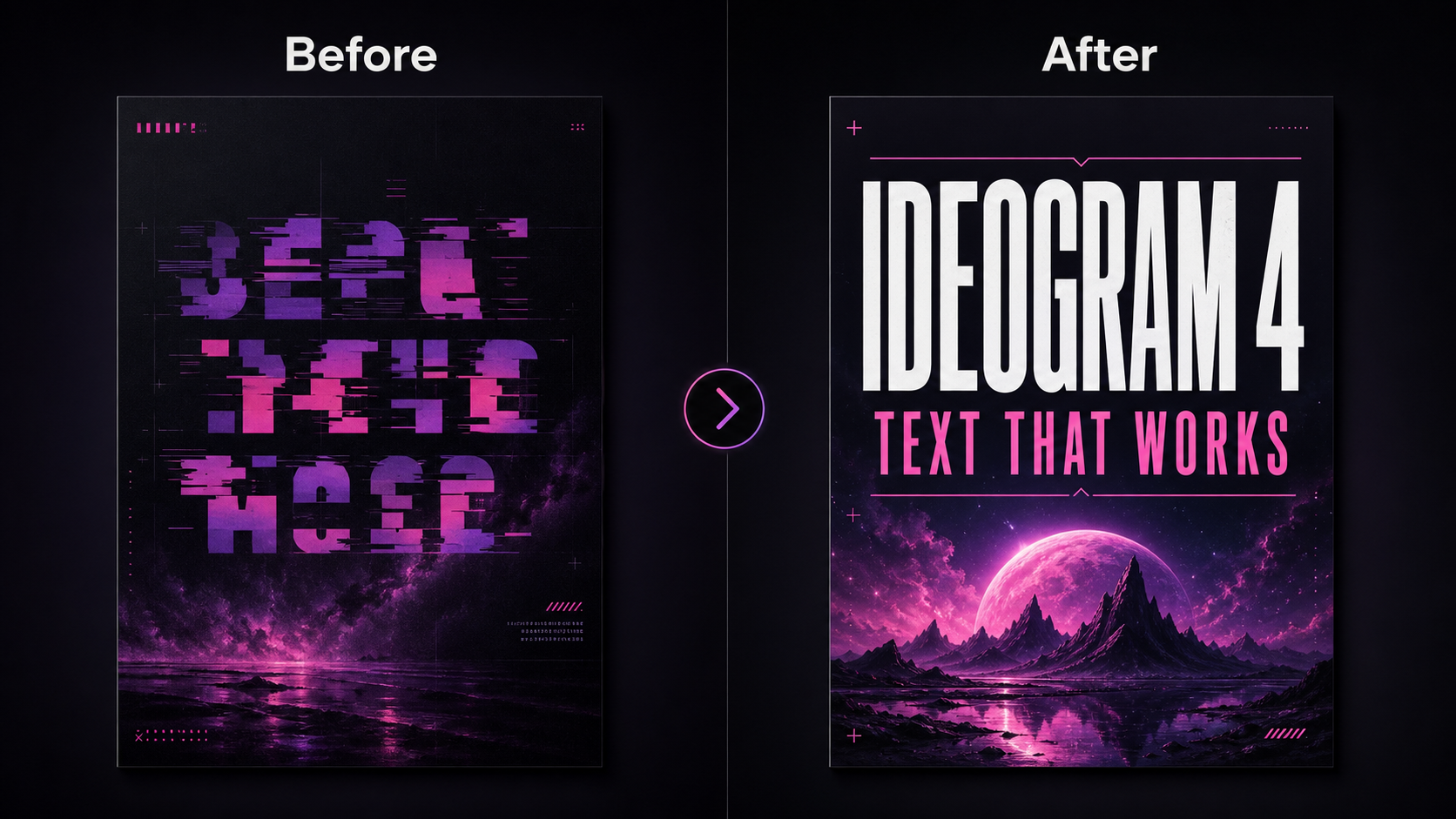
Before: General models produce images where text is scrambled, missing, or hallucinated. After: Ideogram 4 renders headlines, captions, and signage with 0.97 OCR accuracy — text that actually says what you wrote.
Try this workflow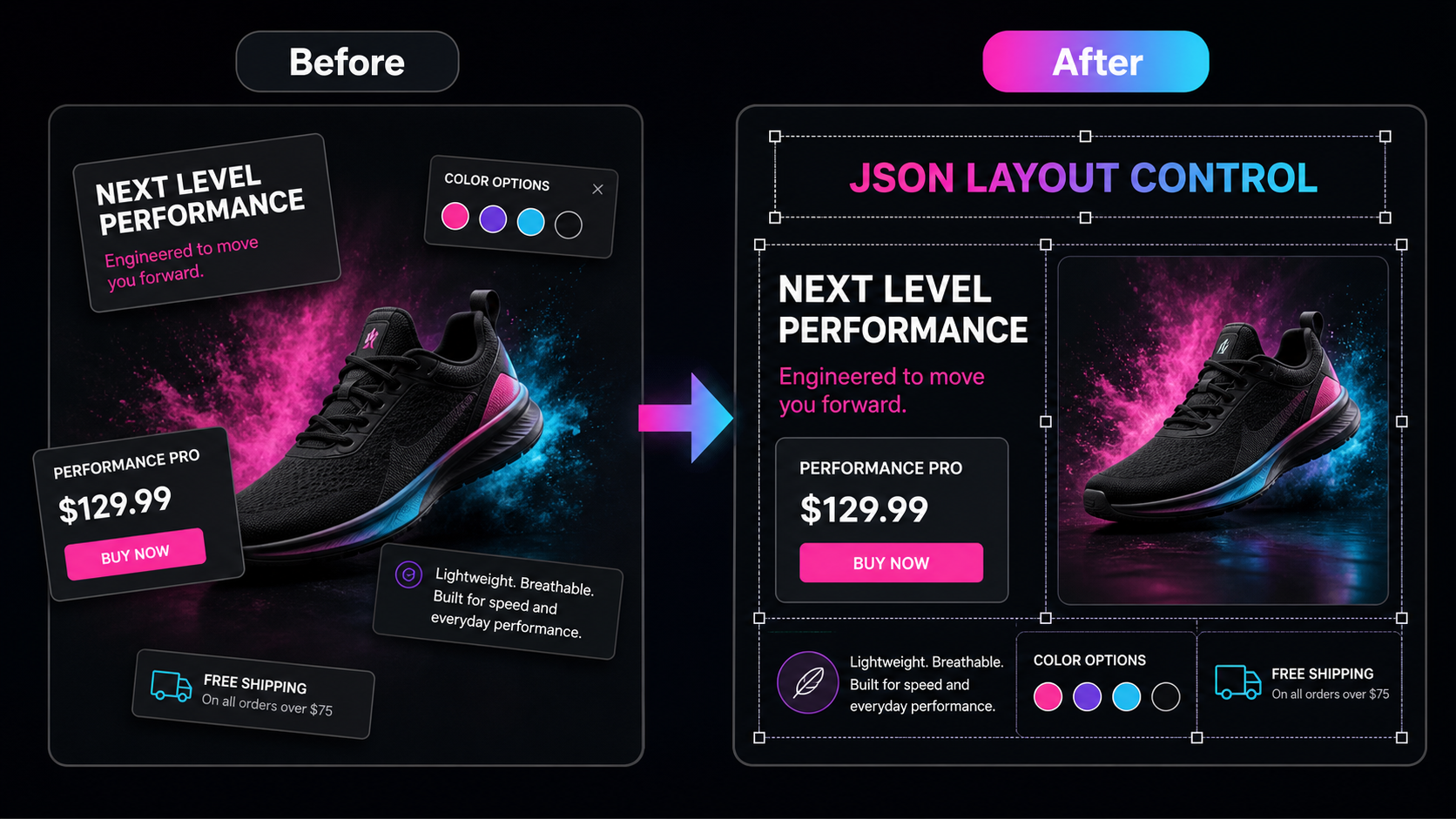
Before: You describe layout with words and hope for the best. After: You supply JSON with exact bounding box coordinates and hex colors. The model places every element where you told it to. Outperforms all closed-source models on 7Bench layout benchmark (0.69 mIoU).
Try this workflow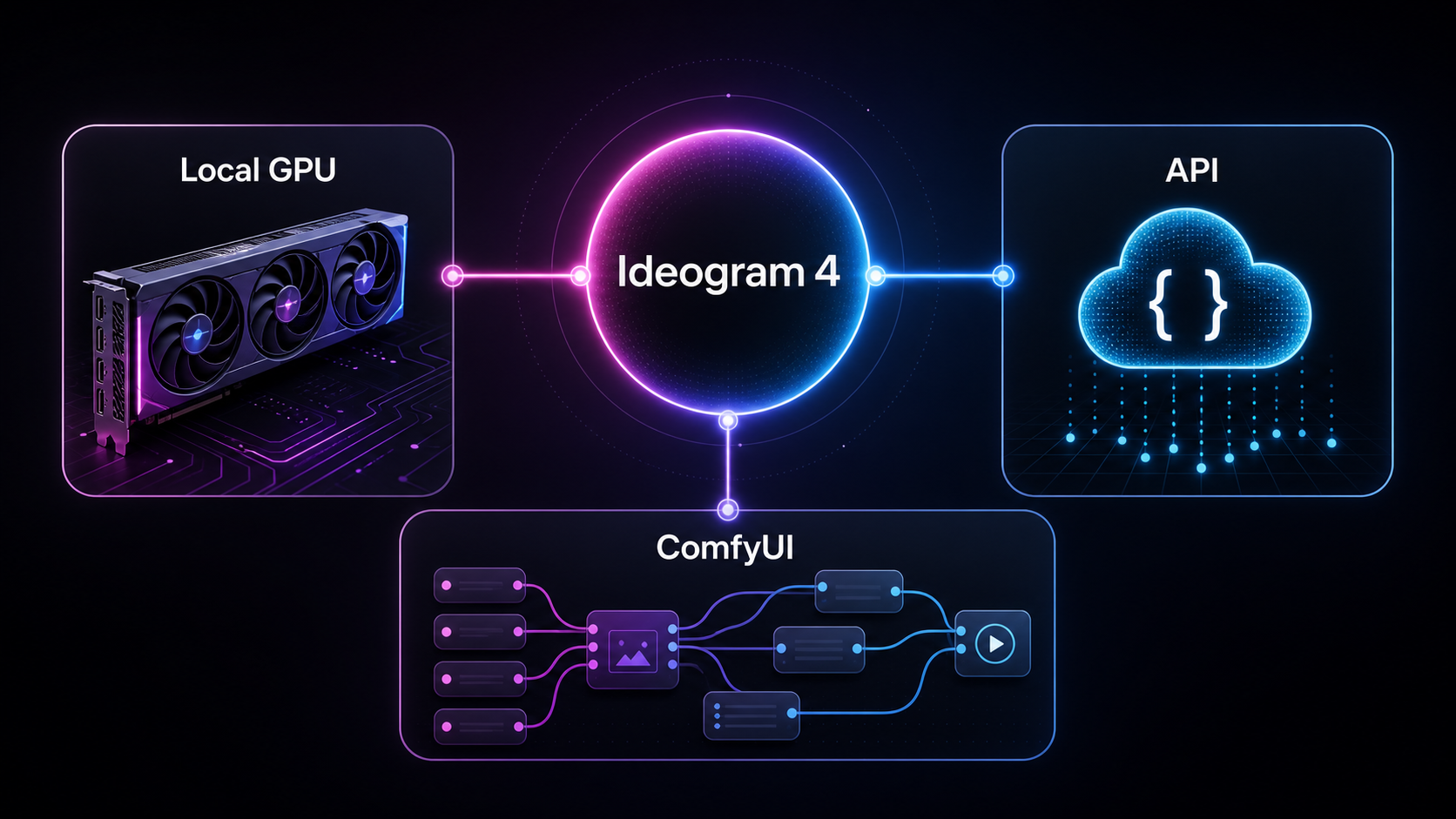
Before: Design iterations are locked inside proprietary platforms. After: Run Ideogram 4 locally on a 24GB GPU, integrate via API, or use it inside ComfyUI — your workflow, your infrastructure, your data.
Try this workflowUse Cases
Ideogram 4 fits any workflow where text legibility, layout precision, and design iteration speed matter.
Turn a headline, tagline, and visual direction into a typography-led poster that is ready for client review — no redesign needed because the text rendered incorrectly.
Try this use caseGenerate ad variations with product focus, offer text, and platform-ready composition. Iterate faster between concepts without waiting for a designer to hand-place every headline.
Try this use caseExplore logo concepts, brand visuals, and graphic systems using hex-locked color palettes. Ideogram 4 respects brand colors where general models approximate them.
Try this use caseGenerate product shots with embedded labels, pricing, and calls to action. Transparent PNG export skips the manual background removal step entirely.
Try this use caseConvert creative briefs into square posts, story graphics, and thumbnail concepts with visible, readable title text — no separate typography layer needed.
Try this use caseCreate packaging concepts with product names, ingredient lists, and brand copy rendered inside the image. Present realistic mockups without manual compositing.
Try this use caseTestimonials
Role-specific feedback from the workflows this model is built for.

"As a brand designer, I use Ideogram 4 to generate client mockups with exact brand colors and readable typography in a single pass. It cuts the gap between concept and approval by about half."
- Danny Williamson, Brand Designer

"As a product designer, the structured JSON prompting is what sets Ideogram 4 apart. I can define bounding boxes and colors before generating — layout control, not prompt roulette. It works the way I think."
- Brad Gray, Product Designer

"As an e-commerce creative lead, I generate product shots with embedded pricing and labels directly in Ideogram 4. The transparent PNG export means we skip manual cutout entirely. That is a direct cost saving per asset."
- Jim Davis, E-Commerce Creative Lead

"As an AI research engineer, I find Ideogram 4 remarkable not despite its 9.3B size but because of it. Outperforming models 8x larger on text and layout shows the architecture was designed for the task, not scaled until it worked."
- Tammy Wallace, AI Research Engineer

"As an AI artist, I run Ideogram 4 FP8 on a 32GB ComfyUI setup. Getting 2048px output with text that actually spells correctly is something no other open-weight model delivers today."
- Irene Chambers, AI Artist

"As an instructional designer, I use Ideogram 4 to generate diagrams with embedded labels and multilingual captions. Text renders inside the image — no separate overlay step. That changes how fast we produce educational visuals."
- Andrea Williamson, Instructional Designer
FAQ
Ideogram 4 is a 9.3 billion parameter open-weight text-to-image model released on June 3, 2026. It is built specifically for design work: it renders text with 0.97 OCR accuracy, accepts structured JSON prompts with bounding box coordinates and hex color palettes, and outputs natively from 256px to 2048px at aspect ratios up to 6:1.
Write a prompt or supply structured JSON describing the image, text, layout, and colors you want. Choose your resolution (up to 2048px) and aspect ratio (up to 6:1), select a quality tier, and click generate. The model outputs a full image with embedded text in a single pass. Download as PNG or transparent PNG.
Yes. Ideogram 4 achieves 0.97 accuracy on the X-Omni English OCR benchmark, the highest among open-weight models. In professional blind tests, designers preferred its typography 47.9% of the time, beating Gemini 3.1 Pro (30%), FLUX.2 (15.5%), and Grok Imagine (15%). Posters, signage, logos, and labels render legibly on the first attempt.
Ideogram 4 is released as open weights under a non-commercial license. The inference code is Apache 2.0. NF4 quantized weights run on a single 24GB GPU (RTX 4090), and FP8 weights support broader hardware with 32GB VRAM. Commercial use requires a paid enterprise license.
Ideogram 4 generates natively from 256px to 2048px in multiples of 16, with a maximum aspect ratio of 6:1. This covers everything from square social media posts to wide banners and billboard layouts without external upscaling.
API pricing: Turbo at $0.03/image, Standard at $0.06/image, and Quality at $0.09/image. Subscription plans start at Basic $8/month (400 priority generations), Plus $20/month (1,000), and Pro $60/month (3,000) — all include unlimited slow generation. Enterprise licensing covers self-hosting and fine-tuning.
Instead of natural language, you supply a JSON object with bounding box coordinates for element placement, up to 16 hex colors per image, and literal text strings with style descriptions. The model validates the JSON before generating — invalid prompts are rejected. This gives you layout control measured in pixels rather than word approximations.
Ideogram 4 is available on 14+ platforms including Hugging Face, ComfyUI, Replicate, Leonardo AI, Krea AI, Picsart, Cloudflare, fal, Runware, and Magnific. For local deployment, the NF4 version runs on a single RTX 4090 (24GB VRAM). The API is available at developer.ideogram.ai.
9.3B parameters. 0.97 OCR accuracy. Native 2K output. JSON layout control. Available via API from $0.03/image, on 14+ platforms, or locally on a single RTX 4090.
Try Ideogram 4 NowNo credit card required. Runs locally, via API, or on 14+ platforms.