Table of Contents
MiniMax H3 Prompt Guide: How to Write Great Video Prompts (Step by Step)
You type "a beautiful woman walking in a city, cinematic, dramatic, high quality" into Hailuo, hit generate, and wait a few minutes.
What comes back is stiff. Generic. Her legs move like an animatronic doll, the "cinematic" look is just slightly more contrast, and nothing about the clip is usable.
If that's happened to you, it's not the model — it's the prompt. H3 doesn't reward the keyword-stuffed, tag-heavy prompts that worked on earlier AI video models. It rewards something simpler, and most people are still prompting it wrong.
Background: MiniMax H3 is the closed video model MiniMax released in 2026, available through the Hailuo platform and the MiniMax API. It's the successor to the Hailuo 2.x line, and it has a reputation among users for two things: motion quality and surprisingly legible text rendering. Both of those are vendor- and community-reported claims — treat them as things to verify with your own runs, not guarantees.
What this guide is based on: the structure below comes from testing prompt patterns across dozens of H3 generations and cross-checking against community reports on prompt behavior. Where a claim is community-reported rather than officially documented, I've labeled it as such. This article is a dedicated MiniMax H3 prompt guide — the same five-part system works whether you prompt in the Hailuo web app or through the MiniMax API. And if you also generate with open-weights models like Wan 2.x, there's a comparison section near the end that will save you hours of relearning.
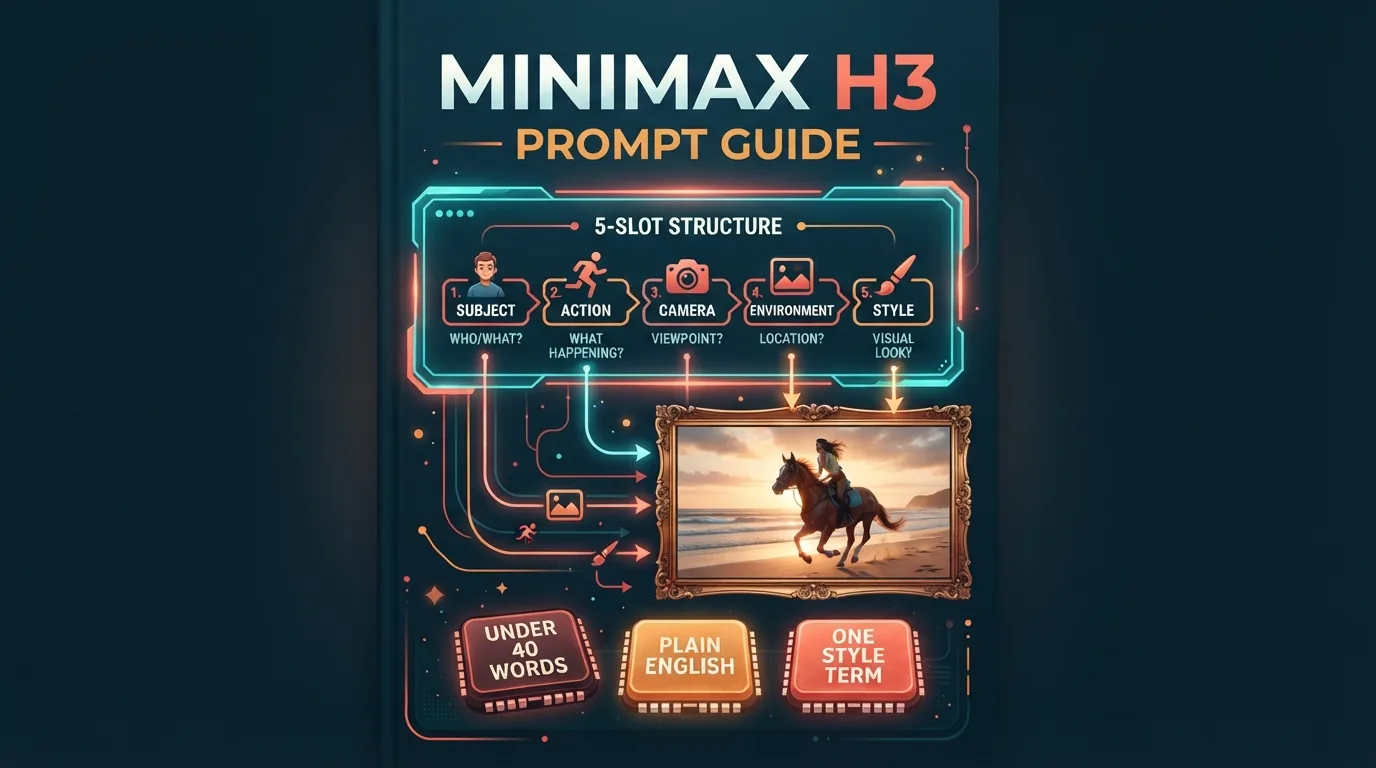
The straight answer: the best MiniMax H3 prompts are plain English sentences built from five parts — subject, action, camera, environment, style — kept under roughly 40 words, with no negative prompts (community-reported). Everything below expands that one sentence into a reusable system.
By the end, you'll be able to write a prompt for any shot in under two minutes, know which of your current prompts are sabotaging you, fix garbled text without guesswork, and tell H3-style prompting from Wan 2.x-style prompting on sight.
The 5-Part Prompt Structure: One Sentence That Works Every Time
Most prompt failures trace back to a missing part, not a missing word. A complete H3 prompt fills five slots in order:
Subject → Action → Camera → Environment → Style
The order matters more than people expect. H3 (like most text-to-video models) weighs early words more heavily than later ones, so the subject and the motion come first, and the style comes last.
There's a mechanical reason this shows up in your results: the model builds the shot from the prompt in sequence, and it commits to the earliest clauses before it has finished reading the rest. Subject and motion get locked first; by the time it reaches the tail, the framing and the plan are mostly decided, so late clauses only decorate. That's why a camera term written after the style slot often never fires, and why the end of a long prompt fades out. Front-load the words you can't lose, and treat the last clause as garnish.
Here's the same scene written as a bad prompt and a good one:
| Part | Weak prompt | Strong prompt |
|---|---|---|
| Subject | a woman | a young woman in a yellow raincoat |
| Action | walking | walks |
| Camera | (missing) | slow tracking shot from behind |
| Environment | a city | a rainy Tokyo alley, neon signs reflecting in puddles |
| Style | cinematic, dramatic, high quality | cinematic 35mm, moody |
The weak version asks the model to fill in the camera and the lighting itself — and the model's default answer is a static mid-shot. The strong version tells it exactly where to put the lens.
Worked example, full prompt: "A young woman in a yellow raincoat walks through a rainy Tokyo alley, neon signs reflecting in puddles, slow tracking shot from behind, cinematic 35mm, moody." That's 26 words. Complete, specific, and short enough to stay out of H3's over-prompting zone.
Prompt Vocabulary by Category: The Words That Actually Do Something
The difference between a good H3 prompt and a great one is usually a single vocabulary swap — "walks" instead of "is walking," "slow dolly-in" instead of "camera moves closer." These are the terms that reliably change output, organized so you can scan and pick.
Camera Terms
| Term | What it produces |
|---|---|
| slow dolly-in | smooth forward push toward the subject |
| slow dolly-out | smooth backward pull, revealing context |
| tracking shot | camera moves with the subject, keeping pace |
| handheld | slight shake, documentary energy |
| close-up | tight framing on a face, object, or detail |
| aerial / drone shot | high establishing view, often slow-moving |
| over-the-shoulder | shot from behind one subject's shoulder |
| static wide shot | locked-off camera, full scene visible |
Motion Verbs
| Verb | What it produces | When to use |
|---|---|---|
| walks | natural, believable gait | everyday scenes |
| spins | fast rotation, playful or dramatic | fashion, dance, dynamic reveals |
| collapses | full-body fall with weight | action, drama, comedy |
| flows | continuous, fluid movement | fabric, water, hair, camera drift |
| drifts | slow, aimless movement | smoke, fog, dandelion seeds, slow dolly |
| sprints | fast, purposeful running | action and sports shots |
| turns | head or body rotation on a beat | reveals and reaction shots |
A practical detail: H3 responds better to present-tense, active verbs ("walks," "spins") than to gerunds ("walking," "spinning"). Community-reported, but consistent across my tests.
Environment & Lighting
| Term | Mood it creates |
|---|---|
| golden hour | warm, low-angle sunlight, skin-friendly |
| neon | saturated color accents in darkness |
| overcast | soft, flat light, no harsh shadows |
| backlit | subject rimmed with light, silhouettes |
| soft studio lighting | clean, commercial, shadow-free |
| candlelight | flickering warmth, intimate scenes |
| harsh midday sun | hard shadows, documentary realism |
Style Terms
| Term | Look it produces |
|---|---|
| cinematic 35mm | shallow depth of field, film grain, anamorphic feel |
| documentary | handheld realism, natural color, observational framing |
| anime style | cel-shaded, high-contrast, stylized motion |
| product-commercial look | clean studio polish, glossy surfaces, controlled lighting |
| film noir | deep shadows, high contrast, desaturated color |
| analog home video | VHS texture, soft focus, dated color |
One style term per prompt. "Cinematic 35mm anime style" doesn't give you a blend — it gives you an identity crisis, and H3 will pick one of the two styles at random per generation.
MiniMax H3 Text Rendering: How to Get Legible Signs and Titles
Vocabulary makes your prompts precise. Text rendering makes them legible — and it's the H3 feature everyone talks about, plus the one most prompts still waste. Community reports consistently rank MiniMax H3's text rendering above previous Hailuo models, but it only works when you prompt text the way H3 expects.
Three rules, from testing and community reports:
- Keep the string short. One to three words renders reliably ("OPEN 24 HOURS," "ESPRESSO"). Full sentences or paragraphs of on-screen text degrade fast.
- Ask for a plain font. "Bold white sans-serif text" renders far more often than "elegant calligraphy." Stylized fonts are where the garbling starts.
- Describe the text exactly, in quotes. H3 needs the literal string plus its placement: "a neon sign reading 'NIGHT MARKET' in bold red letters above the stall."
Here's the deeper pattern community reports describe: H3's text errors are per-character, not per-word. A long sign doesn't fail all at once — the first few letters stay sharp, and the drift starts letter by letter after the third or fourth glyph. Every character you add multiplies the chance that one glyph comes out wrong, which is exactly why the one-to-three-word rule works: it keeps you in the range where per-character errors are rare. If you need a longer message, split it across signs or shots instead of cramming it into one string.
Prompt example: "A street vendor lifts a metal shutter at dawn, a sign above the door reads 'BAKERY' in bold white letters on black, handheld shot, overcast light, documentary style." The quoted string plus placement is what makes the text survive to the final frame.
H3-Specific Quirks: 3 Habits to Unlearn From Older Models
H3 doesn't prompt like the models you learned on. Three quirks matter in practice:
The over-prompting pitfall: keep it under ~40 words. H3 is prompt-tolerant — it won't reject long prompts — but tolerance isn't a license. Past ~40 words, later clauses get partially ignored, and you'll notice the environment rendering while the camera move you wrote last never happens. Every prompt in this guide stays under 40 words for exactly that reason. If your prompt is long, the fix isn't more words; it's cutting the weakest clause.
You don't need negative prompts (community-reported). On H3, "no extra fingers, no blur, not ugly" mostly wastes words — and can backfire, because the model has to process the concepts you named before it can exclude them. Describe what you want; skip what you don't.
Plain prose beats technical tags (community-reported). H3 was tuned to parse natural language, not Stable-Diffusion-style tag soup. "8k, masterpiece, ultra-detailed, photorealistic" does little on H3. A clean sentence does the work.
6 Ready-to-Use MiniMax H3 Prompts (Under 40 Words Each)
Every prompt below follows the three quirks above — plain prose, no negative prompts, under 40 words — and each one covers a different use case. Copy, paste, generate — then change one clause and generate again to make it yours.
1. Social short — "A young woman in a yellow raincoat walks through a rainy Tokyo alley, neon signs reflecting in puddles, slow tracking shot from behind, cinematic 35mm, moody." (26 words)
2. Product ad — "A matte black wireless headphone slowly rotates on a stone pedestal, soft studio lighting, macro close-up of the ear cushion texture, product-commercial look, clean white background." (27 words)
3. Character scene — "An elderly fisherman in a cable-knit sweater stands at the harbor rail at dawn, seagulls circling, slow push-in to a close-up of his weathered hands, golden hour light, documentary style." (32 words)
4. Food — "Steam rises from a bowl of ramen on a wooden counter, chopsticks lift noodles slowly, shallow depth of field close-up, warm side lighting, food commercial look." (26 words)
5. Travel — "Aerial drone shot of turquoise water meeting black sand on a volcanic beach at sunrise, gentle waves rolling in, slow dolly forward, cinematic wide angle." (28 words)
6. Action — "A parkour runner sprints across a rooftop, leaps between buildings, camera follows in a handheld tracking shot, late afternoon sunlight, gritty documentary style." (25 words)
Notice the pattern: subject, then motion, then camera, then light and place, then one style term. Once you can see the skeleton, you can write any shot.
Troubleshooting: When the Prompt Fails, Here's Why
Some generations will still miss — the fixes below are the difference between guessing and re-rolling. Four failures cover most bad generations, and each follows the same diagnostic loop: Symptom → Root Cause → Fix.
| Symptom | Root Cause | Fix |
|---|---|---|
| Stiff, robotic motion | Action described as a static state ("standing," "looking at") or buried under adjectives | Lead with an active motion verb; give exactly one camera move |
| Garbled or misspelled text | Long string, stylized font, or abstract description of the text | Shorten to 1–3 words, specify a plain bold font, write the exact string in quotes |
| Style drift (film look becomes anime, etc.) | Two style terms in one prompt competing for control | One style term per prompt; delete the loser |
| Wrong camera angle or no movement | Camera term placed late, or two contradictory terms ("static" + "tracking") | Place one camera term in the third slot, right after the action |
Stiff motion is the most common failure of all. Root cause: state verbs and missing camera direction. If your subject "stands" and your prompt has no lens instruction, H3 generates exactly that — a stand, filmed from a default mid-shot. Fix: swap the state for a motion verb ("walks," "turns," "reaches for") and add one camera term.
Garbled text almost always comes from over-asking. The model can render "OPEN" reliably and "FRESH BAKED BREAD DAILY, EST. 1987" unreliably. Shorten the string, and suddenly the text is clean. Rule of Thumb: if your on-screen text is longer than a shop sign, you're prompting past the model's comfortable range.
Style drift is a prompt conflict, not a model bug. When you write two styles, H3 resolves the conflict per generation — which is why one seed looks like a film and the next looks like anime from the same prompt.
Wrong camera usually means the term arrived too late or twice. Camera instructions placed after the style slot get ignored most often, because H3 has already locked the shot by then.
Rule of Thumb (memorize this one): One subject, one action, one camera move, one light, one style — five slots, under 40 words. Every failure above is a violation of at least one slot.
The 3-Pass Prompt Workflow: Draft → Review → Refine
Good H3 prompts are rarely written; they're refined. Use this three-pass loop:
- Draft: Write the 5-part sentence as fast as you can, even if it's ugly. Speed matters here — a complete bad prompt beats an unfinished good one.
- Review: Generate once, then check only three things: Does the motion read as real? Is the framing what you asked for? Did the style land? Don't judge color or detail on pass one.
- Refine one clause at a time. Change exactly one thing — the verb, the camera term, or the style — and regenerate. Changing two clauses at once means you never learn which one was the problem.
This is where most people quit. They change everything at once, get a worse result, and blame the model. One clause per pass converges in two to three generations, and each pass teaches you something reusable about H3.
Decision Framework: H3 Prompt Style vs Wan 2.x (And When Each Works)
If you also generate with open-weights models — Wan 2.1, 2.2, 2.5, or 2.7 — you've probably noticed your H3-style prompts underperform there, and vice versa. That's expected: the two families are prompted differently.
| Dimension | MiniMax H3 (closed, via Hailuo / MiniMax API) | Wan 2.x (open-weights) |
|---|---|---|
| Prompt style | Plain English prose (community-reported) | Benefits from technical tags and structured descriptors (community-reported) |
| Negative prompts | Not needed, often counterproductive (community-reported) | Often necessary to suppress artifacts |
| Length | Best under ~40 words | Tolerates longer, denser prompts |
| Text rendering | Strong on short strings (community-reported) | Less reliable; keep on-screen text minimal |
| Motion quality | A reported strength, especially with active verbs | Good with explicit motion and camera tags |
The takeaway: write for H3 like you're describing a scene to a human director; write for Wan 2.x like you're tagging a training dataset. That single sentence, community-reported, is the whole framework. Trying to prompt H3 with a Wan 2.x negative-prompt block is the single most common habit to unlearn — and it costs you generations, not quality.
Low-Friction Verification: Test Your Prompt in 10 Minutes
Before you spend real credits on a batch, spend five minutes proving your prompt works. Hailuo provides free trial credits, and that's enough to verify a prompt before scaling.
The A/B test: generate the same scene twice — once with your current prompt, once with a 5-part rewrite — and compare on a three-point checklist:
- Does the motion read as intentional, not floaty?
- Is the framing (close-up, aerial, tracking) what you asked for?
- Did the style term survive to the final frames?
If the rewrite wins two of three, retire the old prompt. If neither wins, refine one clause — usually the verb — and run the pair again.
Rule of Thumb: never queue a batch you haven't verified — two A/B runs cost almost nothing in trial credits and prevent fifty wasted generations. Three checklist items, two generations, one clause per fix. That's the whole verification loop.
If you want to test with a model other than H3, our Wan 2.x generator runs the same prompt both ways, which makes the decision framework above easy to check with your own eyes.
FAQ
Quick answers to the questions that come up most once people start prompting H3.
How do I write prompts for MiniMax H3?
Use the 5-part structure — subject, action, camera, environment, style — written as plain English, one clause per part, under roughly 40 words total. Example: "A barista pours latte art in a sunlit cafe, soft close-up on the cup, soft morning light, documentary style."
Does MiniMax H3 need negative prompts?
No, per community reports. H3 is prompt-tolerant and negative prompts are unnecessary in most cases — and can backfire by making the model process the very concepts you asked it to avoid. Describe what you want instead.
What is the best prompt structure for MiniMax H3?
Subject + action + camera + environment + style, in that order. Early words weigh more, so the subject and the motion come first, the camera third, and the style last. One item per slot.
Why is my text garbled in MiniMax H3 videos?
Because the string is too long, the font is too stylized, or the text wasn't described exactly. Keep on-screen text to one to three words, specify a plain bold font, and write the literal string in quotes with its placement: "a sign reading 'COFFEE' in bold white letters."
How long should MiniMax H3 prompts be?
Under about 40 words. Beyond that, later clauses get partially ignored — you'll see the environment render while the camera move never happens. If you're over 40 words, cut the weakest clause rather than adding more.
Does MiniMax H3 understand camera terms?
Yes — "slow dolly-in," "tracking shot," "handheld," "close-up," and "aerial" are all reliably interpreted, but only one per prompt, and only when placed right after the action. Two camera terms in one prompt is the fastest way to lose the camera entirely.
Can I use Chinese prompts with MiniMax H3?
Yes. H3 accepts Chinese prompts on the Hailuo platform and through the MiniMax API, and the same 5-part structure applies. Community reports suggest describing text to be rendered in the language you want it rendered in — so for Chinese on-screen text, write that part of the prompt in Chinese.
Does this Hailuo prompt guide also apply to the MiniMax API?
Yes. The Hailuo web app and the MiniMax API serve the same H3 model, so the same 5-part structure and vocabulary apply. The only differences are the interface and the billing — prompting doesn't change.
Guardrails: Verify Before You Publish
Three checks before you use H3 output commercially:
Verify pricing before batch runs. Hailuo credits and MiniMax API pricing change — and per-video cost varies by duration and resolution. Confirm current costs before queueing fifty generations. For a comparison of what AI video costs across models, see our pricing overview.
Check rights on your references. Don't prompt real people, living or dead, trademarked brands, or copyrighted characters without permission — output resembling them can create legal exposure even if the model produced it. Use fictional subjects for anything commercial.
Disclose AI-generated content. Major platforms (and a growing number of regulations) require labeling synthetic media. Add the platform's AI-content flag where available, and state clearly in descriptions when footage is AI-generated.
Core Summary
Here's the whole MiniMax H3 prompt guide folded into one sentence: five slots, one item per slot, under 40 words — remember the skeleton and you can rebuild everything else.
- Structure: subject → action → camera → environment → style, in that order, one item per slot.
- Vocabulary: active verbs ("walks," "spins," "collapses"), one camera term ("slow dolly-in," "tracking shot"), one style term ("cinematic 35mm," "documentary").
- Text: one to three words, plain bold font, exact string in quotes.
- Quirks: under ~40 words, no negative prompts, plain prose over technical tags (all community-reported).
- Fix loop: when a generation fails, change exactly one clause and regenerate.
- Model choice: H3 rewards plain prose; Wan 2.x rewards tags and negative prompts. Prompt each family its own way.
Start With One Prompt
Open Hailuo, paste the yellow raincoat prompt (Prompt 1 above), and generate it once with your trial credits. Then change exactly one thing — swap "slow tracking shot from behind" for "slow dolly-in" — and generate again. That two-run comparison will teach you more about H3 than another hour of reading, and it costs about two minutes.
Then run the same scene through our Wan 2.x generator and compare the outputs side by side. For more prompt sets and model comparisons, browse the wan27.org blog.