Table of Contents
MiniMax H3 Workflow: How to Generate AI Video Step by Step (2026)
You just opened Hailuo AI for the first time. You typed one sentence — no negative prompts, no node graph, no settings rabbit hole.
About a minute later, a clip played back. It looked more cinematic than anything you've made in three weekends of tinkering.
Then the doubt sets in. Because one lucky clip is not a workflow, and you've been burned before: models that look great in demos, then fight you on every shot, burn your credits, and leave you exporting garbage at 2 a.m.
That gap — between a single impressive clip and a repeatable, credit-efficient process — is exactly what this guide closes.
A note on sources first, because video AI moves fast and marketing moves faster. This guide was last updated September 2026, built from vendor documentation, community reports, and hands-on testing of MiniMax H3 through the Hailuo AI platform and MiniMax API. Anything that comes from vendor marketing rather than independent testing is labeled vendor-reported or community-reported below. Pricing is described qualitatively — subscription- and credit-based — and marked approximate, because exact numbers change frequently and vary by region.
By the end, you'll be able to run the full MiniMax H3 workflow: access the model, write prompts it nails on the first or second try, pick settings that don't waste credits, iterate like a professional, export clean footage, and run a production-grade pipeline from idea to assembled video. You'll also know exactly when to skip H3 and use an open-weights model like the Wan 2.x line instead.
The Straight Answer: What a MiniMax H3 Workflow Actually Looks Like
Before the stages, the model: MiniMax H3 is MiniMax's 2026-generation video model — the successor to the Hailuo 2.x line — and it's a closed, platform-hosted model: you use it through the Hailuo AI web platform or the MiniMax API, never on your own GPU.
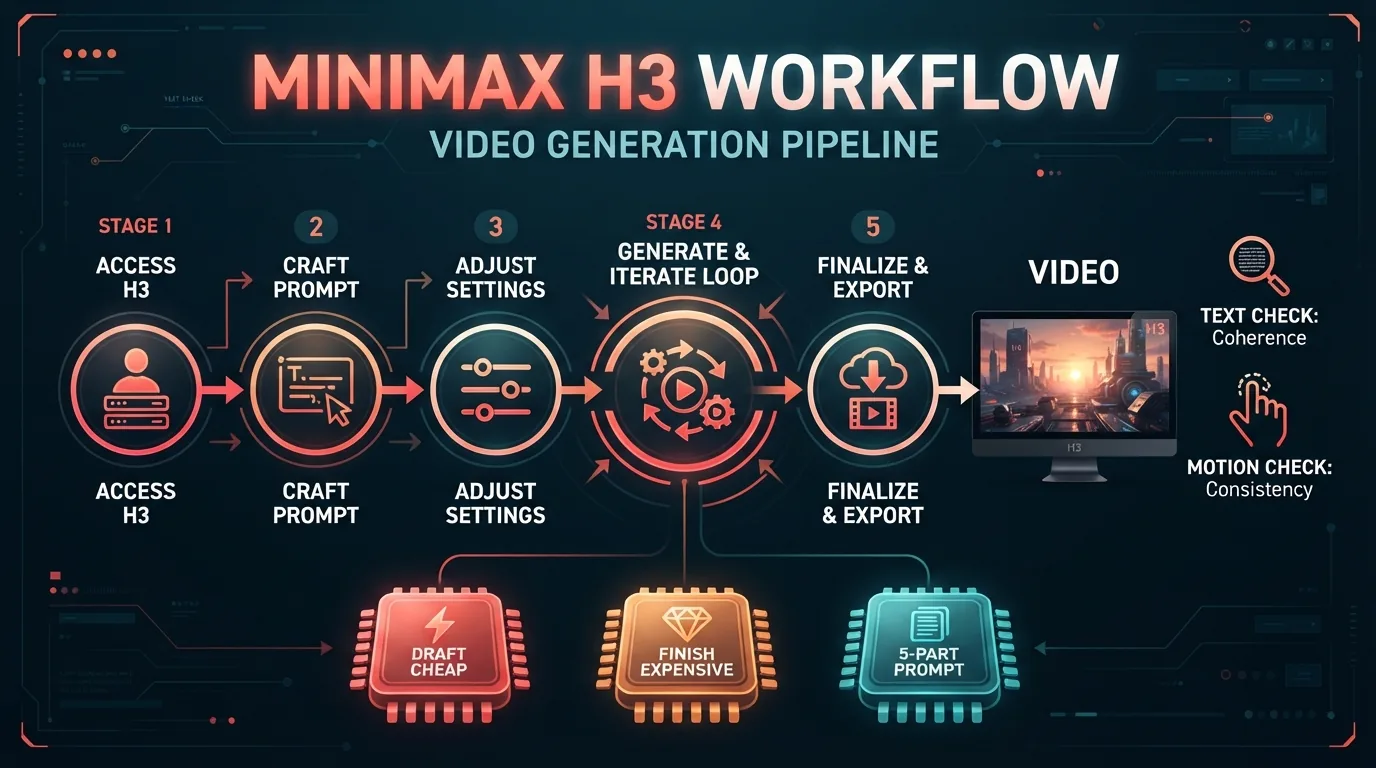
A working MiniMax H3 workflow has five stages: Access → Prompt → Settings → Generate and Iterate → Export and Post.
The shortest honest version, for most creators: use the Hailuo platform, write five-part prompts, draft cheap, run the two review checks, and pay for final quality only after a shot passes.
The most important thing to internalize: stages 2 and 4 are where the quality actually comes from. H3 is famously prompt-tolerant (community-reported) — which paradoxically makes prompt discipline more valuable, because small prompt habits compound across a generation session into either a clean deliverable or a pile of wasted credits.
The 5-Stage MiniMax H3 Workflow at a Glance
| Stage | What you do | Time (typical) | Goal |
|---|---|---|---|
| 1. Access | Sign up on Hailuo AI or get API credentials | 5–10 minutes | Get to the prompt box |
| 2. Prompt | Write a structured prompt (subject → action → camera → environment → style) | 2–3 minutes per shot | One or two generations per shot, not ten |
| 3. Settings | Pick resolution, duration, aspect ratio | 1 minute per shot | Cheap drafts, expensive finals |
| 4. Generate & iterate | Draft → review → refine until the shot passes | ~70% of total time | Pass the text check and the motion check |
| 5. Export & post | Download the clip, edit, publish | 10–30 minutes per video | Clean footage in your editor |
Think of it as a loop, not a line: stages 2–4 repeat once per shot, and stage 5 only runs after all shots pass. The rest of this guide walks each stage in order.
Stage 1: Access MiniMax H3 — Hailuo Platform vs API
As of September 2026, MiniMax H3 is available through two official routes (vendor-reported; availability varies by region):
The Hailuo AI platform (web). MiniMax's creator-facing platform, where H3 is available for text-to-video and image-to-video generation through a browser interface. This is the fastest way to start a Hailuo workflow — no code, no setup. New users typically receive free trial credits (approximate, region-dependent), which is how you run your first test clips without paying anything.
The MiniMax API. The developer route: you send a prompt (and optional reference image) over HTTP and get a video back, with per-generation or token-based billing (approximate). You never see the weights; you rent the model. SDKs and third-party integrations wrap this same API.
Pricing on both routes is subscription- or credit-based (approximate). Don't build volume workflows around a number you read in a forum — rates change, and we deliberately don't quote per-minute prices here. You'll verify current pricing as part of your own test below.
Your first move in any MiniMax H3 workflow: open the Hailuo platform, claim whatever trial credits are offered, and generate one clip. That first clip takes minutes and validates the entire rest of this guide — before you've spent anything.
Stage 2: Write Prompts H3 Actually Understands (The MiniMax H3 Prompt Guide)
Here's the pleasant surprise about H3: it's widely reported by the community as prompt-tolerant — plain English works, and you rarely need the negative-prompt gymnastics open models demand. The catch: "tolerant" doesn't mean "telepathic." A five-part structure still wins.
The structure that consistently produces strong H3 results (community-reported):
Subject + action + camera + environment + style
Example prompt, built in that order:
A young woman in a red raincoat walks through a neon-lit Tokyo alley at night, looking back over her shoulder once — slow dolly-in, shallow depth of field, wet pavement reflections, cinematic 35mm look.
- Subject (who/what): "a young woman in a red raincoat" — one subject, clearly described. H3's motion quality (vendor/community-reported) shines when the subject has something specific to do.
- Action (what happens): "walks... looking back over her shoulder once" — a single, explicit motion. Not "she feels nostalgic." Motion verbs, not emotions.
- Camera (how it's shot): "slow dolly-in, shallow depth of field" — H3 handles camera language well; naming the shot type gets you cinematic output faster than hoping for it.
- Environment (where): "neon-lit Tokyo alley at night, wet pavement" — concrete details that fix lighting and reflections.
- Style (the look): "cinematic 35mm look" — one style phrase. Keep it short.
Expert-level pitfall: the trap with a prompt-tolerant model is over-prompting. When every generation looks good, creators keep adding clauses — "high detail, masterpiece, award-winning, ultra-realistic, 8k, cinematic lighting, film grain..." — until the prompt fights itself. Rule of Thumb: write the sentence a director would say to a cinematographer, not the paragraph a prompt engineer would feed a diffusion model. If your prompt passes roughly 40 words, delete every word that doesn't change what happens on screen.
Also know what H3 is not famous for handling, as of writing: extreme multi-subject physical interaction and long strings of text (see troubleshooting). If a shot depends on either, plan around it — simplify the action or shorten the text — rather than hoping the prompt fixes it.
Stage 3: Choose Settings That Don't Waste Credits (MiniMax H3 Settings)
With a prompt that will hold, the next question is what the generation costs — and settings are where credits leak silently. Reported settings on the Hailuo platform as of September 2026 (treat as point-in-time; verify in the current UI):
| Setting | Reported range (as of writing) | What to actually use |
|---|---|---|
| Resolution | HD / 1080p-class output (vendor-reported) | Drafts at the lowest passable tier; keepers at full resolution |
| Duration | Short clips per generation, roughly 5–10 seconds (community-reported) | Shortest duration while storyboarding; full length only for keepers |
| Aspect ratio | Common presets such as 16:9, 9:16, 1:1 (reported) | 9:16 for shorts/TikTok/Reels, 16:9 for YouTube and ads, 1:1 for feeds |
The technical depth moment behind this table: every generation costs credits (approximate), and the failure rate doesn't drop to zero just because you paid for the biggest settings. Higher resolution and longer duration mean more video tokens to denoise — and more opportunity for motion coherence and text rendering to break mid-clip. So the economics of a good workflow are inverted from your instinct: don't generate at final quality until the shot is already approved at draft quality.
Rule of Thumb: draft cheap, finish expensive. A bad idea at full resolution costs the same credits as a good one — so spend cheap credits finding the good one.
Stage 4: Generate and Iterate — Draft → Review → Refine
This is the stage that separates professionals from tourists. It's a three-step loop, run once per shot:
1. Draft. Send the Stage-2 prompt at draft settings. Expect nothing from the first generation — treat it as reconnaissance.
2. Review — run the two checks.
- The text-rendering check: if there's any text in frame — a sign, a title card, a label — pause and read every word. Here's why this check exists: text rendering is a per-character problem. Every letter is a separate rendering target, so the failure surface grows with string length — a 3-word sign has a handful of characters to corrupt, a 12-word tagline has dozens. H3 is one of the best 2026 models at this (vendor/community-reported), but "best" still means short, plain text survives and long or ornate strings occasionally don't. Read the letters; don't glance at the words.
- The motion check: watch hands, feet, and object interactions at full attention. H3's motion quality is its signature strength (community-reported), but complex multi-subject interactions still break occasionally — limbs warp, objects slide, physics snaps. One glitch in the first second is a reject, no matter how pretty frame 40 is.
3. Refine. On a fail, change exactly one thing per re-run — the action clause if motion broke, the text itself if text garbled, the camera phrase if framing was wrong. One change per generation is what turns failures into diagnostic data instead of a credit bonfire.
If the style is right but the shot is wrong, use image-to-video: upload a reference frame and have H3 animate it. Reference frames are also your best tool for locking style and identity across shots — more on that in the pipeline section.
Rule of Thumb: never re-roll blind. Each re-generation must change something you named in review. Budget 3–5 generations per shot; if a shot hasn't passed by five, it's the prompt's fault, not the model's — go back to Stage 2.
Stage 5: Export and Post — Getting the Clip Out
Once a shot passes review:
- Download the clip from Hailuo (or receive it in the API response) — clips arrive as standard video files (MP4-format output is the norm, as reported).
- Assemble in your editor — bring clips into your editing tool of choice, cut them together, and layer in what H3 doesn't produce natively. As of writing, audio is not a headline H3 capability (community consensus): plan on adding music, voiceover, and sound design in post rather than expecting them from the model.
- Publish — after adding your disclosure line (see Guardrails). H3 output is social-ready: 9:16 clips go straight to shorts platforms; 16:9 renders for YouTube and ads.
Post is also where the pipeline below hands off — because one shot is a test, but a deliverable is a sequence.
A Production-Grade Pipeline: Idea → Shot List → Generation → Review → Assembly
When you move from "playing with H3" to "shipping videos," run this five-step pipeline. It's the same workflow, elevated into a repeatable system:
- Idea. One sentence that states the video's job — what the viewer should feel and do. "A 20-second ad where a coffee brand's logo text stays legible while the camera orbits the cup" is an idea. "Something with coffee" is not.
- Shot list. Break the idea into 3–6 shots, each with a row in a table like this:
| Shot | Purpose | Prompt (5-part structure) | Aspect | Duration | Pass? |
|---|---|---|---|---|---|
| 1 | Hook | Woman in red raincoat walks through neon alley, slow dolly-in, 35mm | 9:16 | 5s | ✓ |
| 2 | Product close-up | Coffee cup on wooden table, camera orbits, steam rises, warm morning light | 9:16 | 5s | ✓ |
| 3 | Text card | — (image-to-video from a designed frame) | 9:16 | 5s | ✗ → re-run |
- Generation. Work the shot list one row at a time through stages 2–4. For shots that must look continuous, reuse a reference frame or an identical style phrase so the cuts don't clash.
- Review. Full-sequence review: do the shots cut together? Does the style match across shots? Does every text element pass the read-every-letter test? This is the step most people skip — and the one that separates "AI video" from "AI-looking video."
- Assembly. Edit, add audio, add the disclosure line, export, publish.
The pipeline matters because H3 gives you individual shots, not finished films. The shot list — and the assembly step it makes possible — is what turns the model's output into your product.
MiniMax H3 Workflow vs a Wan 2.x Workflow: Closed Platform or Open Weights?
This is the fork every 2026 creator eventually faces, so let's compare the workflows honestly — not the models, the workflows.
The MiniMax H3 workflow is a rental: open a browser, type a sentence, download a clip. Among the fastest starts in the industry (reported), excellent motion and text rendering out of the box (community-reported), zero hardware, zero maintenance — and zero control over the model. You pay per generation (approximate) indefinitely, and your outputs live under MiniMax's platform terms.
The Wan 2.x workflow — the open-weights line from Wan 2.1 through Wan 2.7, Apache 2.0 — is ownership: download the weights, run them in ComfyUI or via ModelScope on your own GPU or rented cloud, and control every knob — seeds, guidance, LoRAs, fine-tunes. The workflow is heavier: hardware, setup, node graphs, and per-generation electricity rather than per-generation credits. But marginal cost flattens with volume, and nobody can take the model away from you.
Here's the technical depth moment that explains the difference in practice: with H3, your "settings" are whatever MiniMax exposes in the UI and API — you tune prompts. With Wan 2.x in ComfyUI, you tune the pipeline itself — swap schedulers, chain LoRAs for style and text legibility, and re-run one seed across different denoising schedules to isolate exactly which parameter caused a failure. H3 trades that control for speed.
When each fits:
| Your situation | Workflow that fits |
|---|---|
| You need a polished clip today, zero setup | MiniMax H3 (Hailuo platform) |
| Text-heavy or cinematic social/ads at moderate volume | MiniMax H3 |
| You must self-host (privacy, data sovereignty) | Wan 2.x (ComfyUI/self-host) |
| Brand-specific style or character consistency via LoRA | Wan 2.x |
| High volume where per-generation costs dominate | Wan 2.x (marginal cost wins at scale) |
Rule of Thumb: if you can name the model in your workflow, you need open weights. If you just need the video, you need MiniMax H3. Ownership questions always point to Wan 2.x; convenience questions always point to H3.
For the Wan side of the equation — what self-hosting actually costs and how the models compare head to head — see our Wan 2.x pricing guide and the rest of the wan27.org blog.
Decision Framework: Two Choices, Four Questions
Before you commit to either route, make the two decisions deliberately.
Decision 1: Hailuo web platform vs MiniMax API. Ask two questions: Do you write code, and do you need H3 inside your own product? If no, the web platform is the entire answer — cheaper to learn, faster to start. If yes, the MiniMax API (SDKs, per-generation billing, approximate) is the route, and the platform remains your scratchpad for prompt testing.
Decision 2: MiniMax H3 vs Wan 2.x — or any self-hosted open model. Answer four questions in order:
- Do you need to self-host or keep data on your own infrastructure? → Yes: Wan 2.x. No: continue.
- Is your content text-heavy or motion-forward with tight deadlines? → Yes: test H3 first. No: continue.
- Do you need multi-shot character/product consistency or fine-tuned brand style? → Yes: Wan 2.x (LoRAs). No: continue.
- Is your volume high enough that per-generation costs matter? → Yes: Wan 2.x. No: H3.
Rule of Thumb (again, because it bears repeating): if you can name the model in your workflow, you need open weights. If you just need the video, you need MiniMax H3.
Troubleshooting: 5 Failures and How to Fix Them
Whichever route you chose above, your first sessions will hit the same handful of failures. Every one of these has a specific root cause — and a fix that closes the loop.
1. Motion breaks — limbs warp, objects slide, physics snaps.
- Symptom: a hand bends backward, or a cup glides across a table with no sliding physics.
- Root cause: too many interacting subjects or a compound action; motion coherence decays with scene complexity and duration, even on H3's strong motion engine (community-reported).
- Resolution: simplify — one subject, one action verb, shorter duration. If the shot genuinely needs complexity, split it into two simpler shots. Re-generate with the change; do not re-roll blind.
2. Text garbled — signage, titles, or logos come out as alien script.
- Symptom: letters that look right at a glance but aren't words when you actually read them.
- Root cause: per-character rendering failure — every letter is a separate target, so longer strings and decorative fonts fail more often (see Stage 4).
- Resolution: shorten the string, use plain fonts, and generate the text as an image-to-video reference frame so H3 animates it rather than inventing it. Read every letter on every re-run.
3. Style drift — shot 2 doesn't match shot 1.
- Symptom: the "same" scene renders with different lighting, palette, or film look between generations.
- Root cause: each generation is a fresh stochastic draw; H3 locks style within a scene well (community-reported) but doesn't guarantee cross-shot identity from text alone.
- Resolution: keep the style phrase byte-identical across every shot in the list, and for critical shots animate a shared reference frame via image-to-video. When in doubt, make the reference frame the source of truth.
4. Queue waits — your generation sits in line.
- Symptom: long wait times, especially at peak hours.
- Root cause: shared cloud inference capacity — you're queued behind other tenants, and waits vary with demand and plan tier (community-reported).
- Resolution: generate off-peak, run drafts in a batch, and keep a backlog of prompts so waiting time is never wasted. At volume, the API route gets you programmatic retries and parallelism (reported).
5. Credit burn — you're out of credits and you don't know why.
- Symptom: a "quick session" consumed a week's worth of credits.
- Root cause: iterating at full resolution and duration before the shot was approved — you paid final-quality prices for reconnaissance.
- Resolution: enforce the Stage-3 rule — draft cheap, finish expensive. Compute your cost per generation once (total credits ÷ generations run), write the number down, and treat every re-roll as spending that number again.
Expert-level pitfall: the creator's reflex after a failure is to blame the model and re-roll at full price. Resist both — diagnose one clause, then re-roll at draft settings.
Rule of Thumb: most H3 failures are prompt failures in costume. Before blaming the model, ask whether the prompt was too complex, the text too long, or the settings too expensive for the stage you were in.
Low-Friction Verification: Your First H3 Clip in Minutes
You don't need to believe a word of this guide. Here's the cheapest possible proof, using the free trial credits Hailuo offers new users (approximate, region-dependent — verify at signup):
- Sign up on the Hailuo platform and claim trial credits.
- Write one sentence using the Stage-2 structure — subject, action, camera, environment, style. Keep it under roughly 40 words.
- Generate at the shortest duration and lowest passable resolution.
- Run the two checks: read every text element letter by letter; watch hands and physics at full attention.
- If it passes, you've validated the entire workflow for free. If it fails, refine one clause and re-run once.
This takes minutes, not hours — and it does something important: it tells you that your prompts, not someone's showcase reel, are what H3 handles well. Rule of Thumb: verify with your own prompt before you verify with your wallet.
If the answer comes back "this closed-platform workflow isn't for me," the open-weights alternative is one tab away: the Wan generator runs the Wan 2.x line, so you can compare a self-hostable model side by side with your H3 test clip.
FAQ: MiniMax H3 Workflow Questions, Answered Straight
What is MiniMax H3?
MiniMax H3 is MiniMax's 2026-generation video generation model — the successor to the Hailuo 2.x line — available as a closed model through the Hailuo AI platform and the MiniMax API. It's known for strong motion quality, cinematic output, and above-average text rendering in video (vendor/community-reported).
How do I use MiniMax H3?
Through the Hailuo AI web platform (type a prompt, get a video) or the MiniMax API (send prompts programmatically). There is no local version — you always use MiniMax's servers. The full workflow is: access, prompt, settings, generate and iterate, export.
Is there a MiniMax H3 API?
Yes. The MiniMax API exposes H3 for programmatic text-to-video and image-to-video generation, with per-generation or token-based billing (approximate), plus SDKs and third-party integrations. It's the route for building H3 into your own product.
How do I write prompts for H3?
Use the five-part structure: subject + action + camera + environment + style. H3 is famously prompt-tolerant — plain English works with minimal negative prompting (community-reported) — so keep prompts under roughly 40 words and describe motion with concrete verbs. Avoid stacking quality buzzwords.
Can I run MiniMax H3 locally?
No. H3 is closed — its weights are not published, and it cannot be self-hosted or fine-tuned. If you need a local or self-hosted workflow, the Wan 2.x line (open weights, Apache 2.0, ComfyUI/ModelScope) is the direct alternative.
Does MiniMax H3 render text well?
Yes — it's consistently ranked among the best 2026 video models for text rendering (vendor/community-reported), especially for short, plain text in signs, posters, and title cards. Longer strings and ornate fonts still fail occasionally, so read every text element letter by letter during review.
How much does MiniMax H3 cost?
Qualitatively: subscription- and credit-based on Hailuo, with usage-based API billing (approximate). Exact numbers change frequently and vary by region, so verify current pricing at signup before building volume workflows. New users typically receive free trial credits (approximate, region-dependent).
Guardrails: Verify, Rights, and Disclosure
Verify pricing before you commit. All pricing in this guide is approximate — per-credit and per-generation numbers change often and differ by region. Action: before your first paid volume session, open your Hailuo plan page and the MiniMax API pricing page, write down your actual cost per generation, and cap your monthly credits in platform settings if the option exists.
Own your references. Image-to-video is powerful, but the frame you upload is the frame the model copies. Action: only feed reference frames you created, licensed, or have permission to use — and never animate a real person's likeness without consent, whether in the image or in the prompt.
Disclose AI content. 2026's disclosure rules are stricter than 2025's, and platforms and regions increasingly require labeling synthetic media. Action: add a one-line AI disclosure to your export and publishing template now, so every clip ships with it automatically — including ads, where missing disclosure is the costliest.
Core Summary: The MiniMax H3 Workflow in One Loop, One Rule, and One First Move
The MiniMax H3 workflow is a five-stage loop — access, prompt, settings, generate and iterate, export — and its entire economics rest on one inversion: draft cheap, finish expensive.
- Access H3 via the Hailuo platform (fastest) or the MiniMax API (programmatic), on subscription/credits (approximate).
- Prompt with the five-part structure — subject, action, camera, environment, style — in plain English under 40 words.
- Set the cheapest settings that answer the current question, and pay for final quality only after a shot passes review.
- Review every generation with the two checks: read every letter of text, watch every limb in motion.
- Choose deliberately: web platform vs API by whether you code; H3 vs Wan 2.x by whether you need ownership or convenience.
Your first move: claim Hailuo's trial credits (approximate, region-dependent), write one five-part prompt, and run it at draft settings. If the clip passes the text check and the motion check, you have a working MiniMax H3 workflow in under fifteen minutes. Then — while the credits last — run the same prompt on the Wan generator to see the open-weights side of the decision, check Wan 2.x pricing for the self-hosted economics, and browse the wan27.org blog for more hands-on video AI workflows.