I Just Beat The Case AI Template: Courthouse Victory Dance
Drop one clear photo and get a 15-second 9:16 vertical courthouse walkout dance in ~1–2 minutes—no prompts needed.
- Drop One of Your Photos
- You Burst Out the Courthouse Doors
- Point, Flex, Skip & Bounce
- Ready to Drop in Your Group Chat
One Everyday Photo, Your Iconic Courthouse Walkout
Celebrate any tiny win like you just walked away completely free
Burst straight through the courthouse glass doors into bright daylight, flash a huge grin of relief, point at the lens, and break into raised-arm flexes and sideways skipping kicks down the brick walkway. Drop one everyday photo into the I Just Beat The Case AI Template and watch yourself hit that playful final squat—ready for your group chat with zero retakes.
Make My Walkout Video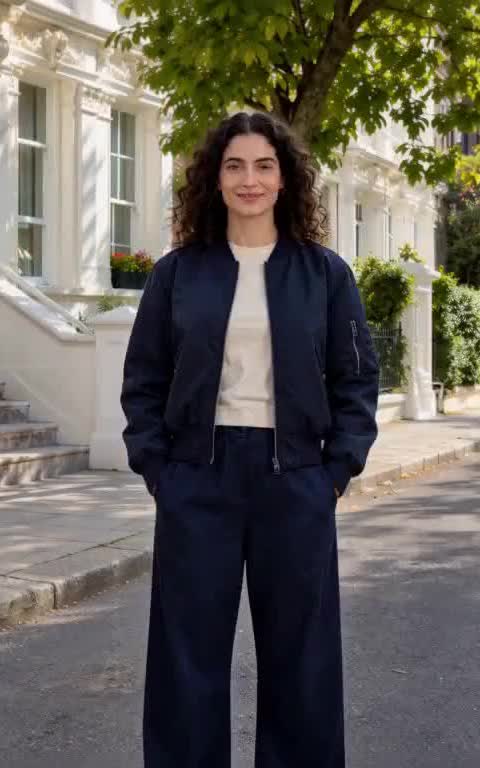 1. Everyday Solo Photo
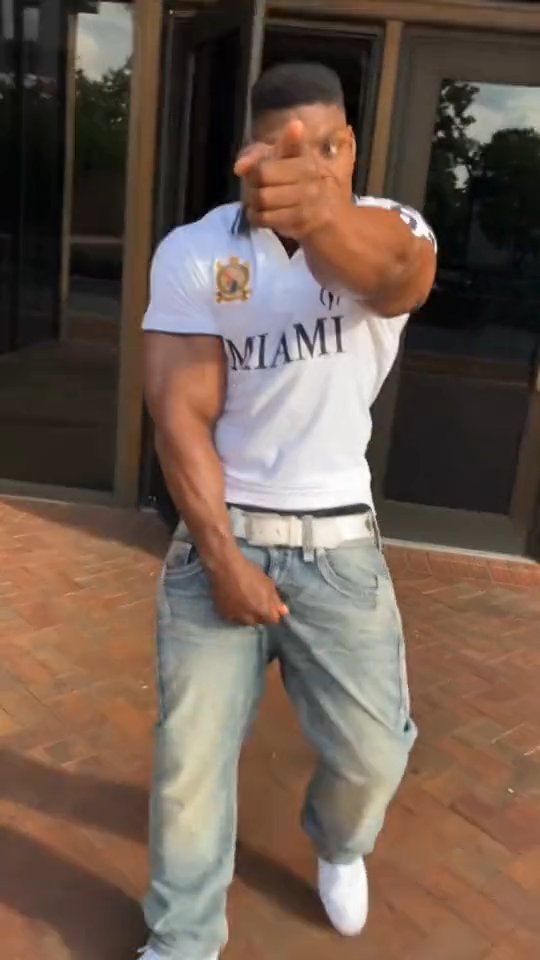 2. Courthouse Walkout & Point12
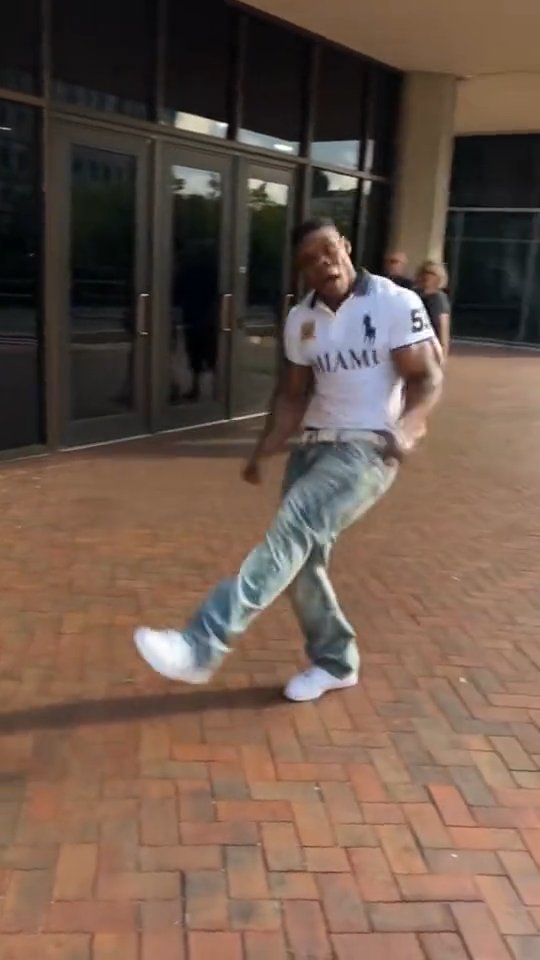 3
3 Easy Steps to Your Courthouse Walkout
No courthouse trip and no dance practice—just drop one photo and steal the show.
- 1
1. Upload Your Photo
Drop one clear photo of you, your friend, or your pet—head-to-toe works best so your jacket and sneakers show during the skipping kicks.
- 2
2. Click Make My Walkout Video
Pick 480p, 720p, or 1080p, leave Audio on or mute it for your favorite TikTok sound, and hit the button—zero prompts needed.
- 3
3. Download & Share
In ~1–2 minutes, watch yourself burst through the glass doors into the final celebratory squat, save your 15s 9:16 clip, and drop it straight in the group chat.
Use a Photo Like This So Your Walkout Looks Crisp
- Pick one bright, sharp photo of a single person so your face stays unmistakable from the glass-door entrance to the final squat.
- Grab a full-body or three-quarter shot when you have one—your jacket, pants, and sneakers stay sharp during the wide skipping kicks.
- Check that both eyes and your grin are clearly lit so your close-up point toward the camera hits with full main-character energy.
Skip These Photos So Your Dance Never Looks Weird
- Skip group shots or busy crowds—extra faces in your photo can confuse who gets the spotlight on the courthouse walkway.
- Skip dark sunglasses, heavy shadows, or hands over your face that hide your expression right when you point at the lens.
- Skip tiny, blurry screenshots—a clean photo keeps your hair, outfit, and footwork crisp in bright 9:16 daylight.
Why Your Walkout Clip Hits Harder
Upload one photo and steal the entire courthouse walkway—no directing needed.
You burst through the glass doors into full celebration
You swing open the courthouse doors into bright daylight, point straight at the camera with a huge grin, flex both arms, kick sideways down the brick path, and drop into that victory squat—just upload your photo and click Make My Walkout Video.
Your face, hair, and outfit stay unmistakably yours
Every frame keeps your real smile, hairstyle, jacket, and sneakers locked in from your first confident stride out the doors to the final celebratory bounce—so your group chat knows it is really you.
Handheld 9:16 framing built for your feed
A lively vertical camera tracks you from head to moving sneakers along the sunny brick walkway, giving you a ready-to-post 15-second clip for TikTok, Reels, and Shorts in one click.
Instant audio or mute it for your favorite TikTok sound
Leave Audio on to send your walkout straight to the group chat, or toggle it off at zero extra credit cost so you can layer the viral I Just Beat The Case sound right in your editor.
Who Belongs in the Courthouse Walkout?
Celebrate surviving Monday or a brutal exam
Drop your own photo right above the second you clock out or finish finals, and watch yourself strut out the glass doors to send straight to your best friends.
Roast your friend in the group chat
Grab your friend's most serious selfie and watch them point, flex, and skip down the brick walkway when they dodge a chore or get out of a boring meeting.
Hype up your partner's small daily wins
Turn your partner's grin into a full courthouse victory dance the moment they pass a test, parallel park on the first try, or win a playful argument.
Put your dog or cat in the spotlight
Upload a sharp photo of your dog or cat after they steal a treat off the counter and watch them own the sunny brick walkway in front of your whole family.
Optional Walkout Remix Prompts (Advanced)
Skip this if you just want the classic courthouse walkout—the generator above needs zero prompts. Only copy these presets if you want custom nighttime or suit remixes in AI Video Maker.
Optional Walkout Remix Prompts (Advanced)
Skip this if you just want the classic courthouse walkout—the generator above needs zero prompts. Only copy these presets if you want custom nighttime or suit remixes in AI Video Maker.
Sunny Courthouse Brick Walkway
Vertical 9:16 handheld tracking shot in bright afternoon daylight. You burst out through courthouse glass doors with a relieved grin, point playfully at the camera, flex both arms overhead, skip sideways down a red-brick walkway with crisp kicks, and finish in a low celebratory squat.
Best with a bright head-to-toe photo so your jacket and sneakers pop on the sunny brick path.
Nighttime Paparazzi Flash Walkout
Vertical 9:16 handheld video outside a stone courthouse at night, warm streetlamps and subtle camera flashes popping behind you. You push open the heavy glass doors, point straight at the lens, break into raised-arm flexes and sideways skipping kicks down the wet pavement, and drop into a victory bounce.
Pair with a sharp night-out outfit photo for extra main-character contrast under the streetlamps.
Oversized Suit & Sneakers Flex
Vertical 9:16 energetic tracking shot in crisp morning sun. Wearing a tailored blazer and bright sneakers, you strut through courthouse glass doors, flash an over-the-top grin, point at the camera, kick sideways down the brick walkway, and land a smooth final squat.
Drop in your friend's most serious selfie or suit photo for maximum comedic payoff.
Transparent Credits & Auto-Refunds
480p (315 credits) is already crisp enough for TikTok, Reels, and group chats. Step up to 720p for sharper phone playback or 1080p for large-screen edits. The $29.90 starter pack (1,685 credits) covers up to five 480p clips (~$5.59 each)—and failed renders refund automatically.
I Just Beat The Case AI Template vs. Filming IRL
| Your Choice | What You Grab | What Hits Your Screen | Time to Group Chat |
|---|---|---|---|
| Upload one photo right above | One clear portrait or full-body photo | A 15s 9:16 vertical courthouse walkout dance with your face and outfit locked in | 10 seconds to upload, ready in ~1–2 min |
| Filming outside a real courthouse | Finding a brick walkway, someone to hold the phone, and 10 awkward retakes | Strange looks from passersby and uneven camera shake | An afternoon of travel and retakes |
| Prompting generic AI from scratch | Long choreography prompts and repeated trial-and-error runs | Stiff walking, missing kicks, or a face that drifts halfway through | Wasted credits and retries |
Frequently Asked Questions
Will the I Just Beat The Case AI Template actually look like my photo?
Yes—a bright, clear single-person photo keeps your face, hair, and outfit recognizable from the moment you step through the glass doors to the final bounce.
Do I need to write any prompts or edit the dance myself?
Nope—the courthouse entrance, pointing gesture, raised-arm flex, sideways skipping kicks, and 9:16 vertical tracking camera are all built in, so you just upload one photo and click Make My Walkout Video.
Should I upload a selfie or a full-body photo?
Both work, and a full-body or three-quarter photo gives the best outfit and sneaker detail during the wide skipping kicks along the brick walkway.
What happens to my credits if a render fails?
You never lose credits on a failed run—you see the exact credit cost before clicking Make My Walkout Video, and any failed render refunds your credits automatically.
How long does it take to get my 15-second 9:16 vertical video?
Your 15-second 9:16 vertical walkout clip is ready in ~1–2 minutes, so you can download it and post to TikTok, Reels, or your group chat right away.
Can I mute the audio so I can use the trending TikTok sound?
Yes—toggle Audio off right above the button at zero extra credit cost, or leave Audio on if you want ready-to-send sound straight out of the download.
Can I use a photo of my friend, partner, or pet?
For sure—drop any clear single-subject photo right above, whether you are celebrating your own win, teasing your best friend, or watching your dog skip down the brick walkway.
You Already Know Whose Photo to Try
Drop one clear photo above and get your 15s 9:16 courthouse walkout in ~1–2 minutes. Flexible credit packs and plans are ready on the Pricing page, and failed renders refund automatically.
Make My Walkout VideoMore AI Video Effects
Neon Duo Dance AI
Turn two photos into a neon-lit 15s synchronized dance video.
Zombie Couple Video AI
Transform couple portraits into a cinematic zombie duet clip.
Flying Car AI
Launch any street photo into a high-speed flying car scene.
Costume Transformation AI
Morph everyday outfits into dramatic themed costumes smoothly.