Flamingo Floatie AI: You on a Pink Rooftop Pool Float
Upload one clear portrait to Flamingo Floatie AI for a 15s 9:16 rooftop pool rescue clip—ready in ~1–2 min with zero prompts.
- Drop One Clear Portrait
- You Lounge on a Pink Flamingo
- A Helping Hand Saves Your Drift
- Ready for Reels & Messages
You, a Pink Flamingo, and That Rooftop Pool Rescue
Drop one selfie into Flamingo Floatie AI and star in the chillest poolside meme
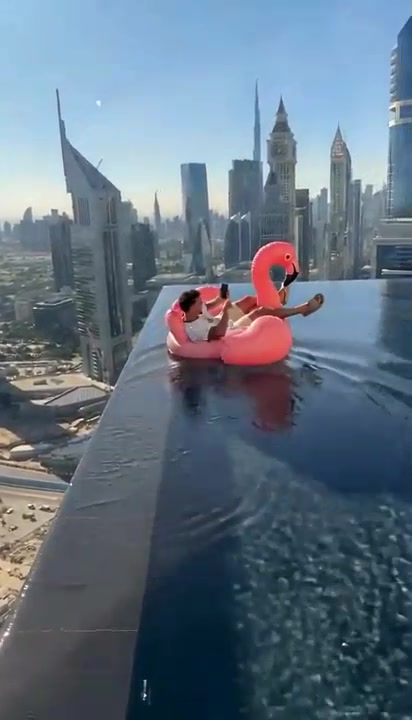
Picture yourself kicking back on a bright pink vinyl flamingo high above a sunlit city skyline as your float drifts toward the infinity pool edge. A helping hand reaches in to nudge you back, and you turn to the camera with that effortless thank-you-bro smile before gliding away. Upload a photo of yourself, your best friend, or your partner—your group chat won't see it coming.
Make My Flamingo Video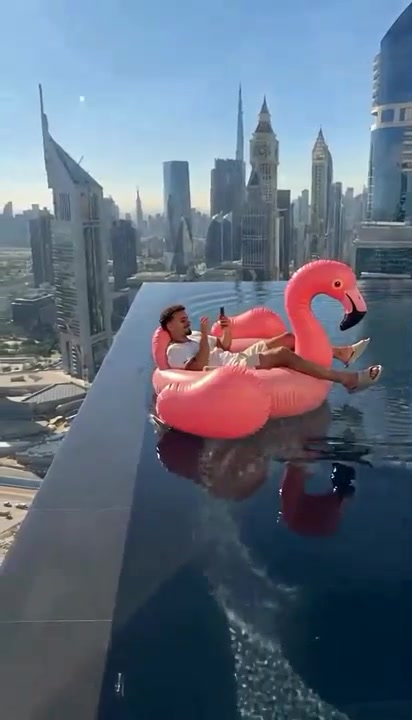 Rooftop Pool Drift
 Helping-Hand Rescue & Smile
3 Easy Steps to Your Flamingo Floatie AI Clip
No rooftop pool, no floatie, and zero prompts—drop one photo and you're in the viral clip.
- 1
1. Upload Your Photo
Drop one clear portrait of yourself, your best friend, your partner, or even your dog—you're about to lounge on a bright pink flamingo high above the city.
- 2
2. Click Make My Flamingo Video
Pick 480p, 720p, or 1080p, keep Audio on or mute it for your own TikTok sound, and let Flamingo Floatie AI render your clip—zero prompts or editing needed.
- 3
3. Download & Share
In ~1–2 minutes, watch yourself drift toward the infinity edge, get nudged back by a helping hand, and flash that relaxed poolside grin—save your 15s 9:16 clip and drop it in iMessage, WhatsApp, or Reels.
Use a Photo Like This for a Crisp Result
- Pick one bright, sharp portrait of a single person so your face stays unmistakable as you lounge on the pink flamingo above the skyline.
- Use a front-facing or slightly angled shot with both eyes clearly lit so your reaction shot lands right on beat.
- Choose a clean, unfiltered photo so your skin tone and hair look natural against the dark pool water and bright pink vinyl.
Skip These Photos So Your Face Never Looks Blurry
- Skip group shots or crowded backgrounds—extra faces in your photo can confuse who gets seated on the pink flamingo float.
- Skip dark sunglasses, heavy beauty filters, or hands on your cheeks that cover your eyes and hide your smile when you turn to the camera.
- Skip tiny, pixelated screenshots—start with a sharp photo so your expression stays crisp in the 9:16 vertical frame.
Why Flamingo Floatie AI Lands Every Poolside Joke
Built to keep your real face recognizable while nailing the poolside meme timing.
You drift, get saved, and own the thank-you-bro nod
Kick back on a bright pink flamingo float near the rooftop infinity edge as a helping hand nudges you back and you flash that amused, grateful grin at the lens.
Your real face steals every frame above the skyline
Your eyes, hair, and deadpan or grinning reaction stay sharp from the first water ripple to your final glide across the dark pool, so friends spot you in half a second.
Sunlit pool contrast ready for your vertical feed
Deep shimmering water, bright pink vinyl, and towering city buildings frame you head-to-toe in vertical 9:16 so your clip hits TikTok, Reels, or iMessage with zero cropping.
Poolside splash audio or your own trending sound
Keep Audio on for crisp rooftop water ambience straight out of the download, or toggle it off before you render so your favorite TikTok sound drops right over your floatie drift.
Who Belongs in Your Flamingo Floatie AI Video?
Thank the friend who always saves your day
Turn your selfie into a rooftop pool rescue grin the next time your friend covers your shift or spots you lunch.
Roast your most serious friend in the group chat
Drop your friend's sternest suit-and-tie headshot and watch them drift completely unbothered on a bright pink flamingo above the city.
Brighten your partner's workday with a pool rescue
Send your partner a sunlit infinity pool rescue clip when they need a mid-afternoon laugh.
Put your dog or cat on rooftop vacation mode
Grab one clear photo of your pet and watch them lounge like royalty on a pink flamingo float while a helping hand nudges them back from the edge.
Transparent Credits & Automatic Refunds
See the exact credit cost right above before you run Flamingo Floatie AI—the $29.90 starter pack (1,685 credits) covers up to five 480p clips or two 720p clips, Audio adds zero extra cost, and failed renders refund automatically.
Flamingo Floatie AI vs. Filming at a Real Rooftop Pool
| Your Choice | What You Grab | What Hits Your Screen | Time to Post |
|---|---|---|---|
| Drop your photo into Flamingo Floatie AI above | One clear portrait photo of you (or a friend) | You lounging on a bright pink flamingo above a sunlit skyline, nudged back by a helping hand with a grateful poolside grin | 10 seconds to upload, ready in ~1–2 min |
| Booking a real rooftop pool & float | Hotel pool access, a giant pink flamingo, a friend to push you, and wet retakes | Wind, harsh glare, and awkward timing on the helping-hand push | An entire afternoon and real money |
| Typing prompts into generic AI from scratch | Long scene descriptions and endless trial-and-error runs | Warped flamingo floats, missing hand cues, or a face that stops looking like you | Wasted credits and retries |
Frequently Asked Questions
Will Flamingo Floatie AI actually look like my photo?
Yes—a bright, clear single-person portrait keeps your face, hair, and expression unmistakable from the moment you drift toward the infinity edge to your final reaction shot.
Do I have to write prompts for Flamingo Floatie AI?
Not a single word—the sunlit skyline, bright pink flamingo float, helping-hand push, and 9:16 vertical framing are already built in. Just upload one photo and click Make My Flamingo Video.
What happens to my credits if a render fails?
You never lose credits on a failed run—you see the exact credit cost before you start, and any failed render refunds your credits automatically.
Which resolution should I pick—480p, 720p, or 1080p?
480p already looks crisp for WhatsApp, TikTok, and Reels, while 720p and 1080p sharpen the water ripples, pink vinyl, and your facial expression on larger screens.
What kind of photo gives me the cleanest reaction?
A bright, front-facing portrait of one person without sunglasses or heavy filters keeps your eyes and smile sharp when you turn toward the camera on the pink flamingo.
How long does Flamingo Floatie AI take to render my 15s clip?
Your 15-second 9:16 vertical clip is ready in ~1–2 minutes, so you can download it and drop it straight into TikTok, Reels, or iMessage.
Can I mute the pool sound to use my own TikTok audio?
Yes—toggle Audio off right above Make My Flamingo Video at zero extra credit cost, or leave it on for poolside splash ambience straight out of the download.
Can I use a photo of my friend, partner, or pet?
For sure—drop any clear single-subject photo above to put your best friend, partner, or dog on that pink flamingo above the skyline.
You Already Know Whose Photo to Try
Drop one clear portrait into Flamingo Floatie AI above and get your 15s 9:16 rooftop pool clip in ~1–2 minutes—transparent credits, automatic refunds on failed runs, and zero prompts.
Make My Flamingo VideoMore AI Video Effects
Neon Duo Dance AI
Turn two photos into a neon-lit 15s synchronized dance video.
Zombie Couple Video AI
Transform couple portraits into a cinematic zombie duet clip.
Flying Car AI
Launch any street photo into a high-speed flying car scene.
Costume Transformation AI
Morph everyday outfits into dramatic themed costumes smoothly.