AI Ghibli Video Generator: You in a Hand-Drawn Anime Scene
Upload one clear photo—AI Ghibli Video Generator turns it into a 15s 16:9 hand-drawn anime clip in ~1–2 min with zero prompts.
- Drop One Photo of You
- Wind, Rain & Lantern Glow
- You Star in Hand-Drawn Motion
- Send Straight to Your Group Chat
Wait Until You See Yourself in That Viral Hand-Drawn Scene
Drop one photo and step straight into a warm, rain-kissed anime movie moment.
Saw that dreamy clip on your feed and wondered how your own photo would look? Picture yourself outside a glowing wooden bookshop as soft rain ripples across the street, wind lifts your hair, and golden lanterns flicker beside painted clouds. Drop a favorite snapshot of you, your partner, or your pet above, and let AI Ghibli Video Generator paint the wind, rain, and lantern glow—then send a scene your group chat will replay all night.
Turn My Photo Into a Ghibli Scene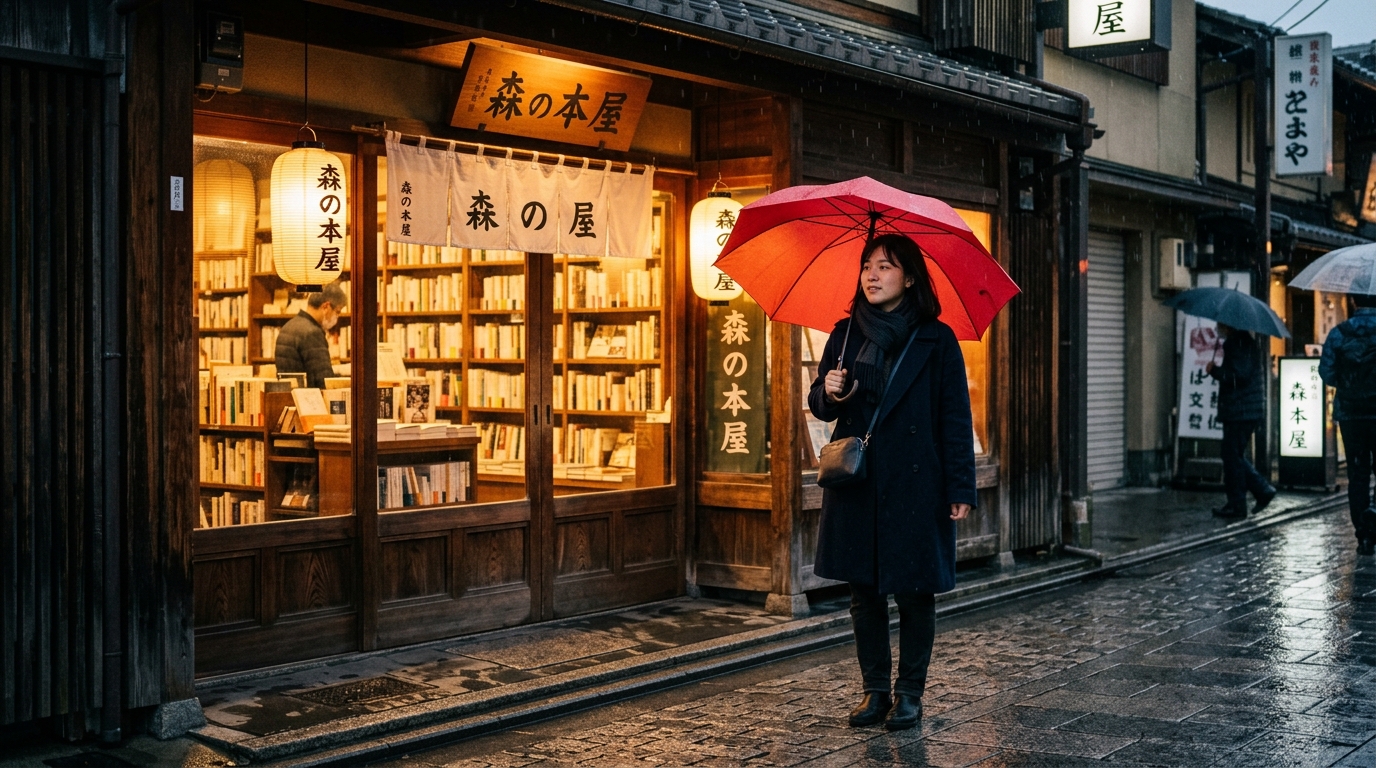 Before · Your Photo
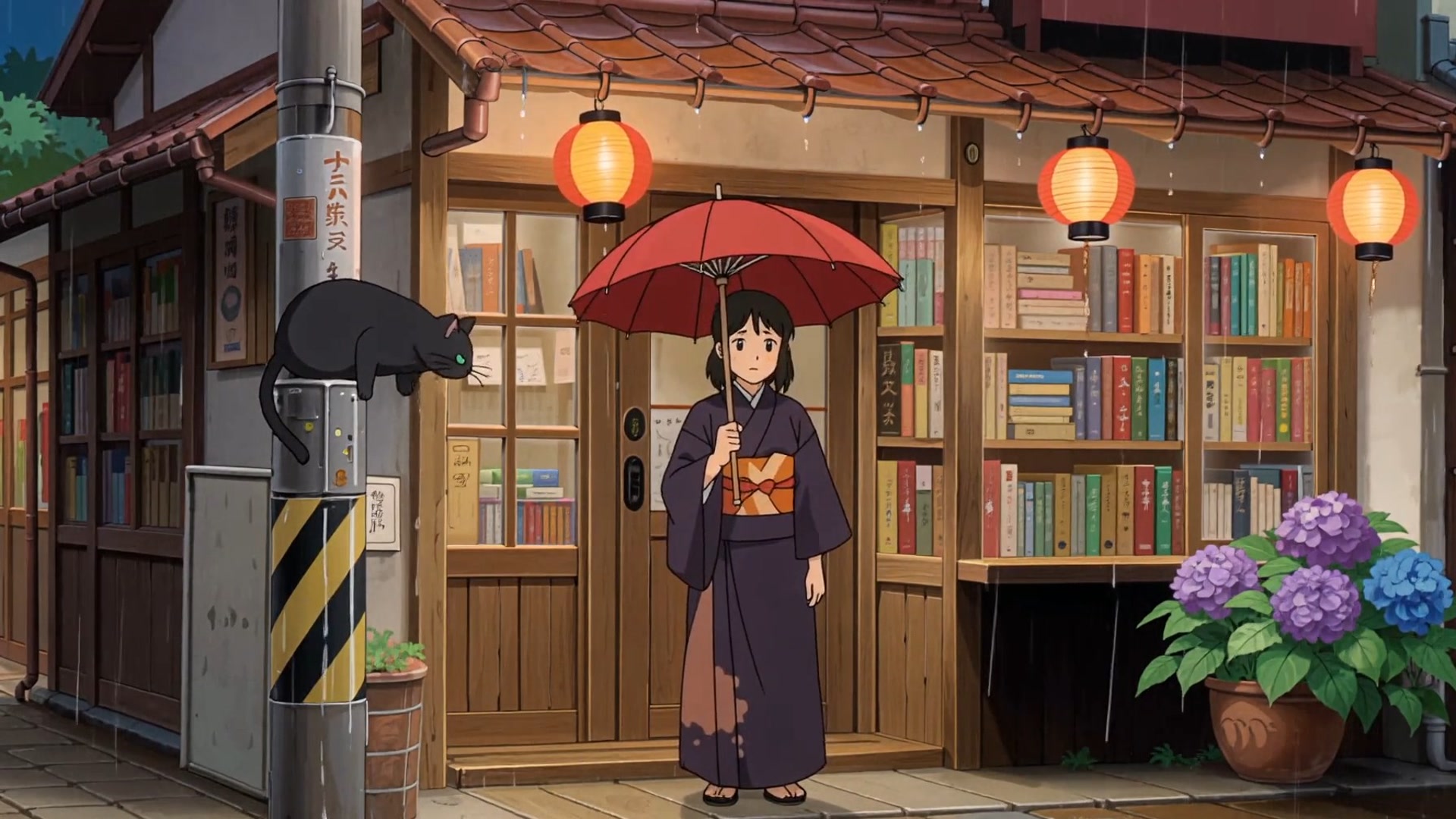 After · Hand-Drawn Anime
3 Easy Steps to Your Hand-Drawn Anime Clip
Zero drawing skills, zero timelines, and zero prompts—drop one photo into AI Ghibli Video Generator and step right into the scene.
- 1
1. Upload Your Photo
Drop one clear photo of you, your partner, your best friend, or your pet—you're about to step into a warm, painted widescreen scene.
- 2
2. Click Make My Ghibli Video
Pick 480p, 720p, or 1080p, leave Audio on for gentle rain or mute it for your own TikTok sound, and hit Make My Ghibli Video.
- 3
3. Download & Share
In ~1–2 minutes, watch wind lift your hair, leaves drift past, and golden lanterns glow across your 15-second clip—save it and drop it straight into iMessage, WhatsApp, or Reels.
Use a Photo Like This for a Crisp Anime Scene
- Pick one bright, sharp photo with your face clearly lit so your eyes, hairstyle, and smile stay unmistakable in hand-drawn anime lines.
- Grab an outdoor street, cafe, or scenic shot with clean outfit colors so warm lantern light and painted clouds wrap around you naturally.
- Use an unfiltered photo from your camera roll so your real likeness shines through every frame instead of getting flattened by beauty smoothing.
Skip These Photos So Your Clip Never Looks Muddy
- Skip crowded group shots with tiny background faces—you want the spotlight on you, your partner, or your pet, not a dozen strangers.
- Skip dark sunglasses, hands over your cheeks, or harsh shadows that hide your eyes and expression.
- Skip blurry, low-res screenshots—start with a crisp photo so every hand-drawn line stays sharp.
Ready to Step Into a Hand-Drawn Scene Yourself?
Drop one clear photo and watch AI Ghibli Video Generator bloom your favorite memory with warm painterly motion—no prompts needed.
Wind, soft rain, and warm lantern glow wrap around you
Picture your hair and jacket catching a gentle breeze as raindrops ripple across cobblestones and golden shopfront lanterns flicker beside you—upload your photo above and hit Make My Ghibli Video to see it in seconds.
Your real smile, eyes, and outfit stay unmistakably you
AI Ghibli Video Generator carries your favorite expression, hairstyle, and jacket colors straight into warm cel-shaded anime lines so your friends spot you in the very first frame—drop your sharpest selfie in now.
Your memory plays out in 16:9 widescreen cinema
Every 15-second clip glides across a full movie frame with painted clouds and a smooth camera drift—click Generate and send your group chat a scene they'll replay all night.
Keep soft rain audio or drop in your own TikTok sound
Leave Audio on for gentle raindrops and cozy street ambience at zero extra credits, or mute it before you click Make My Ghibli Video so your favorite lo-fi track fits right over your clip.
Who Are You Putting in Your Scene First?
Surprise your partner with a lantern-lit date
Upload a candid photo of the two of you—rain ripples across cobblestones while warm streetlamps turn a date-night snapshot into a keepsake clip.
Send your best friend a birthday main-character clip
Drop their everyday coffee selfie in and send them standing by a sunlit train window with painted clouds drifting past.
Give your dog or cat a cozy meadow cameo
Upload one clear snapshot of your pet lounging at home and watch tall grass and warm golden-hour light animate around them.
Turn your favorite solo travel photo into a movie still
Grab that rainy street or quiet cafe picture from your camera roll, drop it into AI Ghibli Video Generator, and watch your jacket catch the breeze under glowing shopfront signs.
Want to Remix Your Scene With a Custom Vibe?
AI Ghibli Video Generator needs no prompt at all—just upload your photo above and click Make My Ghibli Video, or copy one of these hand-drawn scenes if you're customizing in AI Video Maker.
Want to Remix Your Scene With a Custom Vibe?
AI Ghibli Video Generator needs no prompt at all—just upload your photo above and click Make My Ghibli Video, or copy one of these hand-drawn scenes if you're customizing in AI Video Maker.
Warm Wooden Bookshop in Soft Rain
15-second 16:9 widescreen Ghibli-style hand-drawn anime scene. Transform the person in @Image1 into a warmly cel-shaded character standing outside a glowing wooden Japanese bookshop in gentle evening rain, holding an umbrella as soft wind lifts their hair, raindrops ripple on cobblestones, and golden paper lanterns flicker beside painted twilight clouds, smooth cinematic camera drift.
Upload a clear street or cafe photo above and click Make My Ghibli Video—or copy this preset for custom rainy-night vibes.
Coastal Train Window at Golden Hour
15-second 16:9 widescreen Ghibli-style hand-drawn anime scene. Place the person in @Image1 sitting beside an open sunlit train window overlooking a sparkling blue sea, warm afternoon light across their face, wind fluttering their hair and shirt collar as painted summer clouds drift past the glass, nostalgic watercolor backgrounds and gentle camera glide.
Best with bright, unfiltered portraits—drop your photo in above and click Generate to step right onto the train.
Wildflower Hilltop Under Painted Clouds
15-second 16:9 widescreen Ghibli-style hand-drawn anime scene. Turn the subject in @Image1 into an expressive hand-drawn anime character standing on a lush green hilltop meadow at golden hour, tall wildflowers swaying around their knees, soft breeze lifting their hair and jacket under towering watercolor clouds, warm sunlight and smooth 16:9 pan.
Amazing for couple snapshots, solo travel shots, or your dog or cat—upload your favorite photo above and hit Generate.
See Every Credit Before You Click—Zero Surprises
AI Ghibli Video Generator runs on a $29.90 starter pack (1,685 credits) that gives you up to five 480p clips or two 720p clips (~$6/clip at 480p)—Audio is always zero extra credits, and if a render ever fails, your credits bounce right back automatically.
Why Drop Your Photo Here Instead of Waiting?
| Your Move | What You Grab | What Hits Your Screen | Time to Share |
|---|---|---|---|
| Upload one photo to AI Ghibli Video Generator above | One bright photo of you, your partner, or your pet | You standing in a 15-second hand-drawn anime scene with wind in your hair, glowing lanterns, and your real smile | 10 seconds to drop in, ready in ~1–2 min |
| Hiring an animator frame by frame | Character sheets, storyboards, and weeks of back-and-forth | Beautiful art, but hefty custom invoices and weeks of waiting before you can post | Days or weeks |
| Fighting generic prompt boxes from scratch | Endless style tags and frustrating trial-and-error | Plastic 3D faces, jittery lines, and a character who doesn't even look like you | Burned credits & retries |
Frequently Asked Questions
Will AI Ghibli Video Generator actually keep my real face and smile?
Yes—drop in a bright, unfiltered photo and your eyes, hairstyle, and favorite jacket carry straight into warm hand-drawn anime lines so your friends spot you in the first frame. Pick a sharp shot from your camera roll above and hit Make My Ghibli Video.
Do I have to write a long prompt to get that rainy lantern look?
Not a single word—AI Ghibli Video Generator already dials in the painted clouds, drifting wind, and 16:9 movie camera glide for you. Just upload one photo above and click Make My Ghibli Video.
What happens to my credits if a render fails?
You never pay for a dud—you see the exact credit number before you click, and any failed render refunds your credits automatically. Upload your favorite photo above with zero risk and click Make My Ghibli Video.
Should I pick 480p, 720p, or 1080p for my clip?
Pick 480p to test up to five clips per starter pack and flood your group chat fast, or jump to 720p and 1080p when you want every raindrop ripple and lantern glow razor-sharp. Choose your resolution above, drop your photo in, and click Make My Ghibli Video.
What kind of photo looks best for AI Ghibli Video Generator?
A crisp, well-lit shot of one person, a couple, or your dog or cat—with no dark sunglasses or heavy beauty filters—lets your real expression shine through the painted scenery. Grab that favorite snapshot from your phone and upload it above.
How long will I wait before I can share my 15s clip?
Your 15-second widescreen scene finishes in ~1–2 minutes—faster than brewing coffee. Drop your photo into the uploader now and click Make My Ghibli Video so it's ready to post.
Can I mute the rain audio and use my own TikTok sound?
Yes—leave Audio on for cozy raindrops and street ambience at zero extra credits, or toggle it off right above Make My Ghibli Video to lay your favorite lo-fi track over your clip. Pick your vibe above and hit generate.
You Already Know Whose Photo to Try
Drop one clear photo above and watch AI Ghibli Video Generator bring your memory to life with warm lantern light and painted skies in ~1–2 minutes—transparent credits, automatic refunds on failed runs, and zero prompts.
Make My Ghibli VideoMore AI Video Effects
Neon Duo Dance AI
Turn two photos into a neon-lit 15s synchronized dance video.
Zombie Couple Video AI
Transform couple portraits into a cinematic zombie duet clip.
Flying Car AI
Launch any street photo into a high-speed flying car scene.
Costume Transformation AI
Morph everyday outfits into dramatic themed costumes smoothly.