Table of Contents
Most real-time AI video models today generate output at thumbnail resolution — 192×336, grainy, cropped tightly to a single face. They work for a video call avatar but fail at anything that needs spatial context: a tutor pointing at a whiteboard, a character interacting with its environment, a scene where what happens in the frame matters as much as who is in it.
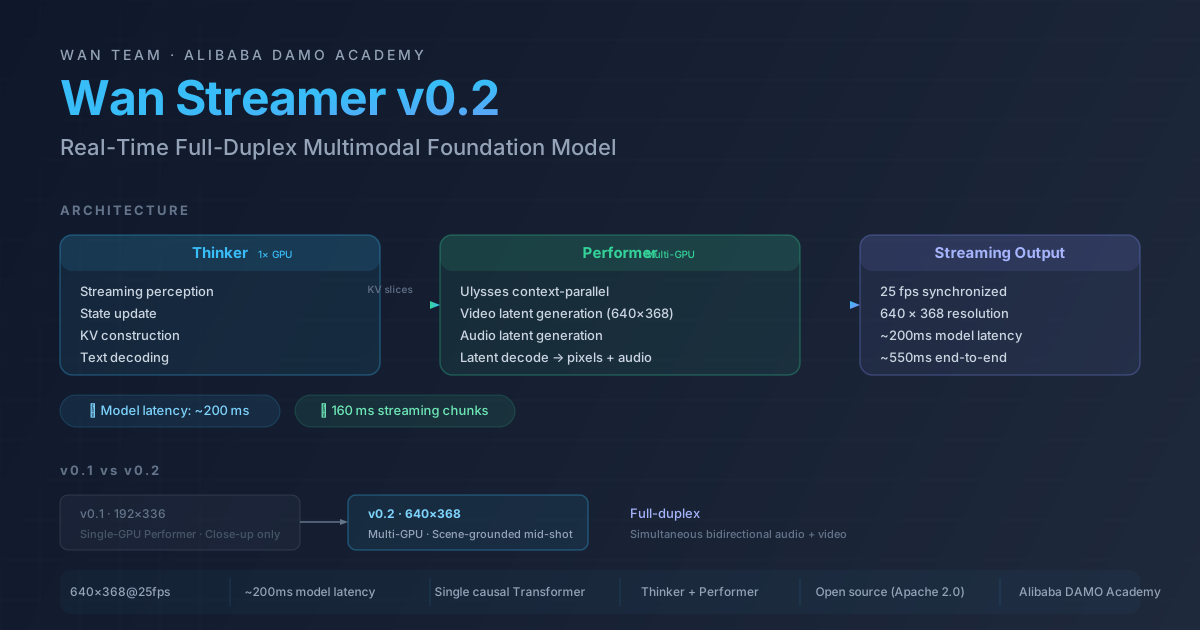
Wan Streamer v0.2 changes that constraint. It raises output resolution to 640×368 while keeping the same ~200ms model-side latency as v0.1. A tutor in a study, an alien in a cavern, Mona Lisa animated to life — these are now real-time streams at 25 fps with synchronized audio, not pre-rendered clips.
This guide covers what Wan Streamer is, how its architecture makes real-time full-duplex video possible, every change from v0.1 to v0.2, and what the model can and cannot do today.
What Is Wan Streamer v0.2?
Wan Streamer is an open-source, end-to-end real-time full-duplex multimodal foundation model developed by Alibaba DAMO Academy (Wan Team). It uses a single causal Transformer to process text, audio, and video on one shared timeline — meaning the model can listen, speak, and see simultaneously without switching between separate pipelines.
Full-duplex is the key capability: both sides of a conversation can speak at the same time, and the model processes both streams continuously. This is different from turn-based systems (you speak → model responds → you speak again) that dominate current AI video and voice products.
v0.2 is the second public release. It keeps the same architecture and latency profile as v0.1 while delivering substantially higher output resolution — 640×368 versus 192×336 — and introducing scene-grounded multi-agent framing alongside the original close-up framing.
| Specification | Wan Streamer v0.2 |
|---|---|
| Output resolution | 640 × 368 pixels |
| Frame rate | 25 fps, synchronized audio-video |
| Model-side latency | ~200 ms |
| Typical total latency | ~550 ms (350 ms network) |
| Streaming chunk size | 160 ms |
| Duplex mode | Full-duplex (simultaneous bidirectional) |
| Audio support | Synchronized speech and ambient audio |
| Architecture | Causal Transformer, Thinker + Performer |
| Training stages | Multi-task pre-training → full-duplex fine-tuning → streaming distillation |
| License | Open source (Apache 2.0 / similar — check official repo) |
Wan Streamer v0.1 vs v0.2 — Every Upgrade That Matters
The jump from v0.1 to v0.2 is not a new architecture — it is the same foundation pushed further. Most improvements center on output quality, performer parallelism, and scene diversity.
| Aspect | v0.1 | v0.2 |
|---|---|---|
| Output resolution | 192 × 336 | 640 × 368 — 3.6× more pixels, usable for mid-shot scenes |
| Frame rate | 25 fps | 25 fps (unchanged) |
| Model-side latency | ~200 ms | ~200 ms (unchanged) |
| Total latency | ~550 ms (350 ms network) | ~550 ms (350 ms network) |
| Thinker | 1 GPU | 1 GPU (unchanged) |
| Performer | Single-GPU | Multi-GPU — Ulysses-style context-parallel |
| K/V cache | Single-GPU cache | Pre-sharded across performer GPUs |
| Visual framing | Close-up only | Close-up + scene-grounded mid-shot agents |
| Audio latents | Short, single-rank | Short, not split across ranks |
Resolution: The Defining Difference
192×336 (v0.1) is roughly the size of a large thumbnail or a low-end webcam feed. Faces are recognizable, but background context, text, and fine details are lost. 640×368 (v0.2) approaches standard definition — roughly half of 720p — which is enough for a viewer to read a whiteboard, see a character's full torso and gestures, or follow a scene with multiple subjects.
This matters because the most compelling use cases for real-time AI video — tutoring, telepresence, interactive characters — all depend on spatial context. A tutor is not just a talking face; they need to point at diagrams. A game character is not just a close-up portrait; they occupy a room.
Performer: From Single-GPU to Multi-GPU
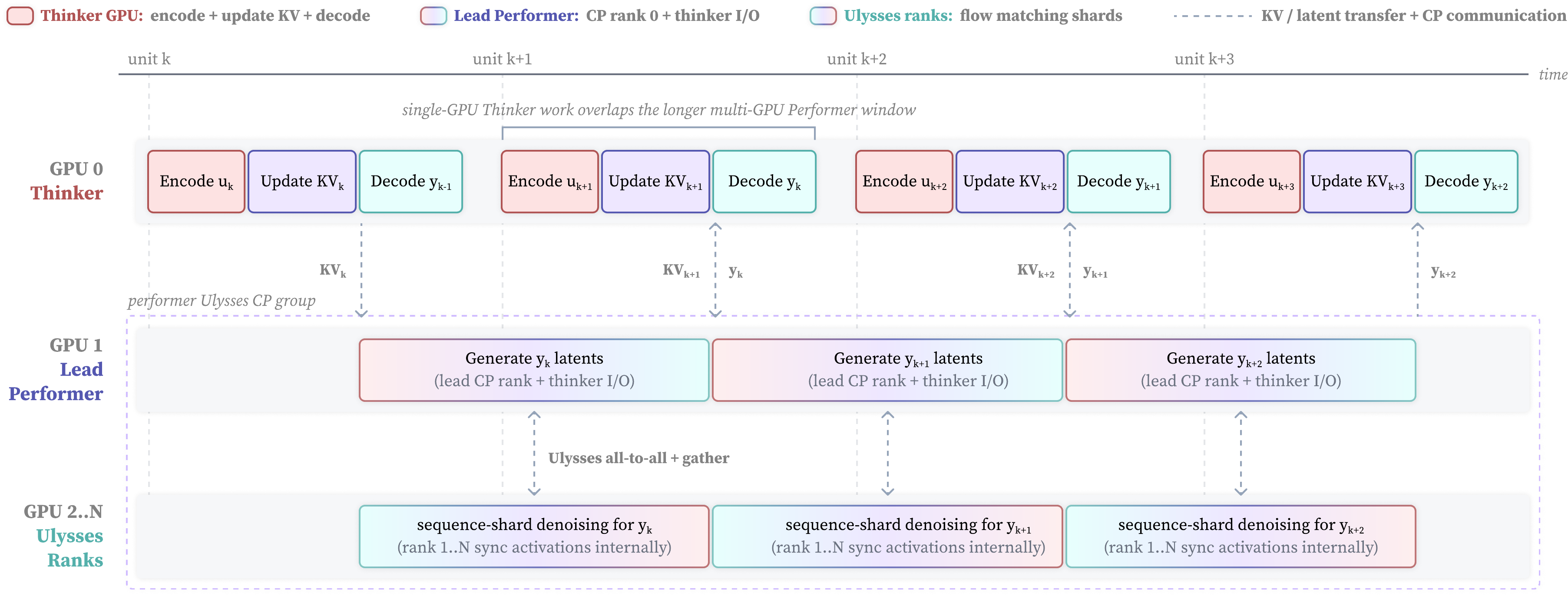
The architecture change that enables the resolution jump is the Performer's expansion from one GPU to multiple GPUs via Ulysses-style context-parallel:
- v0.1: A single GPU handled the full latent generation for 192×336 output. The compute budget capped resolution.
- v0.2: The Performer distributes the 640×368 latent generation across multiple GPUs. Ulysses-style context parallelism splits the sequence dimension — each GPU processes a portion of the spatio-temporal latent in parallel, and KV caches are pre-sharded across performer ranks.
The result: 3.6× more pixels at the same latency. The Thinker (responsible for perception, state update, and KV construction) stays on one GPU because its workload scales with input resolution (unchanged), while the Performer's workload scales with output resolution and benefits from parallelism.
Visual Framing: From Close-Up Only to Scene-Grounded Mid-Shot
v0.1's 192×336 output was effectively a face camera — usable for video-call avatars and talking-head scenarios. v0.2's 640×368 resolution, combined with improvements in scene grounding, enables mid-shot agents — characters shown from the torso up, grounded in a scene with a visible environment.
The official release showcases both framing modes: close-up (the v0.1 style, now at higher quality) and scene-grounded (new in v0.2, showing characters in rooms, caverns, beach scenes, and other environmental contexts).
Wan Streamer Architecture — Thinker and Performer
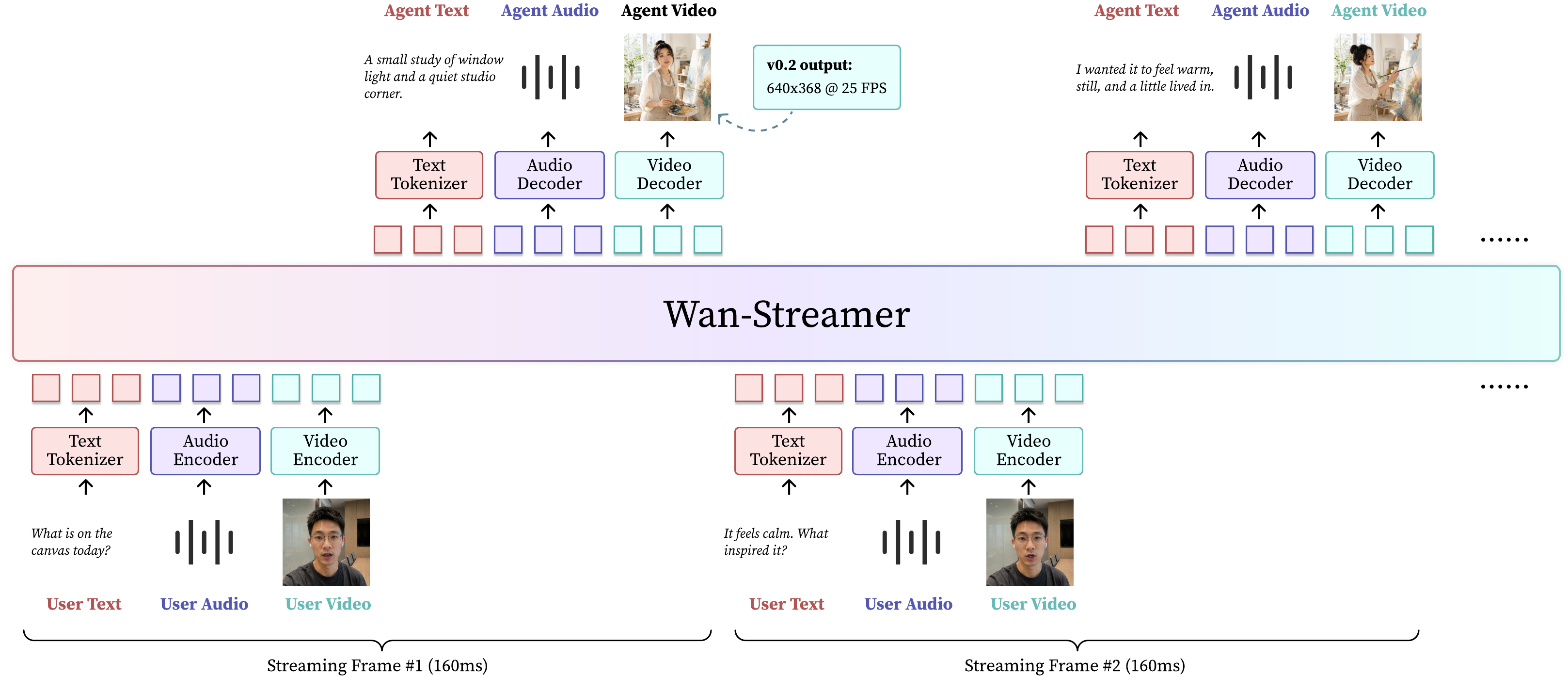
Wan Streamer uses a two-component architecture that separates perception and reasoning (Thinker) from generation (Performer). This separation is what makes real-time streaming feasible: the Thinker runs at input rate, while the Performer generates output latents at frame rate, coordinated through shared KV caches.
Thinker
The Thinker handles the streaming perception and reasoning loop:
- Streaming perception — receives incoming text, audio, and video frames
- State update — maintains a shared timeline across all modalities
- KV construction — builds key-value representations for the Performer
- Decoding — generates text tokens for the response
The Thinker stays on a single GPU because its workload is bounded by input processing, not output resolution. The key design choice is that it operates causally — no future information leakage — so it can stream output as input arrives rather than waiting for the full context.
Performer
The Performer generates the synchronized audio-video output:
- Receives KV slices — pre-computed by the Thinker into pre-sharded performer caches
- Latent generation — produces 640×368 video latents at 25 fps
- Audio generation — produces synchronized audio latents
- Decode — converts latents to pixels and audio samples
In v0.2, the Performer uses multi-GPU Ulysses-style context-parallel for video latent generation. Audio latents remain short enough that they are not split across ranks — only video latents are sharded.
Signal-to-Signal Path
The full pipeline follows a clean signal-to-signal path:
Encode → State Update → Latent Generation → Decode
Each stage adds roughly 50ms, totaling ~200ms model-side latency. The 350ms network latency brings total end-to-end latency to ~550ms in typical configurations.
This ~200ms model latency is measured from the moment input enters the model to the moment output exits — it includes all four stages, rendered at 25 fps with streaming 160ms chunks.
How Wan Streamer v0.2 Works
Streaming Full-Duplex Communication
Wan Streamer processes all three modalities — text, audio, video — through a single causal Transformer. The timeline is shared: a frame of video and a segment of audio at the same timestamp are processed together, not as separate streams that are later synchronized.
Full-duplex means there is no "turn" boundary. If the user speaks while the model is already speaking, both audio streams are processed simultaneously. The model can decide to continue, pause, or adjust based on the overlapping input.
This is architecturally harder than turn-based systems because the model must handle concurrency without confusion — the causal attention must not misinterpret overlapping input as incoherent noise.
Streaming Chunks and Latency Budget
Output is streamed in 160 ms chunks at 25 fps (4 frames per chunk). The latency budget breaks down as:
| Stage | Latency |
|---|---|
| Encoding (input perception) | ~50 ms |
| State update and reasoning | ~50 ms |
| Latent generation (Thinker → Performer) | ~50 ms |
| Decoding to pixels/audio | ~50 ms |
| Total model-side | ~200 ms |
| Network transmission | ~350 ms |
| Total end-to-end | ~550 ms |
The 160 ms chunk size means output begins streaming after the first chunk is ready — the user does not wait for the full response. Content arrives at 25 fps with each 4-frame bundle streamed incrementally.
How the Performer Generates 640×368 Video in Real Time
The multi-GPU Performer distributes the 640×368 latent grid across shards. Each GPU holds a portion of the KV cache (pre-sharded by the Thinker) and generates its segment of the latent in parallel. The segments are stitched by the decoder into a full-resolution frame.
Because video latents are large at 640×368, the context-parallel split is essential: a single GPU would be latency-bound at this resolution. The Ulysses-style approach splits along the sequence dimension, meaning each GPU processes a subset of spatial-temporal positions, writes its output, and the decoder reassembles the full frame.
Audio latents, being much smaller, are not sharded — they are generated on a single rank within the performer group.
Training Pipeline
Wan Streamer v0.2 was trained in three stages:
-
Multi-task pre-training — The model learns to process text, audio, and video modalities independently and jointly on a large corpus of paired and unpaired data. This builds the foundation for multimodal understanding.
-
Full-duplex fine-tuning — The model is fine-tuned on conversational data with overlapping turns. This stage teaches the model to handle simultaneous input and output without confusion.
-
Streaming distillation — The model is distilled to operate efficiently in streaming mode, optimizing the Thinker-Performer coordination and reducing the per-chunk latency to the ~200ms target.
The three-stage approach is common in multimodal foundation models, but the emphasis on full-duplex and streaming distillation is unique to Wan Streamer's real-time requirements.
Demos and Use Cases for Wan Streamer v0.2
The official Wan Streamer v0.2 release includes demonstrations that are real-time streams (not sped up), with near-instant prefill of roughly 0.5 seconds. These demos span a range of visual styles, environments, and interaction types.
Demo Scenes
| Prompt | Framing type | What it demonstrates |
|---|---|---|
| Alien in a cavern | Scene-grounded mid-shot | Character in an environment, spatial grounding |
| Tutor in a study with whiteboard | Scene-grounded mid-shot | Telepresence / tutoring scenario |
| Toddler in duck pajamas | Close-up | Detail on clothing and expression |
| Woman on video call | Close-up | Teleconferencing use case |
| Cat on bed | Scene-grounded mid-shot | Pet interaction, fur texture |
| Terrier digging on beach | Scene-grounded mid-shot | Fast motion in a natural scene |
| Mona Lisa | Close-up | Classic art animated to life |
| Charizard | Scene-grounded / close-up | Fictional character realism |
| Qin Shi Huang | Scene-grounded period setting | Historical figure animation |
The scene-grounded demos (tutor in study, alien in cavern, cat on bed, terrier on beach, Charizard, Qin Shi Huang) are new in v0.2 and made possible by the resolution upgrade. The close-up demos (toddler in duck pajamas, video call, Mona Lisa) were possible in v0.1 but benefit from higher quality in v0.2.
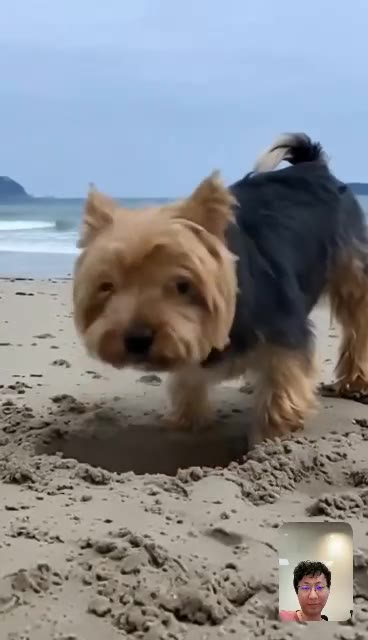
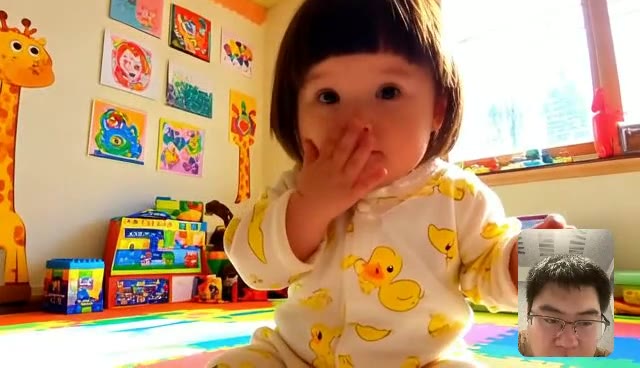
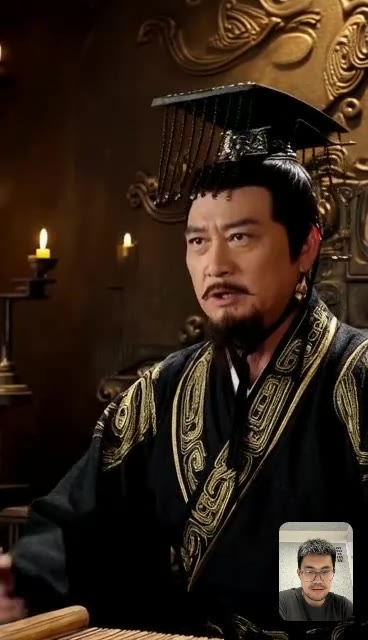
Click any poster to watch the real-time demo video (actual latency, not sped up).
Primary Use Cases
Telepresence and video calling — Wan Streamer v0.2's real-time, full-duplex capability makes it a natural fit for next-generation video communication. The model maintains synchronized audio and video at 25 fps with latency low enough for natural conversation.
Interactive tutoring and education — A tutor character can appear in a scene, point at diagrams or a whiteboard, speak, and respond to student questions in real time. The scene-grounded mid-shot framing makes this practical in a way that close-up-only models cannot support.
Interactive gaming characters — Game characters powered by Wan Streamer v0.2 can see the player, speak, and generate appropriate visual responses — all in real time. The 640×368 resolution is sufficient for character portraits and scene-grounded interactions in casual and mid-fidelity games.
Virtual assistants with visual presence — Beyond voice-only assistants, Wan Streamer v0.2 enables assistants that appear as visible characters in a scene, with facial expressions, gestures, and environmental context.
Creative and entertainment applications — Animating historical figures, fictional characters, or artistic subjects in real-time conversation opens new categories for interactive entertainment and digital art.
Wan Streamer v0.2 Deployment and Hardware Requirements
Wan Streamer v0.2 is a research release — it is not packaged as a consumer application. Deployment requires familiarity with Transformer-based model serving, GPU infrastructure, and the specific runtime requirements of the Thinker-Performer architecture.
Thinker Deployment
The Thinker runs on a single GPU. Its memory and compute requirements scale with input modality complexity (number of simultaneous audio/video streams), not output resolution. A single high-memory GPU (80 GB A100 or H100) is recommended for production-like setups.
Performer Deployment
The Performer requires multiple GPUs for 640×368 generation. The exact count depends on:
- Target resolution — 640×368 at 25 fps requires more parallelization than 192×336
- Latency target — More GPUs reduce per-chunk generation time
- Model precision — FP8 vs FP16 tradeoffs affect GPU count
The Ulysses-style context-parallel approach scales roughly linearly with GPU count for the performer workload. A typical deployment might use 4–8 GPUs for the performer group, paired with one GPU for the thinker.
Minimum Infrastructure
| Component | Recommendation |
|---|---|
| Thinker GPU | 1× A100 80 GB or H100 |
| Performer GPUs | 4–8× A100 80 GB or H100 (for 640×368) |
| Interconnect | High-bandwidth (NVLink or InfiniBand recommended) |
| Network | Low-latency for streaming inference |
| Runtime | PyTorch + custom CUDA kernels for streaming |
These requirements are substantial — Wan Streamer v0.2 is not designed for consumer GPU deployment in its current form. The open-source release allows the community to optimize and quantize for smaller hardware configurations over time.
Open Source and Availability
Wan Streamer is open source (check the official repository for the specific license — Apache 2.0 or similar). The release includes model weights, inference code, and documentation for the Thinker-Performer pipeline.
FAQ About Wan Streamer v0.2
What is the difference between Wan Streamer and Wan 2.7?
Wan 2.7 is a text-to-video and image-to-video generation model optimized for producing short clips from prompts — it generates pre-rendered video on demand. Wan Streamer is a real-time streaming model designed for continuous, interactive, full-duplex communication. They share the "Wan" branding from Alibaba DAMO Academy but target fundamentally different use cases. For an overview of Wan 2.7, see the Wan 2.7 Complete Guide.
Is Wan Streamer v0.2 available for local deployment?
Yes, it is open source, but local deployment requires significant GPU infrastructure — multiple high-end GPUs for the performer and at least one high-memory GPU for the thinker. It is not designed for single-consumer-GPU deployment in its current form.
What does full-duplex mean in Wan Streamer?
Full-duplex means the model can send and receive audio and video simultaneously. Unlike turn-based systems where you speak → the model pauses → the model responds, Wan Streamer processes overlapping input and output continuously. You can interrupt, speak while the model is speaking, and the model handles both streams in real time.
Does Wan Streamer v0.2 support multiple languages?
Wan Streamer processes text, audio, and video on a shared timeline. The underlying language understanding comes from the model's training data. As an Alibaba DAMO Academy model, it handles both English and Chinese input. Other language support depends on the training data distribution.
What is the latency of Wan Streamer v0.2?
Model-side latency is ~200ms. Total end-to-end latency including network transmission is ~550ms in typical configurations. Output begins streaming in 160ms chunks at 25 fps after the initial ~200ms model processing.
Can Wan Streamer v0.2 run on a single GPU?
The Thinker runs on one GPU. The Performer requires multiple GPUs for 640×368 output generation in v0.2. Running both on a single GPU is not supported at this resolution.
How does Wan Streamer v0.2 compare to real-time avatars from other AI labs?
Most real-time AI avatar systems operate at lower resolutions (often sub-360p), use turn-based voice pipelines with separate TTS, or rely on pre-rendered animation loops. Wan Streamer v0.2's differentiators are: (1) full-duplex communication rather than turn-based, (2) a single causal Transformer for all modalities rather than separate model pipelines, (3) scene-grounded mid-shot framing enabled by 640×368 resolution, and (4) open-source availability.
What changed between Wan Streamer v0.1 and v0.2?
The main changes are: output resolution increased from 192×336 to 640×368, the Performer expanded from single-GPU to multi-GPU Ulysses-style context-parallel, KV caches are pre-sharded across performer GPUs, and scene-grounded mid-shot framing was added alongside close-up framing. Model-side latency remained unchanged at ~200ms.
Is Wan Streamer v0.2 suitable for production use?
Wan Streamer v0.2 is a research release. While it demonstrates production-relevant capabilities (640×368 at 25 fps, ~200ms latency, full-duplex), the hardware requirements and deployment complexity make it most suitable for research teams, AI infrastructure teams, and companies building real-time interactive experiences. It is not packaged as a turnkey product.
More Wan Guides on This Site
- Wan 2.7 Complete Guide — Overview of the Wan video generation ecosystem
- Wan 2.7 Model Architecture — Deep dive into DiT, MoE, spatio-temporal attention
- Wan 2.2 Model Files Explained — Decoding Wan model filenames and checkpoints
- Wan 2.7 Prompt Guide — Writing effective prompts for Wan models
- Wan 2.7 Video API Guide — Developer integration with Wan video generation