Table of Contents

You type "wan 2.7 huggingface" into your search bar.
The first result is the Wan-AI organization on HuggingFace. You click it.
And there it is: model after model, all named "Wan." You scan the list. Wan2.2-T2V-14B, Wan2.2-I2V-14B, Wan2.1-T2V-14B...
No Wan2.7.
You refresh. You search again. You check the community repos. Nothing.
Meanwhile, GitHub is full of people asking the same question: "Where is the Wan 2.7 model on HuggingFace?"
Here is the answer: the Wan 2.7 weights are not on HuggingFace. We run wan27.org — the dedicated Wan 2.7 resource site — and verified every channel in this guide ourselves. This guide shows you exactly where and how to get them.
What Is Actually on HuggingFace: The Wan-AI Org
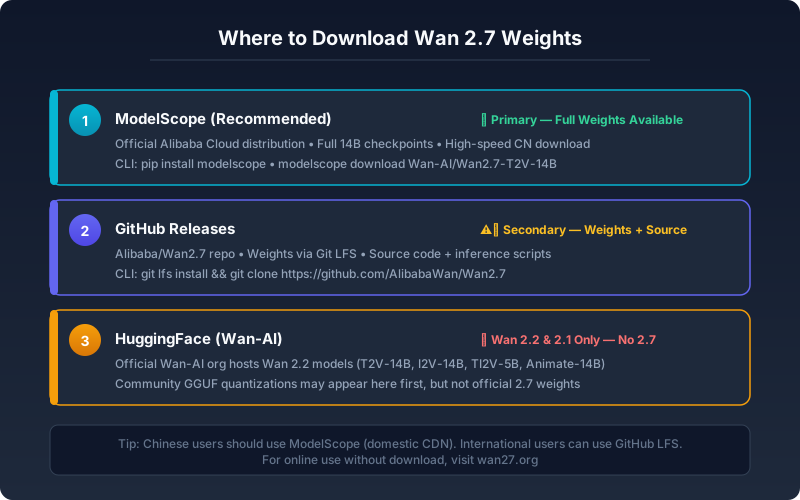
The Wan-AI organization on HuggingFace is the official home for the Wan 2.2 and Wan 2.1 model series. As of June 2026, it has not been updated with Wan 2.7 weights.
Here is what the Wan-AI org currently hosts:
| Model | Type | Parameters | License |
|---|---|---|---|
| Wan2.2-T2V-14B | Text-to-Video | 14B | Apache 2.0 |
| Wan2.2-I2V-14B | Image-to-Video | 14B | Apache 2.0 |
| Wan2.1-T2V-14B | Text-to-Video | 14B | Apache 2.0 |
These are solid models, but if you specifically want Wan 2.7, HuggingFace alone will not get you there.
There Are Community-Uploaded Wan 2.7 Checkpoints
Searching "Wan 2.7" on HuggingFace will surface community-uploaded GGUF quantized versions, third-party fine-tunes, and LoRA adapters. These are not official releases from the Wan team. Use them at your own discretion — they may have different license terms, quality characteristics, or even different model architectures than the official release.
If you want the official Wan 2.7 weights, do not rely on community uploads. Go to the primary source.
Expert pitfall: GGUF quantized Wan 2.7 models on HuggingFace are often uploaded without verification against the official inference code. If you load them with an inference script that expects a different architecture (e.g. a generic LLM loader instead of the Wan-Video codebase), the generation will silently produce garbage — no error, just unusable video. Always verify the architecture tag matches the Wan-Video/Wan2.7 repository before running inference with community weights.
Why Is Wan 2.7 Not on HuggingFace?
The Wan team has not announced a specific reason. The most likely explanation is that Wan 2.7 ships through Alibaba's own ecosystem first — Alibaba maintains ModelScope as its primary AI model platform, so first-party releases naturally land there before other channels.
Timing may also play a role. HuggingFace updates can lag behind initial releases. If the team prioritizes model availability over platform coverage (the right call for an open-weight release), ModelScope comes first.
The practical answer is the same regardless: Wan 2.7 is not on HuggingFace yet, but it is available through ModelScope and GitHub starting today.
Below you will find the exact URLs, CLI commands, and download methods for each official source — no guesswork, no dead-end searches.
Where the Official Wan 2.7 Weights Actually Are
There are two official sources for Wan 2.7 model weights.
Primary Source: ModelScope
ModelScope (modelscope.cn) is Alibaba's official AI model platform. This is where the Wan team uploaded the Wan 2.7 weights first. All model variants are available:
| Model | ModelScope ID | Size |
|---|---|---|
| Wan2.7-T2V-14B (Text-to-Video) | Wan-AI/Wan2.7-T2V-14B | ~30 GB |
| Wan2.7-I2V-14B (Image-to-Video) | Wan-AI/Wan2.7-I2V-14B | ~30 GB |
| Wan2.7-Image (Text-to-Image + Editing) | Wan-AI/Wan2.7-Image | ~25 GB |
ModelScope offers a Python CLI similar to HuggingFace's huggingface_hub, and supports direct browser downloads. The CLI is significantly faster for large checkpoints because it chunks each file into 8 MB segments and downloads up to 4 segments in parallel — cutting total time by 40–60% on high-latency connections compared to a single-threaded download. It also handles resume automatically.
Secondary Source: GitHub Releases
The Wan-Video GitHub organization (github.com/Wan-Video) hosts the inference code and documentation. As of June 2026, the Wan 2.7 repositories include:
- Wan-Video/Wan2.7 — Main inference code and model cards
- Wan-Video/Wan2.7-Image — Image generation and editing code
- Wan-Video/Wan2.7-I2V — Image-to-video pipeline
- Wan-Video/Wan2.7-HuggingFace — HuggingFace integration examples
GitHub Releases sometimes carries model weights as well, though this is not the primary distribution channel. For the full set of variants, prefer ModelScope.
Whichever source you choose, the actual download process needs a few specific commands. Here is how to pull Wan 2.7 from each channel.
How to Download Wan 2.7 from ModelScope
The ModelScope CLI mirrors the HuggingFace download experience. If you have used huggingface_hub, the commands will feel familiar.
Step 1: Install the CLI
pip install modelscopeStep 2: Download the Model Weights
For the text-to-video model:
modelscope download --model Wan-AI/Wan2.7-T2V-14B --local_dir ./Wan2.7-T2V-14BFor image-to-video:
modelscope download --model Wan-AI/Wan2.7-I2V-14B --local_dir ./Wan2.7-I2V-14BFor the image model:
modelscope download --model Wan-AI/Wan2.7-Image --local_dir ./Wan2.7-ImageExpect 10–30 minutes per variant depending on your connection speed. The CLI shows a progress bar and handles resume automatically if the connection drops.
Rule of Thumb: If the download speed stays below 5 MB/s for more than two minutes, cancel and retry — the modelscope CLI often finds a faster mirror on the next attempt.
Watch out: The modelscope CLI installs alongside huggingface_hub without conflicts. But if you are inside a Conda environment that already has an old modelscope version, upgrade first with pip install --upgrade modelscope — older versions lack parallel download support and can be 3–4× slower.
Step 3: Verify the Download
Each ModelScope release includes a sha256 checksum file:
cd ./Wan2.7-T2V-14B && sha256sum -c checksums.sha256If all files pass, your download is intact and ready for inference.
Rule of Thumb: Download one variant at a time. Start with Wan2.7-T2V-14B if you primarily need video generation, or Wan2.7-Image for image generation. All three together need ~100 GB of free disk space.
Browser Download (No CLI)
If you prefer not to install the CLI:
- Go to
modelscope.cn/models/Wan-AI/Wan2.7-T2V-14B - Click the "Download" button
- Select the files you need
The browser path works fine for spot-checking, but for 30 GB checkpoints the CLI is more reliable — resume support alone saves significant time if your connection drops mid-download.
If you want to keep code and model weights in one project, GitHub Releases is a solid alternative — everything stays in one place, and the gh CLI handles checkout and download in two commands.
How to Download from GitHub Releases
This path is useful if you already have the code repository and want to keep everything in one place.
git clone https://github.com/Wan-Video/Wan2.7
cd Wan2.7
Check the Releases page for packaged weight downloads:
# Using the GitHub CLI
gh release list --repo Wan-Video/Wan2.7
gh release download v1.0.0 --repo Wan-Video/Wan2.7
Or download directly from the web interface at github.com/Wan-Video/Wan2.7/releases.
Caveat: GitHub's file size limits mean the largest checkpoints (14B variants) may not be available here. For the complete set, ModelScope is the reliable source.
Running Wan 2.7 Locally: Hardware Check
Before you start downloading 30GB+ of weights, confirm your hardware can run them.
| Hardware | Video (5s 720p) | Video (10s 1080p) | Image Gen |
|---|---|---|---|
| RTX 4090 (24 GB) | Yes, ~3–5 min | Tight, may OOM | Yes |
| RTX 5090 (32 GB) | Yes, faster | Yes, ~2–4 min | Yes |
| RTX 3090 (24 GB) | Yes, ~5–8 min | Tight | Yes |
| RTX 4080 (16 GB) | With GGUF quant | No | Yes |
| RTX 4070 (12 GB) | GGUF quant only | No | Yes |
| Mac M2/M3 (unified) | Very slow, MLX | No | Possible |
| A100 (80 GB) | Yes, fast | Yes, fast | Yes |
Minimum viable GPU for Wan 2.7 video: 24 GB VRAM. Below that, you need GGUF-quantized versions, and output quality drops.
Disk space: Budget ~30 GB per model variant. T2V + I2V + Image together need ~100 GB.
If your hardware falls short of these requirements, skip the download and use a hosted version instead — see the CTA at the end of this guide.
Cost and Responsible Use
Downloading model weights is free beyond your bandwidth, but running Wan 2.7 on cloud GPUs adds up:
- GPU rental (24 GB+): Spot instances on runpod.io or vast.ai run $0.50–$1.20/hour. A single 5-second 720p clip takes ~3–5 minutes, so each generation costs roughly $0.03–$0.10 in compute.
- Storage: All three model variants (~100 GB) on a cloud volume add about $2–10/month depending on the provider.
- License: Wan 2.7 uses the Apache 2.0 license — free for commercial and personal use. No attribution required, but the model card must remain intact if you redistribute the weights.
Factor these into your budget before downloading all three variants. If you only need to evaluate output quality, skip the compute costs entirely and use the hosted version at Wan 2.7.
HuggingFace Spaces: Running Wan Models Online
HuggingFace Spaces currently hosts Wan 2.2 demos, not Wan 2.7. If you want to test the Wan model family from your browser without installing anything, this is a valid starting point.
Wan 2.2 on HF Spaces
Community contributors have deployed several Wan 2.2 Spaces:
- Wan 2.2 Text-to-Video Space — Generate short clips directly in the browser
- Wan 2.2 Image-to-Video Space — Upload an image and animate it
These Spaces use the Wan 2.2 weights from the Wan-AI org. The quality gap between Wan 2.2 and Wan 2.7 is noticeable — Wan 2.7 produces significantly sharper video, better motion coherence, and longer outputs — but trying a Space gives you a feel for the general interface without any local setup.
Running a Custom Wan 2.7 Space
If you have a HuggingFace Pro subscription with a GPU-backed Space (minimum 24 GB VRAM), you can deploy Wan 2.7 yourself:
- Create a new Space from the HuggingFace dashboard
- Select a GPU hardware tier (24 GB+)
- Clone the
Wan-Video/Wan2.7code into the Space - Configure the model download path to pull from ModelScope
- Deploy — the Space will download weights and start the inference server
This path requires DevOps work but gives you a private, browser-accessible Wan 2.7 instance.
With three potential sources (ModelScope, GitHub, HuggingFace), choosing where to start can feel like analysis paralysis. The table below breaks down what each channel offers so you can pick the right one for your situation.
Download Source Comparison Table
| Factor | ModelScope | GitHub | HuggingFace |
|---|---|---|---|
| Wan 2.7 Weights Available? | Yes (all variants) | Partial (code + some weights) | No (Wan-AI has 2.2 only) |
| Download Speed (Asia) | Fast | Variable | Variable |
| Download Speed (Global) | Moderate | Fast | Fast |
| CLI Support | modelscope CLI | git + gh CLI | huggingface_hub |
| Resume Download | Yes | Yes (gh CLI) | N/A for Wan 2.7 |
| Checksum Verification | Yes (sha256) | Varies | N/A for Wan 2.7 |
| Community Models | Yes | Yes | Unofficial only |
| Best For | Primary weight download | Code + integration | Wan 2.2 evaluation |
If you are in Asia, ModelScope is consistently the fastest channel. If you are building with the code, start from GitHub and pull weights from ModelScope. If you just want to evaluate the model family, try Wan 2.2 on HuggingFace Spaces, then download Wan 2.7 from ModelScope.
Troubleshooting Common Download Problems
Downloads of this size fail for predictable reasons. Here is how to handle the four most common scenarios.
"modelscope: command not found"
Symptom: The shell cannot find the modelscope CLI after installation.
Root cause: The pip binary directory is not on your PATH.
Resolution: Use the Python module syntax instead, or add the binary directory to your PATH:
# Option A: run as a Python module
python -m modelscope download --model Wan-AI/Wan2.7-T2V-14B --local_dir ./Wan2.7-T2V-14B

# Option B: add the binary directory to PATH permanently
export PATH="$PATH:$HOME/.local/bin"
Download Fails Midway
Symptom: The progress bar stops or the terminal shows a connection error partway through a 30 GB file.
Root cause: Transient network issues (ISP timeout, proxy drop, unstable Wi-Fi).
Resolution: Simply re-run the same modelscope download command. The CLI skips already-downloaded files and resumes from where it stopped. If it keeps failing at the same file, delete that specific file and retry:
modelscope download --model Wan-AI/Wan2.7-T2V-14B --local_dir ./Wan2.7-T2V-14B --resumeRule of Thumb: If you see three consecutive resume failures on the same file, the remote server may be throttling your IP. Wait 10 minutes before retrying.
Checksum Mismatch After Download
Symptom: sha256sum -c checksums.sha256 reports "FAILED" for one or more files.
Root cause: The file was corrupted during download.
Resolution: Identify the failed file, delete it, and re-download only that file:
sha256sum -c checksums.sha256 2>&1 | grep FAILED
# Example output: Wan2.7-T2V-14B/model-00001-of-00010.safetensors: FAILED
rm Wan2.7-T2V-14B/model-00001-of-00010.safetensors
modelscope download --model Wan-AI/Wan2.7-T2V-14B --local_dir ./Wan2.7-T2V-14B
Disk Space Runs Out Mid-Download
Symptom: The download stops with a "no space left on device" error.
Root cause: Each 14B variant needs ~30 GB free; all three together need ~100 GB.
Resolution: Check available space before starting, and always keep headroom:
df -h . # Check free space in current directoryRule of Thumb: Always keep at least 10 GB free beyond the model size. Some model files need temporary extraction or conversion space before they are usable — running out at that point is harder to recover from.
FAQ
Is Wan 2.7 on HuggingFace?
No. The official Wan-AI organization on HuggingFace hosts Wan 2.2 and Wan 2.1. Wan 2.7 weights are on ModelScope (primary) and GitHub (secondary) as of June 2026.
Where can I download Wan 2.7 model weights?
The primary source is ModelScope (modelscope.cn), under the Wan-AI organization. Use modelscope download --model Wan-AI/Wan2.7-T2V-14B --local_dir ./Wan2.7-T2V-14B.
Why is Wan 2.7 not on HuggingFace?
The Wan team prioritizes Alibaba's ModelScope platform for first-party releases. Wan 2.7 may appear on HuggingFace in the future, but as of June 2026, ModelScope and GitHub are the confirmed official channels.
Can I run Wan 2.7 in HuggingFace Spaces?
Existing community Spaces run Wan 2.2. For Wan 2.7, you would need a custom GPU-backed Space (24 GB+ VRAM) with code from GitHub and weights from ModelScope.
What is the difference between Wan 2.2 and Wan 2.7 on HuggingFace?
Wan 2.2 is available on the Wan-AI HF org with official T2V and I2V checkpoints. Wan 2.7 is not on HuggingFace (as of June 2026) and offers significantly better output: 1080p native video, sharper details, better motion coherence, first/last frame control, and additional model variants for image editing and video editing.
Does HuggingFace have Wan 2.7 GGUF downloads?
Yes. Community contributors have uploaded GGUF-quantized Wan 2.7 checkpoints to HuggingFace. These are not official Wan team releases. Verify the source and license independently before using them.
How do I use Wan 2.7 with ComfyUI?
Download the weights from ModelScope first, then place them in the ComfyUI model directory. See the Wan 2.7 ComfyUI Local Guide for a complete setup walkthrough.
Is the Wan-AI org on HuggingFace official?
Yes. The Wan-AI organization on HuggingFace is the official account for the Wan model series. It is currently maintained with Wan 2.2 and Wan 2.1 releases. It has simply not been updated with Wan 2.7 weights yet.
Summary
The situation is straightforward once you know where to look:
- Wan 2.7 is not on HuggingFace (as of June 2026). The Wan-AI org has Wan 2.2 and 2.1.
- ModelScope is the primary source for Wan 2.7 weights. Use the
modelscopeCLI. - GitHub has the inference code and some weight releases via Releases.
- HuggingFace Spaces runs Wan 2.2 for browser testing — useful for evaluation, but not the full Wan 2.7 quality.
- Choose your download channel by location and use case: ModelScope for Asia and reliable downloads, GitHub for code-first workflows, HuggingFace for Wan 2.2 evaluation only.
If you want to test Wan 2.7 output quality right now without downloading 30GB or setting up infrastructure, generate your first 5-second 720p clip at Wan 2.7 — no install, no GPU required. It runs the same Wan 2.7 model you would download from ModelScope, just without the download time or hardware costs.
For a full picture of Wan 2.7's open-weight status and Apache 2.0 license, read the Wan 2.7 Open Source Guide. To understand the architecture that makes Wan 2.7's output different from Wan 2.2, see the Model Architecture Guide.