What Is Wan 2.2 VACE? How It Differs From Standard Wan 2.2 Workflows (2026)
Wan 2.2 VACE explained — what VACE stands for, how it differs from standard T2V and I2V workflows, what control signals it accepts (pose, depth, canny, trajectory), the VACE-Fun model family, and when to use VACE versus Wan 2.2 Animate.
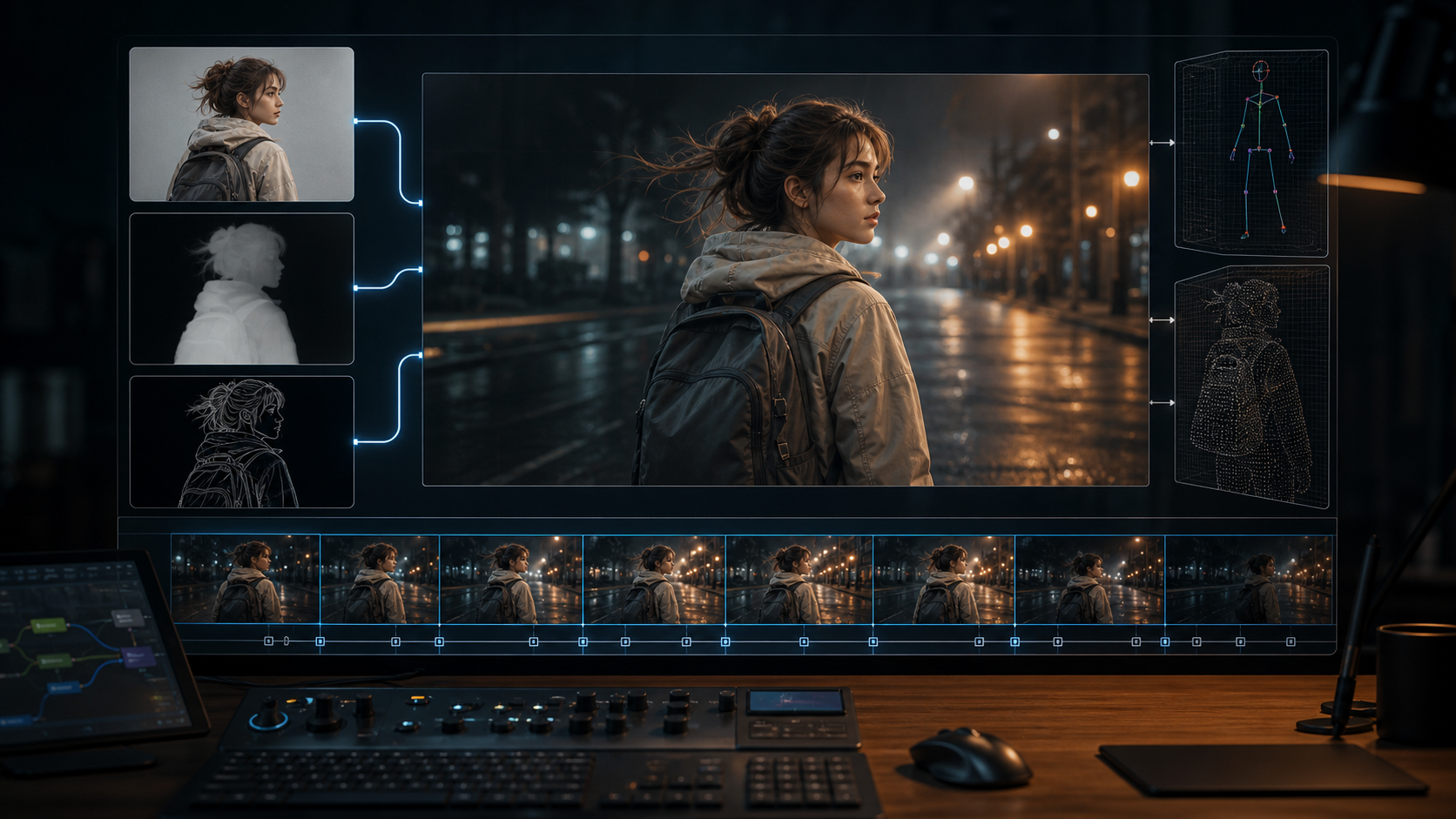
You know how Wan 2.2 Text-to-Video works — type a prompt, get a video. You know how Image-to-Video works — provide a starting frame, get a continuation.
But what if you need the subject to follow a specific pose, or the camera to move along a precise path, or a section of the video replaced without regenerating the whole thing? Standard T2V and I2V give you no control over the structure of the output. The model decides everything — composition, motion, timing — and you accept what it produces.
That is where VACE comes in. It is a companion model family that adds control signals, video editing, and reference-based generation to Wan 2.2 — turning it from a "generate and hope" tool into something closer to a directed video创作 platform.
I tested VACE across its main control modes (pose, depth, canny, and reference-to-video), compared the results against standard Wan 2.2 T2V and I2V, and mapped where VACE adds value, where it falls short, and how it compares to Wan 2.2 Animate. This guide covers what VACE actually is, what it can do that standard Wan 2.2 cannot, and when you should — and should not — use it.
Let's start with what VACE actually is — and what it is not.
What Is VACE?
VACE stands for Video All-in-one Creation and Editing. It is a control and editing framework developed by Alibaba's Tongyi Lab that was originally built for Wan2.1 and later fine-tuned onto Wan 2.2.
VACE is not a separate foundation model. It is a set of control weights that are fine-tuned on top of the base Wan 2.2 14B text-to-video checkpoint. The official model alibaba-pai/Wan2.2-VACE-Fun-A14B on Hugging Face starts from Wan-AI/Wan2.2-T2V-A14B and adds support for structured control inputs — pose skeletons, depth maps, edge detection, and trajectory guidance.
Think of it this way:
- Standard Wan 2.2 T2V: Text goes in, video comes out. The model decides everything.
- Standard Wan 2.2 I2V: A starting image provides the subject, but the model controls the motion.
- VACE: You provide text, AND you provide a control signal (a pose skeleton, a depth map, an edge drawing) that constrains the structure of the video. The output follows your control signal while staying faithful to the subject.
This is the same conceptual jump that ControlNet brought to Stable Diffusion — from "prompt-only generation" to "prompt + structural constraint."
What VACE Is NOT
- VACE is not a separate video generation model that replaces Wan 2.2
- VACE is not an upscaler or frame interpolation tool
- VACE is not an official Alibaba Cloud product — it is a community-developed fine-tune and research project
So how does VACE compare to standard Wan 2.2 in practice? Here is a direct side-by-side across the capabilities that matter most.
Quick Comparison: VACE vs Standard Wan 2.2
| Capability | Standard T2V | Standard I2V | VACE |
|---|---|---|---|
| Input types | Text only | Image + text | Text + control signal (pose/depth/canny/trajectory) + optional reference image |
| Subject identity | Generated fresh each time | Locked by first frame | Locked by reference image with stronger preservation |
| Motion control | Prompt-based only | Prompt + image-based | Pose skeleton or trajectory directly constrains motion |
| Camera control | Prompt-based only (unreliable) | Very limited | Fun-Control-Camera variant adds explicit camera paths |
| Video editing | Not supported | Not supported | Inpainting, outpainting, background replacement, reframe |
| Output quality | Highest — base model | High — constrained by reference | Slightly lower — fine-tune trade-off for control |
| Best for | Cinematic exploration | Character consistency | Structured motion, video editing, precise control |
The table shows the headline differences. Here is what each VACE capability actually looks like in practice.
What VACE Can Do That Standard Wan 2.2 Cannot
1. Control Signal Input
This is VACE's primary value. Instead of hoping your prompt produces a specific pose or composition, you feed the model a control image — a stick figure pose, a depth map, a canny edge drawing, or an MLSD line map — and the output follows that structure.
The supported control modes include:
| Control Type | What It Constrains | Best For |
|---|---|---|
| Pose (OpenPose skeleton) | Human body position, joint angles, limb placement | Character animation, dance moves, action poses |
| Depth map | Scene geometry — foreground vs background, object spacing | Landscape shots, indoor scenes, object placement |
| Canny edge | Outlines and edges of the scene | Architecture, products, scenes with clear structural lines |
| MLSD (line segments) | Straight-line geometry — walls, ceilings, roads | Architectural visualization, urban scenes |
| Trajectory control | Object movement path across frames | Object tracking, panning shots, product rotation |
2. Reference-to-Video With Identity Preservation
I2V in standard Wan 2.2 uses the reference image as the first frame. The subject can drift over time. VACE's reference-to-video mode processes the reference image differently — it extracts the subject, removes the background (via RMBG), and treats the subject as an identity anchor that persists across all 81 frames.
The result is better character consistency than standard I2V, especially for faces and clothing details. The community has noted that VACE-Fun provides "unprecedented stability in facial features, clothing textures, and environmental lighting — even at 480p."
Rule of thumb for reference-to-video: If your subject has fine details (faces, logos, specific clothing patterns) that standard I2V cannot maintain, VACE reference-to-video is worth the extra setup time. If your subject is generic and I2V already handles it, VACE adds complexity without benefit.
3. Video Inpainting and Outpainting
VACE supports mask-based local replacement — you draw a mask over a region of a video, describe what should be there, and VACE fills it in. This is useful for:
- Removing an object from a scene
- Replacing a background element
- Fixing a specific area that has artifacts
- Adding a new element to an existing video
Outpainting extends the video frame in any direction — adding content beyond the original boundaries. The model fills in the expanded area with scene-consistent content.
4. Reframe and Background Replacement
VACE Reframe intelligently changes the aspect ratio of a video without simply cropping. The model expands or shifts the composition to fit the new ratio. This is useful when you shot in 16:9 but need 9:16 for TikTok or Reels.
Background replacement preserves the foreground subject and generates a new background described by the prompt.
Expert pitfall for control signal prep: The quality of your control signal directly determines the quality of VACE output. A blurry pose skeleton, a depth map with incorrect edges, or a noisy canny image will produce a video that follows those errors faithfully. Garbage in, garbage out — but amplified by motion. Always inspect your control signal at full resolution before feeding it to VACE. If the control image looks wrong to your eye, the video will look worse.
These capabilities are spread across multiple VACE variants. Here is how the model family is organized.
The VACE-Fun Family: Four Variants for Different Control Types
VACE is not a single model. The Wan-Fun project includes several fine-tuned variants built on the same approach:
| Variant | Purpose | Location |
|---|---|---|
| VACE-Fun (base) | Multi-control: pose, depth, canny, MLSD, trajectory | alibaba-pai/Wan2.2-VACE-Fun-A14B |
| Fun-Control | Additional control types beyond base VACE | Part of the Fun series |
| Fun-Control-Camera | Explicit camera motion control (pan, tilt, orbit) | Separate Fun variant |
| Fun-InP | Video inpainting with mask input | Separate Fun variant |
All variants share the same base architecture — they are fine-tuned from Wan2.2-T2V-A14B using the VACE training approach.
With multiple variants available, a natural question is how VACE compares to Wan 2.2 Animate — the other control-focused Wan 2.2 feature.
VACE vs Wan 2.2 Animate: What Is the Difference?
This is the most common comparison question, and the answer depends on what you mean by "Animate."
Wan 2.2 Animate is a motion transfer model. You provide a reference video, and Animate copies the motion from that video onto a new subject. For example, you have a video of a person dancing, and you want a different character to perform the same dance moves. Animate extracts the motion and re-targets it.
VACE is a broader framework. It includes motion control (via pose skeletons), but it also includes video editing, inpainting, outpainting, reframe, and reference-to-video generation.
The community consensus from direct comparisons is:
| Capability | VACE | Wan 2.2 Animate |
|---|---|---|
| Motion transfer from a reference video | Supported (pose) | Purpose-built — higher fidelity |
| Video inpainting / outpainting | Supported | Not supported |
| Control signals (pose, depth, canny) | Supported | Not supported |
| Camera control | Via Fun-Control-Camera | Not supported |
| Reference-to-video identity preservation | Supported — strong | Not supported |
| Ease of setup | More complex — requires control signal prep | Simpler — just a reference video |
Expert pitfall for Animate vs VACE: Do not assume Animate replaces VACE or vice versa. They serve different purposes. If you have a reference video and want to copy its motion, use Animate. If you have a still image and want to control its structure with a pose or depth signal, use VACE. If you want to edit an existing video, use VACE. Using the wrong one for the task wastes time and produces poor results.
The practical question after understanding the comparison is: how do you actually run a VACE workflow?
How VACE Works: A 5-Step ComfyUI Workflow
A typical VACE workflow in ComfyUI follows these steps:
- Prepare your control signal. If you are using pose control, run your reference image through an OpenPose estimator. For depth, use a depth estimation model. For canny, apply edge detection. The ComfyUI
comfyui_controlnet_auxplugin provides most of these preprocessors. - Load the VACE model. The VACE-Fun checkpoint (64 GB, same size as base Wan 2.2 14B) replaces the standard Wan 2.2 T2V model in your workflow.
- Connect the control input. The VACE node accepts the preprocessed control image alongside your text prompt.
- Set generation parameters. Same parameters as standard Wan 2.2 — resolution, frame count (81 max), steps, guidance, seed.
- Generate. The output follows the control signal while matching your prompt.
VACE does not require a separate UI or a different runtime. It runs inside ComfyUI with the same hardware requirements as the 14B model — 12 GB VRAM minimum for 480p, 16 GB+ for 720p.
VACE sounds powerful on paper, but there are real trade-offs you should know before building a workflow around it.
Limitations and When Not to Use VACE
VACE is powerful, but it has real limitations that the community has documented.
Lower output quality than native T2V/I2V. Because VACE is a fine-tune on top of Wan 2.2 — not the base model itself — it trades some output quality for control. The fine-tune process optimizes for control signal adherence, which can reduce detail, sharpness, and natural motion compared to the unmodified base model. If your priority is maximum visual quality, use standard T2V or I2V.
Control precision is still evolving. Pose skeletons produce recognizable body positions, but fine joint angles (fingers, subtle head tilts) are not reliably followed. Depth maps work well for broad scene geometry but struggle with fine object boundaries. Canny control provides structural guidance but the output can look "over-constrained" — the model follows the edges rigidly and loses natural texture.
VRAM requirements are identical to the 14B model. VACE does not reduce the hardware requirements. You still need 12 GB for 480p and 16 GB+ for 720p. The control preprocessing step adds 1–2 GB of temporary VRAM usage.
No native support for long-form control. VACE generates 81 frames (5 seconds) per pass, like standard Wan 2.2. Extending controlled output beyond 5 seconds requires continuation workflows or stitching — the same limitations that apply to standard Wan 2.2.
The model is a research project. VACE and the Fun variants are community-driven fine-tunes released under Apache 2.0. They are not production services with guarantees. Expect bugs, breaking changes, and documentation gaps.
Expert pitfall for VACE expectations: Do not expect VACE to match standard Wan 2.2 quality on the first try. The control fine-tune introduces a quality regression that is noticeable at 720p — especially in fine texture, skin detail, and natural motion. Plan for 2–3 iterations to dial in the control signal strength and prompt balance. VACE is a tool that rewards tuning, not a one-shot generator.
Rule of thumb for VACE adoption: Use VACE when you need control that T2V and I2V cannot provide — structured pose, depth-based composition, or video editing. Stay with standard Wan 2.2 when maximum visual quality is your only priority. VACE is a tool for specific problems, not a replacement for the base workflow.
Rule of thumb for control signal quality: If your VACE output looks bad, check the control signal before you change the prompt. Nine times out of ten, the control image is the problem — wrong preprocessing settings, low resolution, or misaligned edges. Fix the control image, regenerate, and only adjust the prompt if the control was already clean.
These limitations raise common questions. Here are the answers to the most frequent ones.
Frequently Asked Questions
Does VACE work with the 5B model? No. VACE-Fun and the other Fun variants are fine-tuned on Wan2.2-T2V-A14B (14B parameters). There is no 5B VACE variant as of mid-2026. You need 12 GB+ VRAM to run it.
Is VACE available in ComfyUI natively? Yes. The ComfyUI Wan 2.2 native workflow supports VACE through the WanVaceToVideo node. You also need the comfyui_controlnet_aux plugin for control signal preprocessing (pose, depth, canny, etc.).
Can VACE generate videos longer than 5 seconds? No — VACE inherits the same 81-frame (5-second) limit as the base Wan 2.2 model. Longer videos require continuation or stitching workflows, which work the same way as with standard Wan 2.2.
Do I need a separate model download for VACE? Yes. The VACE-Fun checkpoint is 64 GB (same as the base 14B model). It is a separate download from the standard Wan 2.2 model files. You run either VACE or standard Wan 2.2 — not both at the same time.
Does VACE support video-to-video workflows? Yes — with limitations. VACE can accept a video as input for motion transfer (via pose extraction) and for inpainting/outpainting. True video-to-video style transfer is not a primary VACE capability, but the inpainting workflow can approximate it by masking and regenerating regions of each frame.
Is VACE better than Wan 2.2 Animate for motion transfer? No. For motion transfer specifically — copying motion from a reference video to a new subject — Wan 2.2 Animate produces higher fidelity results. VACE's pose control is useful when you want to design motion from a single image (rather than a reference video), but Animate is the better choice when a reference video is available.
VACE adds a new dimension to Wan 2.2 — but only for specific problems. Here is the short version of when to use it.
Summary
VACE turns Wan 2.2 from a "generate and hope" tool into a directed video creation platform — but it is not a replacement for the base workflow.
- Use VACE when you need structural control (pose, depth, edges), video editing (inpainting, outpainting), or reference-to-video with stronger identity preservation than standard I2V provides.
- Skip VACE when your priority is maximum visual quality, or when standard T2V or I2V already produces the result you need. The quality trade-off from the fine-tune is real, and control is a feature you add when you need it — not a default improvement.
The most common mistake is treating VACE as "Wan 2.2 but better." It is not. It is Wan 2.2 plus control — and control comes at a cost. Match the tool to the problem: use standard Wan 2.2 for pure generation, VACE for structured generation and editing, and Animate for motion transfer.
Next step: If you want to try VACE, start with the reference-to-video workflow — it gives the most dramatic improvement over standard I2V with the least setup complexity. The Wan 2.2 ComfyUI Workflow Guide covers the base setup you need before adding VACE. For a direct comparison with Wan 2.2 Animate, the Wan 2.2 Animate Guide explains when Animate is the better choice.
Author

More Posts

Wan 2.7-Video Just Dropped — AI Video You Can Finally Direct, Edit, and Reshoot
Alibaba launched Wan 2.7-Video today. Instruction-based editing, dialogue and camera reshoots, creative replication, multi-subject control, storyboard input, and drama-driven cinematic intelligence. Here is everything that changed.


Wan 2.7 Open Source: What Is Actually Open, Where to Get It, and How to Run It Locally
Is Wan 2.7 open source? Yes — open-weight under Apache 2.0. See what is actually open, where to download weights, hardware requirements, and local setup with ComfyUI or Python.

Wan 2.7 Text-to-Image: Generate High-Quality AI Images With Thinking Mode
Wan 2.7 Text-to-Image generates high-quality images from text prompts using a built-in thinking mode for better composition, superior text rendering, hex color control, and flexible aspect ratios. Generate directly at wan27.org.
Newsletter
Join the community
Subscribe to our newsletter for the latest news and updates