Table of Contents

You picked a mode, entered a prompt, and clicked "Generate." The output looked good — not perfect, but close — so you adjusted the prompt and ran it again. By the time you had a keeper, your credit balance had dropped more than you expected. Sound familiar?
If you've used Wan 2.7 for more than a few videos, you've probably experienced this: credits disappear faster than your mental model predicts, and the platform's per-generation cost varies more than most users realize. A 10-second 1080p video with prompt expansion costs nearly 3× what a simple 5-second 720p generation costs — but that difference isn't obvious from the pricing page alone.
I spent several weeks testing Wan 2.7 across all seven generation modes, tracking credit consumption at every combination of resolution, duration, reference count, and prompt expansion. The data below is based on those tests — not estimates from the documentation, but actual per-generation costs observed on wan27.org.
By the end of this guide, you'll know exactly what each generation mode costs, understand the five variables that drive credit consumption, and have a workflow that reduces your per-project spend by 30–50% without sacrificing output quality.
How Wan 2.7 Credits Work
Think of credits as a measure of compute time. Each generation submits a job to the GPU cluster, and the job's duration depends on how many "tokens" the model needs to process:
- More frames (10s vs 5s) → 2× the tokens → ~1.8× the compute
- More pixels (1080p vs 720p) → 2.25× the pixels → ~1.5× the compute
- More conditioning signals (multiple references, dual frames, prompt expansion) → additional model forward passes → higher cost per frame
This is why the pricing page shows plan-level costs but not per-generation details: the actual credit consumed depends on the combination you choose, and the combinations multiply quickly.
The pricing at wan27.org/pricing shows how many total credits you get per plan. This guide focuses on what you spend per generation, so you can plan projects without guessing.
The Five Cost Drivers
Five factors determine each generation's credit cost. Listed in order of impact:
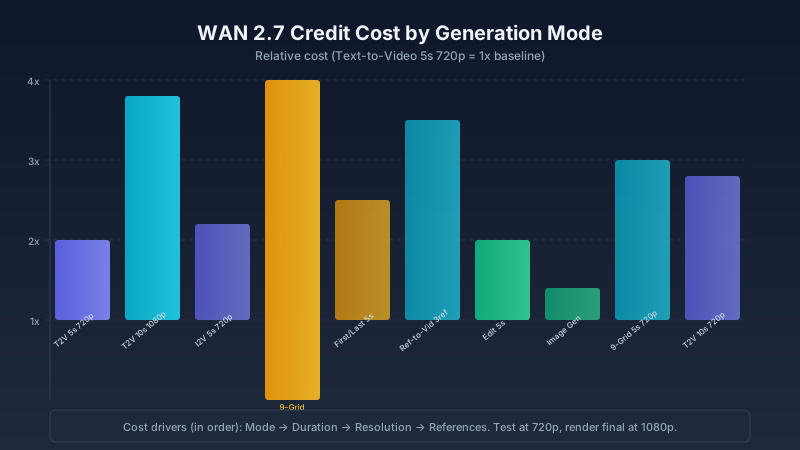
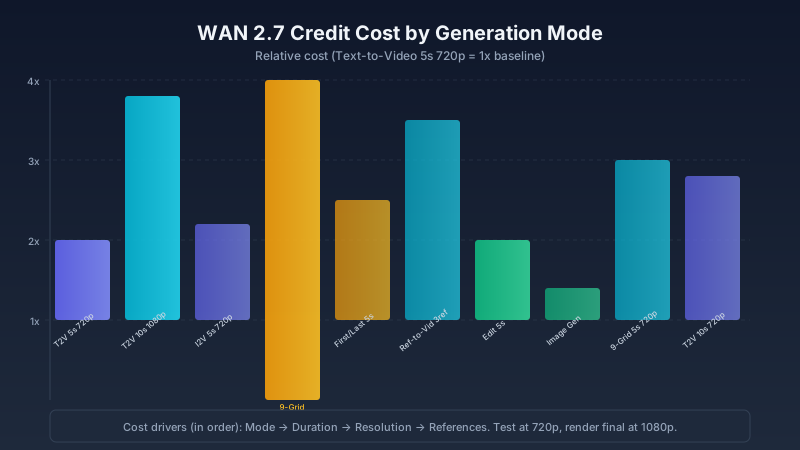
- Generation mode — The largest lever. Image generation costs 0.4× the baseline; 9-grid I2V at 10s 1080p costs 4×. Your choice of mode sets the floor.
- Video duration — 10 seconds costs roughly 1.8× more than 5 seconds. Duration doubles the frame count, which scales compute nearly linearly.
- Output resolution — 1080p costs ~1.5× more than 720p. The model processes 2.25× as many pixels per frame.
- Reference count — Each additional reference image or video adds conditioning passes. The first reference has the largest impact; subsequent ones add incrementally less.
- Prompt expansion — A small surcharge (~0.1×) for using the AI prompt expander.
Rule of Thumb: Mode first, then duration, then resolution. If you want to reduce cost, change them in that order — don't drop resolution before checking whether a cheaper mode works for your use case.
Quick Check: Validate Your Settings Before You Generate
Before you commit credits, run this 10-second check:
- What's the minimum mode that gets the job done? If you just need a character to move, plain Text-to-Video is cheaper than Reference-to-Video. If you need consistent identity, Reference-to-Video is worth the premium.
- Can this wait until after composition is locked? Test at 5s 720p. Only go to 10s or 1080p after you've confirmed the composition.
- Is this a test or a final render? Tests should use the cheapest viable configuration. Bookmark the settings, render the final once.
This check alone can cut your credit usage by 30% per project. Most overspend comes from generating final-quality tests.
Credit Cost by Generation Mode
All costs below are relative to the baseline: a Text-to-Video 5-second 720p generation (1× ≈ 1 credit on most plans).
Text-to-Video
This is the default mode and the cheapest way to produce moving content from a prompt.
| Configuration | Relative Cost | Notes |
|---|---|---|
| 5s, 720p, no prompt expansion | 1× (baseline) | Cheapest way to test ideas |
| 5s, 720p, with prompt expansion | 1.1× | Small premium for expansion |
| 5s, 1080p, no expansion | 1.5× | Resolution is the main driver |
| 5s, 1080p, with expansion | 1.6× | |
| 10s, 720p, no expansion | 1.8× | Duration adds roughly 80% |
| 10s, 720p, with expansion | 2× | |
| 10s, 1080p, no expansion | 2.5× | |
| 10s, 1080p, with expansion | 2.8× | Most expensive text-to-video option |
Start all text-to-video projects at 5s 720p. Move to 10s or 1080p only when the composition is confirmed — that workflow saves about 1.5× per iteration round.
Image-to-Video
Image-to-video costs more than text-to-video because the model must condition on the input image, adding a full extra pass per frame. The 9-grid variant compounds this by running nine conditioning paths in one generation.
| Configuration | Relative Cost | Notes |
|---|---|---|
| Single image, 5s, 720p | 1.2× | Slightly more than text-to-video baseline |
| Single image, 5s, 1080p | 1.7× | |
| Single image, 10s, 720p | 2× | |
| Single image, 10s, 1080p | 2.7× | |
| 9-grid board, 5s, 720p | 2× | 9-grid is computationally heavier |
| 9-grid board, 5s, 1080p | 2.8× | |
| 9-grid board, 10s, 720p | 3.2× | Highest I2V cost |
| 9-grid board, 10s, 1080p | 4× | Maximum cost tier |
For 9-grid, stick to 5s 720p for initial tests. The 9-grid mode already produces more directed output by sampling nine variations in one run — you're less likely to need long-duration rerolls, and 9-grid at 10s 1080p costs 4× the baseline.
First/Last Frame
First/last frame costs more than standard I2V because the model runs dual conditioning — it must satisfy both boundary frames simultaneously. This doubles the constraint space the model must navigate, increasing compute per frame.
| Configuration | Relative Cost |
|---|---|
| 5s, 720p | 1.5× |
| 5s, 1080p | 2.2× |
| 10s, 720p | 2.5× |
| 10s, 1080p | 3.5× |
The cost is worth it when shot control matters (animation sequences, branded content), but expensive for casual testing. A common mistake is using first/last frame for simple A-to-B transitions that a well-prompted text-to-video could handle at 1×.
Reference-to-Video
Each added reference increases the conditioning complexity. The first reference establishes subject identity — it has the largest impact on both quality and cost. Additional references carry style or environment information, with diminishing returns.
| Configuration | Relative Cost |
|---|---|
| Single reference, 5s, 720p | 1.5× |
| Single reference, 5s, 1080p | 2.2× |
| 2 references, 5s, 720p | 1.8× |
| 3+ references, 5s, 720p | 2–2.5× |
Start with one reference and test before adding more. Most use cases (consistent character + a style reference) are covered by two references. Three or more only helps when you need tight control over subject, style, and environment simultaneously — and in those cases, test at 720p first to confirm the references are compatible.
Instruction-Based Video Editing
Editing is the most cost-effective mode for revisions because it starts from an existing generation rather than generating from scratch.
| Configuration | Relative Cost |
|---|---|
| Simple edit (background change, color grade) | 1× |
| Complex edit (subject modification, scene restructuring) | 1.5× |
If a clip is 80% right, edit — do not regenerate. Editing costs 1–1.5× versus 1.2–2.5× for a fresh generation, and the result preserves what was already working.
Wan 2.7 Image Generation
Image generation is the cheapest operation in the ecosystem because it produces a single frame — no temporal modeling needed.
| Configuration | Relative Cost |
|---|---|
| Text-to-Image (1024×1024) | 0.3–0.4× |
| Image Edit (region-level) | 0.4–0.5× |
| Text-to-Image with face control | 0.5× |
| Transparent PNG export | 0.4× |
If your workflow involves thumbnails, style frames, or social assets, generate them through Wan 2.7 Image rather than a separate tool. The integration saves the export/import step and costs less than a single video generation.
How to Choose the Right Mode: A Decision Framework
Not sure which mode to start with? Use this table to match your goal to the cheapest viable option:
| Your Goal | Start With | Why | Upgrade To | When |
|---|---|---|---|---|
| Test a concept or animation idea | Text-to-Video, 5s, 720p | 1× cost, fastest iteration | Higher resolution | After composition is confirmed |
| Turn a specific image into a video | Image-to-Video, single image, 5s, 720p | 1.2×, cheaper than any reference mode | 9-grid or longer duration | When you need multiple variations or need to pick the best composition |
| Ensure character consistency across clips | Reference-to-Video, 1 ref, 5s, 720p | 1.5×, single ref is usually enough | 2+ references | Only if subject alone isn't producing consistent style |
| Control the exact start and end points | First/Last Frame, 5s, 720p | 1.5×, dual conditioning is precise but expensive | 1080p | Only for client delivery, not internal drafts |
| Fix a nearly-good clip | Instruction Editing | 1–1.5×, cheaper than regenerating | Complex edit | When simple edits aren't enough |
Real-World Cost Scenarios
Here is what typical projects actually cost, based on real usage patterns:
Scenario 1: Social Media Hook (Minimal Cost)
Goal: One 5-second vertical video for TikTok/Reels.
| Step | Mode | Cost |
|---|---|---|
| Test prompt (720p) | Text-to-Video, 5s, 720p | 1× |
| Final render (1080p) | Text-to-Video, 5s, 1080p, 9:16 | 1.5× |
| Total | 2.5× |
Scenario 2: Product Demo (Moderate Cost)
Goal: 5-second product showcase with controlled start and end.
| Step | Mode | Cost |
|---|---|---|
| Test composition (720p) | First/Last Frame, 5s, 720p | 1.5× |
| Adjust frames, retest | First/Last Frame, 5s, 720p | 1.5× |
| Final render | First/Last Frame, 5s, 1080p | 2.2× |
| Total | 5.2× |
Scenario 3: Character Campaign (Higher Cost)
Goal: Three consistent-character videos with reference images.
| Step | Mode | Cost |
|---|---|---|
| Test reference setup | Reference-to-Video, 1 ref, 5s, 720p | 1.5× |
| Video 1 final | Reference-to-Video, 2 refs, 5s, 1080p | 2.5× |
| Video 2 (seed locked, prompt adjusted) | Reference-to-Video, 2 refs, 5s, 1080p | 2.5× |
| Video 3 (seed locked, prompt adjusted) | Reference-to-Video, 2 refs, 5s, 1080p | 2.5× |
| Edit round for Video 1 | Instruction Editing | 1× |
| Total | 10× |
How to Minimize Credit Consumption
These six strategies are ordered by impact. Start with the first one and work down.
1. Always Test at 720p
This is the single highest-impact optimization. Testing at 1080p costs 50% more per generation. If you average 3 test generations before the keeper, 720p testing saves roughly 1.5× the baseline cost per project.
Rule of Thumb: Every project should have two phases — a "discovery" phase at 720p (keep or discard each output quickly) and a "production" phase at final settings. Never skip the discovery phase.
2. Lock Seeds, Don't Reroll
When a generation is close, lock the seed and adjust one thing — the prompt, a reference, or the aspect ratio. A seed-locked regeneration produces a slightly different result from the same random starting point, which means you explore the neighborhood of what worked rather than jumping to a completely different output. The savings come from reduced total generation count: two seed-locked iterations usually replace four to five full rerolls.
3. Use Instruction Editing for Revisions
If a client or stakeholder wants changes to an otherwise good clip, edit — do not regenerate. Editing starts from the existing generation rather than building from scratch, so it costs less and preserves what was already working.
Expert Pitfall: Don't use instruction editing to fix fundamental problems (wrong subject, bad composition, incompatible references). Editing is for refinements. If the clip is fundamentally wrong, regenerating with adjusted settings is cheaper than trying to edit your way out of a bad foundation.
4. Batch Your Testing Sessions
Plan what configurations you want to test before opening the generator. Random exploration is the most expensive way to use credits — you burn through your balance without learning what works.
A practical batching workflow:
- Open a notes file or spreadsheet
- List 3–5 prompt variations and the settings for each
- Enable seed saving so each variation uses a different seed
- Generate all variations in sequence
- Review outputs together and pick the keeper
A 5-minute planning session before generating can cut credit usage by 30–50%.
5. Reuse Successful Prompt Templates
When a prompt structure works, save it. Replace only the subject, environment, or action while keeping the camera direction, lighting, and quality descriptors. This reduces the number of failed generations per project because you're only changing the variables that need testing.
6. Right-Size Your Duration
Ask whether the shot genuinely needs 10 seconds. Many social media clips, ad hooks, and B-roll shots work perfectly at 5 seconds. A 10-second generation costs roughly 1.8× more than a 5-second one — make sure the extra length is earning its cost.
Rule of Thumb: If the shot is a single action (someone walking, a product rotating, a camera pan), 5 seconds is enough. If the shot contains a sequence (someone entering a room, interacting, then leaving), you need 10 seconds.
Troubleshooting: When Credits Don't Go As Expected
| Symptom | Likely Root Cause | Resolution |
|---|---|---|
| You expected ~1 credit but were charged ~2.5 | Prompt expansion was on, or you selected 1080p thinking it was 720p | Check the generation settings review panel before each generation. The displayed credit cost reflects your current configuration — read it, don't estimate. |
| Multiple short generations cost more than one long one | Test mode vs final mode was not separated | Batch all 720p tests first, then do a single 1080p final. Avoid switching between test and final mid-session. |
| You attached one reference but were charged 1.8× instead of 1.5× | The platform may have auto-upgraded to 2 references (if you uploaded multiple images referencing the same subject) | Upload only the reference images you intend to use. Review the reference count before generating. |
| Editing a clip cost nearly as much as regenerating | The edit was complex enough to require near-full recomputation | Regenerate instead — it is occasionally cheaper when the required change is large. Compare the displayed cost before committing. |
| Your credit balance dropped faster than expected across a session | Background generations from a different tab or previous session may still be processing | Check the generation queue before starting a new round. Close completed generation tabs to avoid accidental reruns. |
Free Credits: What You Get and How to Maximize Them
Wan 2.7 offers free credits to new users. The exact amount varies by promotion period, but typically covers 5–10 baseline generations.
Strategy for free credits:
- Use all free credits at 5s 720p — cheapest mode, most learning per credit
- Test prompt structures, not final outputs
- Save every prompt that produces promising results so you have a library to work from when you switch to a paid plan
- Switch to a paid plan only after you have a repeatable workflow confirmed by your free-credit tests
Wan 2.7 vs Other AI Video Generators: Credit Comparison
When comparing credit costs across platforms, what matters is not the credit number but the cost per usable output. Wan 2.7's control features — first/last frame, seed locking, instruction editing — mean fewer failed generations per project:
| Generator | Avg. Generations to Usable Clip | Why |
|---|---|---|
| Wan 2.7 (basic T2V) | 2–4 | Prompt adherence is good, but still random |
| Wan 2.7 (with frame control) | 1–2 | Boundaries defined → fewer misses |
| Wan 2.7 (with instruction editing) | 1 + edit | Fix the near-miss instead of regenerating |
| Competitor A (prompt-only) | 3–6 | No frame control → more variance |
| Competitor B (prompt-only) | 3–5 | Similar to basic T2V range |
The per-generation credit cost of Wan 2.7 is competitive with other platforms. But the real advantage is in the failure rate reduction from control features. A tool that costs 1.5× per generation but needs half as many generations is cheaper in practice.
Bottom Line
Wan 2.7 credits aren't complicated once you understand the underlying pattern: mode sets the floor, duration and resolution multiply from there, and references add a fixed tax per conditioning signal. Ignore the details and you'll overspend. Learn the five cost drivers, and you can predict your per-generation cost within 10–20% before you ever click "Generate."
| Do This | Don't Do This |
|---|---|
| Test at 720p, render final at 1080p | Test at 1080p and burn credits confirming what you already know |
| Lock seeds to iterate on near-misses | Reroll entirely for small adjustments |
| Use instruction editing for revisions | Regenerate from scratch for minor changes |
| Batch variations in one session | Explore one idea at a time with no plan |
| Plan your test configurations before opening the tool | Experiment randomly and track nothing |
If you remember one thing: test at 720p, render final at 1080p. That workflow alone saves 30–50% on credit consumption across any project type. Start your next project with this rule, and your credit balance will go noticeably further.
For current plans and credit packages, see wan27.org/pricing. For a complete walkthrough of every generation mode — including settings guides and prompt templates for each mode — see the Wan 2.7 Complete Guide.
FAQ
How many credits does one 5-second video cost?
Approximately 1 credit for a basic 5-second 720p text-to-video generation on wan27.org. The exact number depends on your plan tier and current platform pricing — check the displayed cost before generating.
Do credits expire?
It depends on your plan. Free credits typically reset periodically. Paid plan credits may roll over or expire based on subscription terms. Check the current policy at wan27.org/pricing.
Can I see the credit cost before generating?
Yes — the platform shows the credit cost for your selected configuration before you click generate. Review it before committing. This is your best protection against unexpected spend.
Is 1080p worth the extra credits?
If the output is for client delivery, a campaign, or any public-facing use, yes — 1080p is worth the 50% premium. If you are testing compositions or creating internal drafts, stay at 720p.
How do Wan 2.7 credits compare to Kling or Seedance?
Per-generation costs are in a similar range across major AI video platforms. Wan 2.7's advantage is not cheaper per-generation pricing but lower total project cost due to control features that reduce failed generations and revision cycles.